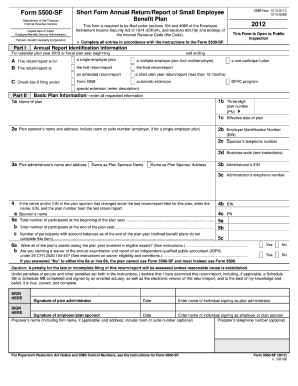
Form 5500-SF. Annual Report Identification Information For calendar plan year 2012 or fiscal plan year beginning A B 2012 This form is required to be filed under sections 104 and 4065 of the Employee Retirement Income Security Act of 1974 (ERISA), and sections 6057(b) and 6058(a) of the Internal Revenue Code (the Code). Department of Labor Employee Benefits Security Administration Part I OMB Nos. 1210-0110 1210-0089 Short Form Annual Return/Report of Small Employee Benefit Plan Form 5.

How it works
  • Open form

    Open form follow the instructions

  • Easily sign form

    Easily sign the form with your finger

  • Share form

    Send filled & signed form or save

How to fill out the DoL 5500-SF online

The Department of Labor's Form 5500-SF is essential for small employee benefit plans to comply with reporting requirements under ERISA. This guide will provide you with clear, step-by-step instructions to effectively complete the form online.

Follow the steps to complete the DoL 5500-SF online.

  1. Use the ‘Get Form’ button to access the Form 5500-SF and open it in your preferred format.
  2. Begin with the Annual Report Identification Information section. Enter the plan year information, including the start and end dates.
  3. Complete Part I by checking the appropriate boxes that apply to your plan type: single-employer, multiple-employer, or others.
  4. Fill out Part II, Basic Plan Information. Provide the plan name, number, sponsor details, including contact information and Employer Identification Number (EIN).
  5. In Part III, Financial Information, report total plan assets, liabilities, and income/expenses for the plan year. Ensure calculations are accurate.
  6. Proceed to Part IV, Plan Characteristics, and provide relevant pension and welfare benefit feature codes as indicated in the instructions.
  7. In Part V, Compliance Questions, answer yes or no to the queries regarding participant contributions, transactions, fidelity bonds, and any plan failures.
  8. Complete Part VI by addressing minimum funding requirements if applicable, and report the necessary contributions.
  9. In Part VII, discuss any plan terminations. State if there has been a resolution to terminate, and any related asset distributions.
  10. Optionally, complete Part VIII by providing the name and EIN of the trust managing the plan assets.
  11. Finally, review the form for accuracy, provide electronic signatures, and include the date for the plan administrator and the employer or plan sponsor.
  12. Once all sections are completed, you can save your changes, download a copy, print the form, or share it as needed.

Complete your documents online to ensure compliance and accuracy.

Get form

Experience a faster way to fill out and sign forms on the web. Access the most extensive library of templates available.

Related content

Form 5500 Series | U.S. Department of Labor

Certain Form 5500-EZ filers may file the Form 5500-SF electronically with EFAST2 rather...

Learn more
Troubleshooter's Guide to Filing the ERISA Annual...

Oct 15, 2010 - efast.dol. gov. If you need help completing the Form 5500 or Form 5500-SF...

Learn more
Reporting and disclosure guide for employee...

Summary Annual Report (SAR) Narrative summary of the Form 5500. ... Internet site at...

Learn more
Questions & Answers

Get answers to your most pressing questions about US Legal Forms API.

Contact support

Is form 5500-SF required?

All pension benefit plans and welfare benefit plans covered by ERISA must file a Form 5500 or Form 5500-SF for a plan year unless they are eligible for a filing exemption.

– To begin your search for a specified filing plan, first go to https://.efast.dol.gov/portal/app/disseminate. – On this site you can start your search associated with the sponsor name, plan name, filing ID, plan administrator, the Plan Number (PN), Employer Identification Number (EIN), and acknowledgment ID.

Form 5500-SF, Short Form Annual Return/Report of Small Employee Benefit Plan. Form. Form 5500-SF, Short Form Annual Return/Report of Small Employee Benefit Plan (form and instructions)

There are three main types that are used: Form 5500 is generally used for an EBP that contains at least 100 participants. Form 5500-SF is generally used for organizations with less than 100 participants in their EBP. Form 5500-EZ is used for EBPs that are maintained from outside the U.S. or for owner-only plans.

There are 3 types of Form 5500: Form 5500-EZ—for one-participant plans only; Form 5500-SF for plans with fewer than 100 participants; and Form 5500—for plans with 100 or more participants. Forms 5500 and 5500-SF must be filed electronically using the DOL ERISA Filing Acceptance System (EFAST2)Opens in a new window.

Generally, any business that sponsors a retirement savings plan must file a Form 5500 each year that the plan holds assets. Form 5500 Series reporting may also be required for certain employer-sponsored health and welfare plans, including medical, dental, life insurance and disability benefits.

Compared to the Form 5500, Forms 5500-SF and EZ have summarized financial information sections and no additional schedules to attach. If you're a Guideline plan sponsor, we will determine the appropriate form that needs to be filed and complete the filing process for your plan.

Get This Form Now!

Use professional pre-built templates to fill in and sign documents online faster. Get access to thousands of forms.

If you believe that this page should be taken down, please follow our DMCA take down process here.

DoL 5500-SF Form

This form is available in several versions. Select the version you need from the drop-down list below.

Get DoL 5500-SF