Loading
Get Co Afc Realty & Management Authorization Agreement For Direct Deposits 2015-2026
How it works
-

Open form follow the instructions
-

Easily sign the form with your finger
-

Send filled & signed form or save
How to fill out the CO AFC Realty & Management Authorization Agreement For Direct Deposits online
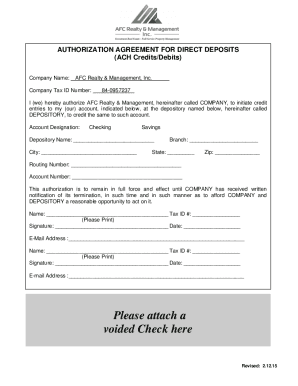
Completing the CO AFC Realty & Management Authorization Agreement For Direct Deposits online is a straightforward process. This guide provides step-by-step instructions to help you navigate each section of the form with ease and confidence.
Follow the steps to complete your authorization agreement online.
- Click ‘Get Form’ button to obtain the form and open it in the editor.
- In the Company Name field, enter 'AFC Realty & Management, Inc.' as it is pre-filled.
- Enter the Company Tax ID Number '84-0957237' in the designated field.
- Indicate whether the account is a checking or savings account by selecting the appropriate option.
- In the Depository Name field, provide the name of your bank or financial institution.
- Fill in the City where your depository is located.
- Specify the Branch of your bank.
- Enter the State in which the depository is located.
- Input the Zip code associated with your depository.
- Fill in the Routing Number for your bank account.
- Enter your Account Number associated with the account you wish to use.
- Print your name and Tax ID Number in the respective fields.
- Complete the Signature and Date fields confirming your authorization.
- Provide your email address for any communications.
- If needed, a second person can repeat steps 12-14, should they be involved in the account.
- Attach a voided check to the form, if required.
- Once all sections are completed, save changes, then you may download, print, or share the filled form as necessary.
Ready to complete your authorization agreement? Fill out the form online now!