Loading
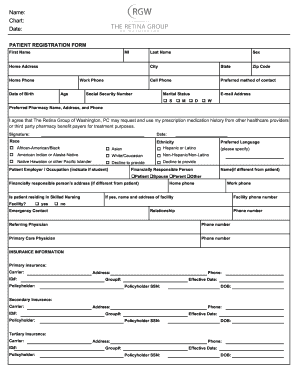
Get Rgw New Patient Registration Form Packet 2015
How it works
-

Open form follow the instructions
-

Easily sign the form with your finger
-

Send filled & signed form or save
How to fill out the RGW New Patient Registration Form Packet online
Completing the RGW New Patient Registration Form Packet online is a straightforward process that ensures your information is accurately recorded for your upcoming visit. This guide provides clear, step-by-step instructions tailored to your needs.
Follow the steps to complete the form effortlessly.
- Use the ‘Get Form’ button to obtain the RGW New Patient Registration Form Packet and open it in your chosen application for editing.
- Begin by entering your first name, middle initial, and last name in the designated fields. Accuracy here is crucial for identification purposes.
- Next, fill out your home address, including city, state, and zip code. Provide your home phone number and any work or cell phone numbers where you can be reached.
- Indicate your date of birth and age, and select your sex from the provided options.
- Choose your preferred method of contact (such as phone or email) and enter your email address for correspondence.
- Provide your Social Security number and marital status by selecting the appropriate option.
- List your preferred pharmacy's name, address, and phone number for prescription needs.
- Read the agreement regarding prescription medication history and sign with the current date.
- Provide details regarding your employer or occupation, indicating if you are a student, along with your preferred language.
- Identify the financially responsible person if different from the patient, including their address and relationship to you.
- If residing in a skilled nursing facility, select 'yes' and provide the facility's name, address, and phone number; otherwise, select 'no'.
- Enter the emergency contact's details, such as their relationship to you and phone number.
- Provide information on your primary and referring physician, including their names and phone numbers.
- Fill out insurance information accurately, completing primary, secondary, and tertiary insurance fields if applicable.
- Review the financial policy statement, select your authorization option (either Option A for billing or Option B for opting out), and sign with the date.
- Finally, save your changes. You can download, print, or share the completed form as needed.
Now that you have a clear understanding of how to fill out the RGW New Patient Registration Form Packet online, please complete your document promptly.
Get form
Experience a faster way to fill out and sign forms on the web. Access the most extensive library of templates available.
Get This Form Now!
Use professional pre-built templates to fill in and sign documents online faster. Get access to thousands of forms.