Loading
Get Logistics Plus Customer Setup Form Credit Application And Terms/conditions Of Shipment 2020-2025
How it works
-

Open form follow the instructions
-

Easily sign the form with your finger
-

Send filled & signed form or save
How to fill out the Logistics Plus Customer Setup Form Credit Application And Terms/Conditions Of Shipment online
Filling out the Logistics Plus Customer Setup Form is a crucial step for establishing your account with Logistics Plus. This guide will provide you with clear and concise instructions to ensure that you complete the form accurately and efficiently.
Follow the steps to successfully complete the form online.
- Press the ‘Get Form’ button to access the Logistics Plus Customer Setup Form or download it for editing.
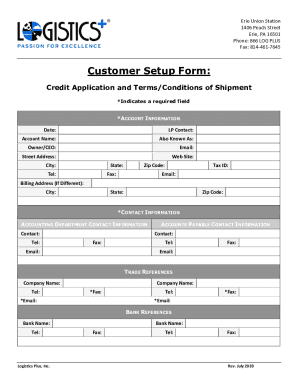
- In the *Account Information* section, enter the date and the LP contact details. Ensure that you fill in the account name along with any alternative names the account may be known by.
- Provide the owner or CEO's name and the primary email address for communications.
- Fill out the street address, ensuring it includes the city, state, telephone number, and zip code. If there's a separate billing address, please provide its details in the 'Billing Address (If Different)' section.
- In the *Contact Information* section, you should input the accounting department contact's name and telephone number.
- Under the *Accounts Payable Contact Information*, enter the contact name, along with their email address and telephone number.
- For the *Trade References* section, fill out the company names, ensuring to provide both telephone numbers and fax numbers where necessary. Remember to include email addresses as well.
- Complete the *Bank References* section by providing the bank names and their respective contact numbers.
- Review the *Agreement Terms*, taking note of the payment terms and potential finance charges. This section includes important information regarding your responsibilities and the legal aspects of your agreement.
- Sign and date the form in the *Signature* section. Ensure that the person signing is an owner or officer of the company.
- After completing all sections, save your changes, then download or print the form for submission.
- Submit the completed form by emailing it to customersetup@logisticsplus.com or faxing it to Attn: Accounts Receivable Department at 814-461-7645.
Proceed to fill out the Logistics Plus Customer Setup Form online to streamline your setup process.
Industry-leading security and compliance
US Legal Forms protects your data by complying with industry-specific security standards.
-
In businnes since 199725+ years providing professional legal documents.
-
Accredited businessGuarantees that a business meets BBB accreditation standards in the US and Canada.
-
Secured by BraintreeValidated Level 1 PCI DSS compliant payment gateway that accepts most major credit and debit card brands from across the globe.