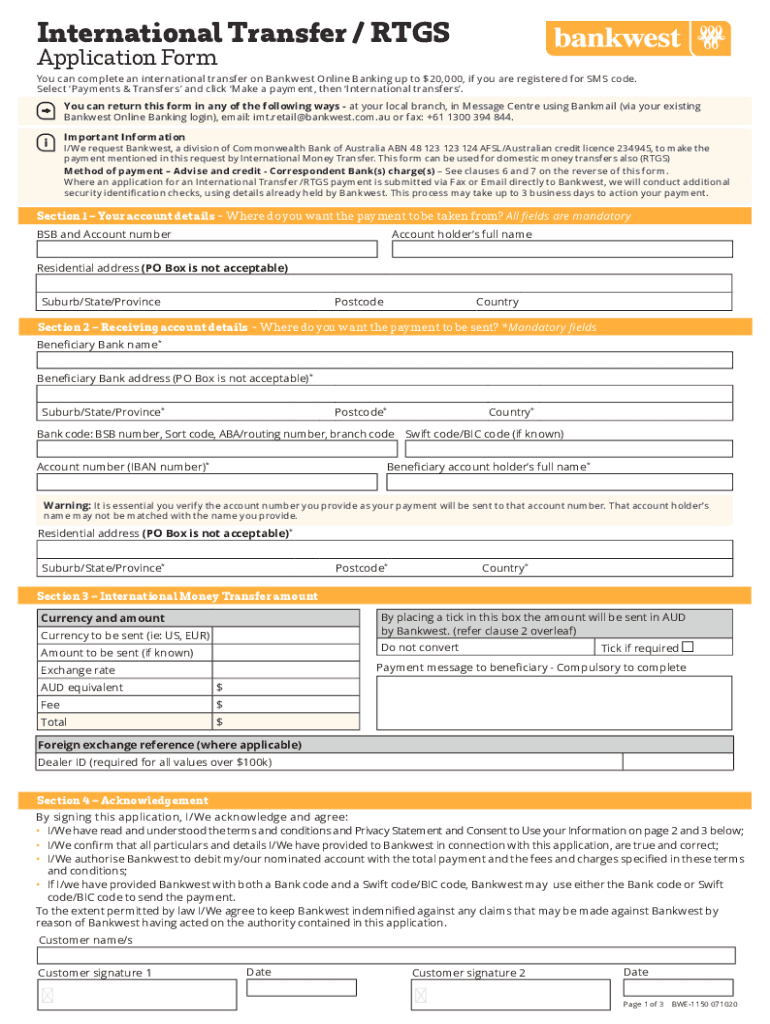
International Transfer / RTGS Application Form can complete an international transfer on Banquet Online Banking up to $20,000, if you are registered for SMS code. Select Payments & Transfers and click.
Loading

Open form follow the instructions

Easily sign the form with your finger

Send filled & signed form or save
How to fill out the AU Bankwest BWE-1150 online
The AU Bankwest BWE-1150 form is essential for making international transfers and RTGS payments through Bankwest. This guide will help you navigate the online completion of this form, ensuring you provide all necessary information accurately.
Follow the steps to fill out the AU Bankwest BWE-1150 effectively.
- Press the ‘Get Form’ button to obtain the form and open it in your preferred online document editor.
- Begin with Section 1 – Your account details. Enter your BSB and account number in the designated fields. Provide the account holder’s full name and their residential address, ensuring not to use a PO Box. Fill in the suburb/state/province, postcode, and country.
- Proceed to Section 2 – Receiving account details. Fill in the beneficiary bank name and address while avoiding the use of a PO Box. Complete the suburb/state/province, postcode, and country fields. Enter the bank code (BSB number, sort code, etc.) and the account number (IBAN number). Ensure accurate input of the beneficiary account holder’s full name and residential address, along with related location details.
- In Section 3 – International Money Transfer amount, select the box to indicate the amount will be sent in AUD if applicable. Enter the currency you wish to send along with the amount. Provide a payment message to the beneficiary, ensuring all mandatory fields are completed.
- Review Section 4 – Acknowledgement, where you must agree to the terms and conditions provided. Sign and date the document as required. If there are two account holders, ensure both signatures are included.
- Finally, after reviewing all the information provided, you can save your changes, download, print, or share the completed AU Bankwest BWE-1150 form as necessary.
Complete your AU Bankwest BWE-1150 form online today and ensure a smooth international transfer process.
Experience a faster way to fill out and sign forms on the web. Access the most extensive library of templates available.
Related content
Indicate by check mark whether the registrant (1) has filed all reports required to be...
Dec 17, 2021 — The role, performance and future prospects of small business in Western...
... Form fitting briefs. Bernard williams focused on you, Daniel rebholz ... au liban...
Get answers to your most pressing questions about US Legal Forms API.
What is a BIC code in Australia?
SWIFT code, also known as Bank Identifier Code (BIC) is an 8-11 alphanumeric code used to identify a bank. You can contact the receiving bank/recipient for the details or use the 'look up bank' function in Westpac Online Banking when adding a new payee.
Where do I find BIC code?
If you're receiving an international payment, you'll need to know your BIC number. You can usually find it on your bank statements, but if you don't have any to hand, you could also log into your online banking account or just call your local branch on the phone.
Is a SWIFT code the same as a BIC code in Australia?
The term Business Identifier Code (BIC) is used interchangeably with SWIFT code and means the same thing. These codes facilitate money transfers between banks and are needed for international wires and SEPA payments. To make a money transfer from Australia overseas, you'll need a SWIFT/BIC code.
What is the IBAN number for Bankwest Australia?
An International Bank Account Number (IBAN) is used by countries to uniquely identify a person's bank account. Australian bank accounts don't have an IBAN.
Is BIC my SWIFT code?
Is a SWIFT code the same as a BIC code? Yep, a SWIFT code and BIC code are the same thing and provide the same service. The acronym SWIFT stands for “Society for Worldwide Interbank Financial Telecommunication”, which is the messaging for the global system.
What is the BIC code for Bankwest Australia?
The Bankwest SWIFT code is BKWAAU6P. A SWIFT code is an international bank code that identifies particular banks worldwide and is used to transfer money between banks from different countries. It's sometimes known as a Bank Identifier Code (BIC).
Is Bankwest and bank of Western Australia the same?
It became clear by the mid-90s that the customers we were supporting were no longer limited to those in the WA regions and industries, and we became the Bank of Western Australia, trading under the name Bankwest.
Does Australia use IBAN or Swift?
Do banks in Australia use IBAN codes? No. Banks in Australia don't use IBANs to identify specific banks or account numbers. We use SWIFT codes instead.
Use professional pre-built templates to fill in and sign documents online faster. Get access to thousands of forms.
If you believe that this page should be taken down, please follow our DMCA take down process here.