Loading
Get Canada Bentall Physiotherapy Ergonomic Evaluation Form 2012-2026
How it works
-

Open form follow the instructions
-

Easily sign the form with your finger
-

Send filled & signed form or save
How to fill out the Canada Bentall Physiotherapy Ergonomic Evaluation Form online
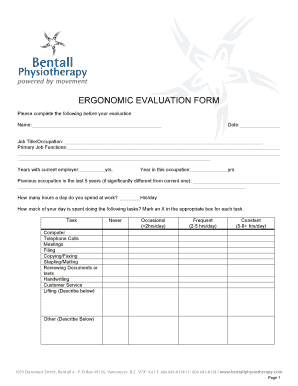
The Canada Bentall Physiotherapy Ergonomic Evaluation Form is designed to assess and improve your workplace ergonomics. By completing this form online, you will provide essential information to help optimize your workstation and reduce discomfort.
Follow the steps to complete the form effectively.
- Press the ‘Get Form’ button to access the Canada Bentall Physiotherapy Ergonomic Evaluation Form in your preferred online editor.
- Begin by entering your personal details in the Name, Date, Job Title/Occupation, and Primary Job Functions fields.
- Indicate your Years with current employer and Year in this occupation by filling in the respective fields with the number of years.
- List any previous occupations in the last 5 years that differ significantly from your current occupation.
- Specify the number of hours you spend at work each day in the Hours per day field.
- For the task section, mark an X in the corresponding box for each task based on your daily activity: Never, Occasional (<2hrs/day), Frequent (2-5 hrs/day), or Constant (5-8+ hrs/day).
- Answer whether you wear glasses and specify the type of glasses if applicable.
- Indicate whether you are right-handed or left-handed.
- Choose the phrase that best describes your workstation from the given options.
- Mark any equipment present at your workstation, such as keyboard trays or ergonomic devices.
- Respond to the set of questions about your posture and workstation setup with 'Yes' or 'No'.
- Address the questions related to your workstation organization and work habits, indicating your responses accordingly.
- List any concerns you may have regarding your condition or workstation in the provided space.
- Finally, review your responses for accuracy. You may then save your changes, download, print, or share the completed form as needed.
Start completing your Canada Bentall Physiotherapy Ergonomic Evaluation Form online now.