Loading
Get Za Standard Bank 00196448 2013-2026
How it works
-

Open form follow the instructions
-

Easily sign the form with your finger
-

Send filled & signed form or save
How to fill out the ZA Standard Bank 00196448 online
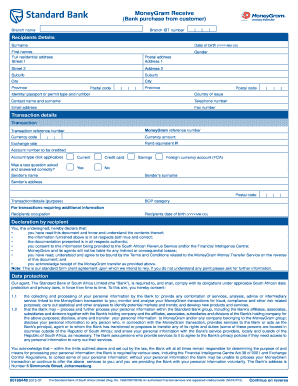
Filling out the ZA Standard Bank 00196448 form is an essential step in successfully receiving funds via MoneyGram. This guide provides clear and detailed instructions to help you complete the form accurately and efficiently.
Follow the steps to fill out the ZA Standard Bank 00196448 form online.
- Click ‘Get Form’ button to obtain the form and open it in the online editor.
- Begin by entering the branch name and branch IBT number in the designated fields.
- Fill in the recipient's details, including surname, first names, and date of birth in the format YYYY-MM-DD.
- Complete the full residential address, including street addresses, suburb, city, province, and postal code.
- Provide gender, identity or passport number, and country of issue in the respective fields.
- Enter your contact details, including name, telephone number, email address, and fax number.
- Complete the transaction details by including transaction reference number, MoneyGram reference number, currency code, amount, exchange rate, and the rand equivalent.
- Specify the account number to be credited and select the account type by ticking the applicable option.
- Indicate if a test question was asked and answered correctly by selecting Yes or No.
- Fill in the sender's details, including surname, name, address, and postal code.
- Specify the purpose of the transaction in the transaction/details field and select the applicable BOP category.
- Provide additional information such as the recipient's occupation and confirm the recipient's date of birth.
- Read the declaration by the recipient, and ensure all statements are acknowledged by signing in the designated area.
- Complete the data protection consent section, ensuring to understand the implications of sharing personal information.
- Review all entered information for accuracy and completeness.
- Once satisfied, you can save your changes, download, print, or share the completed form as needed.
Complete your ZA Standard Bank 00196448 document online for a smooth transaction.
Sign in to Internet Banking to secure your exchange rate and process your transaction at a reduced banking fee. Save 064 570 0291 to your contacts or click here and send 'Hi' on WhatsApp.