Loading
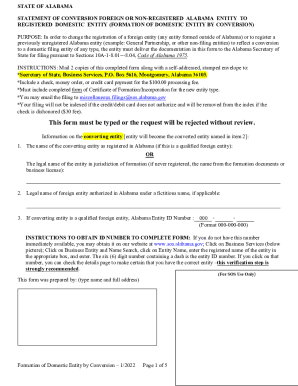
Get Al Formation Of Domestic Entity By Conversion 2022-2025
How it works
-

Open form follow the instructions
-

Easily sign the form with your finger
-

Send filled & signed form or save
How to fill out the AL Formation Of Domestic Entity By Conversion online
Filing the AL Formation of Domestic Entity By Conversion form is essential for changing the registration of a foreign entity or registering a previously unregistered Alabama entity. This guide provides step-by-step instructions on how to complete the form online, ensuring a smooth submission process.
Follow the steps to successfully complete the AL Formation of Domestic Entity By Conversion form.
- Press the ‘Get Form’ button to access the AL Formation of Domestic Entity By Conversion form and open it in your preferred online editor.
- Enter the name of the converting entity as registered in Alabama or the legal name from the formation documents if it has never been registered. If applicable, provide the legal name of the foreign entity authorized in Alabama under a fictitious name.
- If the converting entity is a qualified foreign entity, include the Alabama Entity ID Number in the designated field.
- Specify the jurisdiction of formation for entities outside the United States and provide the title and address of the public office where the certification of formation for the converting entity is filed, if available.
- For the newly converted entity, input the name of the new converted domestic entity resulting from the conversion, ensuring it aligns with the entity type according to Alabama regulations.
- Complete the addresses for the converted entity, including the street and mailing address. Ensure that street addresses do not include P.O. Boxes.
- Provide the name and address of the registered agent for service of process, ensuring that the registered agent is physically located in Alabama.
- Indicate the type of entity formed by the conversion, and attach any necessary documentation as specified based on the type of entity (e.g., business corporation, nonprofit corporation). Make sure all required attachments are present.
- Review and check the statements regarding the conversion to ensure compliance with legal requirements before signing the document.
- Sign the form in the designated area, ensuring that typed names and titles are included, and provide the dates of signature.
- After completing the form, save your changes. You can then download, print, or share the completed form as necessary.
Complete your documents online today to ensure a timely and accurate filing.
Industry-leading security and compliance
US Legal Forms protects your data by complying with industry-specific security standards.
-
In businnes since 199725+ years providing professional legal documents.
-
Accredited businessGuarantees that a business meets BBB accreditation standards in the US and Canada.
-
Secured by BraintreeValidated Level 1 PCI DSS compliant payment gateway that accepts most major credit and debit card brands from across the globe.