Loading
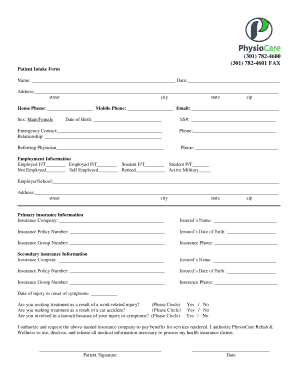
Get Md Physiocare Patient Intake Form 2018-2026
How it works
-

Open form follow the instructions
-

Easily sign the form with your finger
-

Send filled & signed form or save
How to fill out the MD PhysioCare Patient Intake Form online
Filling out the MD PhysioCare Patient Intake Form online is an essential step in ensuring you receive the best care possible. This guide provides clear, step-by-step instructions to help you successfully complete the form, ensuring that all necessary information is captured accurately.
Follow the steps to complete the MD PhysioCare Patient Intake Form with ease.
- Click the ‘Get Form’ button to access the MD PhysioCare Patient Intake Form and open it in your preferred editor.
- Begin by entering your full name and the date at the top of the form. Make sure to use the exact format requested.
- Fill in your address, including the street, city, state, and zip code. Please ensure accuracy as this information is crucial for effective communication.
- Input your home and mobile phone numbers, along with your email address. This ensures that the facility can contact you easily.
- Indicate your date of birth and sex by choosing the appropriate options provided.
- Enter your Social Security number where indicated. This information is necessary for insurance and identification purposes.
- Provide the name and relationship of your emergency contact, along with their phone number in case of an emergency.
- Include the name and phone number of the referring physician, if applicable. This helps to coordinate your care.
- Fill out your employment information, specifying your employment status and providing the name and address of your employer or school.
- If applicable, complete the primary and secondary insurance information, ensuring to provide the insurance company name, policy holder’s name, and all relevant policy numbers.
- Answer the questions related to the date of injury or onset of symptoms, along with any relevant circumstances, such as if it is work-related or due to an accident.
- Sign and date the authorization section at the bottom of the first page to confirm your consent for billing and usage of your medical information.
- Proceed to fill in the Worker’s Compensation/Auto Accident Intake Form if applicable, following similar instructions. Provide all requested details, including claim numbers and insurance carrier information.
- Acknowledge receipt of the Notice of Privacy Practices by signing where indicated, ensuring you understand how your information may be used.
- Complete the Medical Screening Form, ensuring to provide accurate medical history and current medications.
- Indicate your preferred methods of contact and list any individuals allowed to discuss your healthcare information.
- Review the financial policy sections carefully, initialing where required, and confirm your understanding of payment responsibilities.
- Once all sections are completed, save your changes. You may download, print, or share the completed form as needed.
Make sure to complete your MD PhysioCare Patient Intake Form online to streamline your care process!
Medical intake forms collect demographic, health history, consent forms, insurance, and other important pieces of information from new and returning patients, prior to their visit. Medical intake forms collect everything from patients' addresses, phone numbers and email addresses, medical and social history.