Loading
Get Az Enr Frm-018 2015-2026
How it works
-

Open form follow the instructions
-

Easily sign the form with your finger
-

Send filled & signed form or save
How to fill out the AZ ENR FRM-018 online
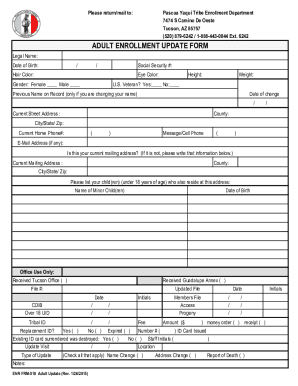
The AZ ENR FRM-018 is an essential document for individuals seeking to update their enrollment information with the Pascua Yaqui Tribe. This guide provides a comprehensive overview of how to accurately fill out the form online, ensuring all necessary information is submitted correctly.
Follow the steps to fill out the AZ ENR FRM-018 online.
- Click ‘Get Form’ button to obtain the form and open it in the editor.
- Begin by entering your legal name in the designated field. Ensure that the name matches your official documents to avoid any discrepancies.
- Fill in your date of birth using the provided format. This information is crucial for verifying your identity.
- Enter your social security number in the appropriate section. Protect this information as it is sensitive data.
- Provide your hair color and eye color, selecting the descriptions that best represent your features.
- Indicate your gender by marking the appropriate box for either female or male.
- Fill in your height and weight accurately. This information may be necessary for identification purposes.
- If applicable, indicate whether you are a U.S. veteran by selecting 'Yes' or 'No.'
- If you are changing your name, provide your previous name on record along with the date of the change.
- Enter your current street address, including the county, city, state, and ZIP code. Ensure that this address is current and accurate for correspondence.
- Supply your current home phone number and an alternative message or cell phone number if available.
- Provide your email address, if applicable. This will help facilitate communication regarding your enrollment application.
- Confirm whether your current mailing address is the same as your street address; if not, provide the updated mailing address details.
- List any child(ren) under 18 years of age who live at your current address, along with their dates of birth.
- Review the 'Office Use Only' section, which will be completed by the enrollment office.
- After completing the form, make sure to save changes and consider downloading, printing, or sharing the form as necessary.
Complete your AZ ENR FRM-018 online quickly and efficiently today.