Loading
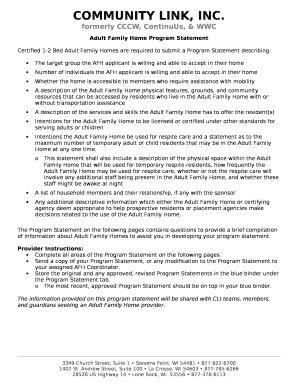
Get Wi Inclusa Adult Family Home (afh) Program Statement 2017-2026
How it works
-

Open form follow the instructions
-

Easily sign the form with your finger
-

Send filled & signed form or save
How to fill out the WI Inclusa Adult Family Home (AFH) Program Statement online
This guide provides step-by-step instructions on how to effectively fill out the WI Inclusa Adult Family Home Program Statement online. By following these clear and supportive guidelines, users can ensure that their submissions are accurate and complete.
Follow the steps to complete the form correctly.
- Click ‘Get Form’ button to obtain the form and open it in the designated editor.
- Begin with the 'Adult Family Home Program Information' section. Fill in the number of beds certified for your home, and indicate the types of individuals you are certified to provide support for, such as adults with disabilities.
- Complete the 'Description of Home and Grounds' section. Describe the type of home you are operating, its layout, and any physical features that residents may need to access safely. Include details about available amenities and the environment.
- In the 'Community Resources and Access' section, describe the local resources available to residents, including transportation options and nearby facilities like libraries or community centers.
- Fill out the 'Skills and Services of Provider' section, where you will outline the specific services you can provide to residents. Be comprehensive and include any specialized training or certifications.
- If applicable, complete the 'Respite/Substitute Care Services' section, detailing if you intend to provide respite care and the number of residents you can accommodate.
- Finally, review all sections for accuracy and completeness before saving your changes. You will have the option to download, print, or share the completed form.
Start filling out your WI Inclusa Adult Family Home Program Statement online today!