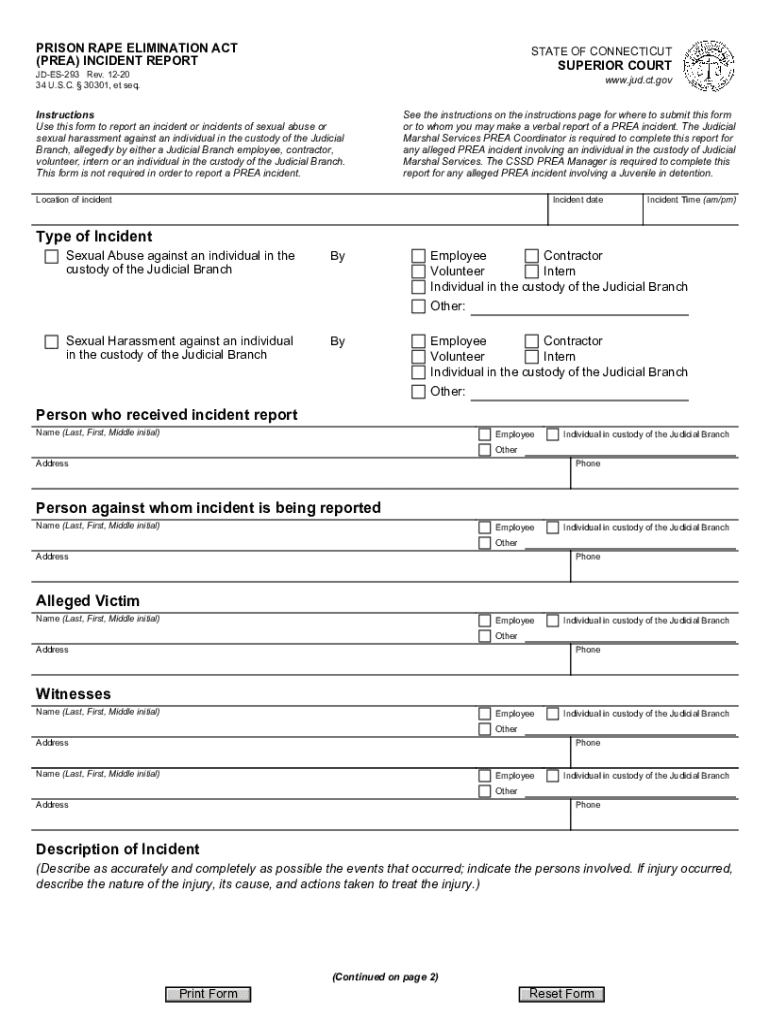
PRISON RAPE ELIMINATION ACT (PREA) INCIDENT REPORTSTATE OF CONNECTICUTSUPERIOR COURTJDES293 Rev. 1220 34 U.S.C. 30301, et seq.www.jud.ct.govInstructions Use this form to report an incident or incidents.
Loading

Open form follow the instructions

Easily sign the form with your finger

Send filled & signed form or save
How to fill out the Connecticut Prison Rape Elimination Act (PREA) Incident Report online
This guide provides a clear and comprehensive approach to filling out the Connecticut Prison Rape Elimination Act (PREA) Incident Report online. Whether you are a user with little legal experience or seeking additional clarity, these instructions will help ensure that the process is straightforward and accessible.
Follow the steps to complete the form effectively.
- Press the ‘Get Form’ button to access the form and open it for editing.
- Begin by filling out the 'Location of incident' field where the incident occurred. Ensure to provide the exact location to maintain precise records.
- Next, enter the 'Incident date' followed by the 'Incident Time' using am/pm format. Accurate timing is essential for documenting the incident.
- Fill in the details of the 'Person who received the incident report' including their name, address, and phone number. This person is typically the one documenting the incident.
- Provide the information for the 'Person against whom the incident is being reported' following the same format as above.
- Complete the section for the 'Alleged Victim', ensuring to include their name, address, and phone number.
- List any 'Witnesses' who were present during the incident. Include their full names, titles, addresses, and phone numbers if applicable.
- In the 'Description of Incident' field, describe the events as accurately and completely as possible. Include details of the injury if any occurred and actions taken post-incident.
- Continue with the 'Persons Notified' section, recording the names and details of individuals who have been notified about the incident.
- Address the 'Injuries' section by identifying any injuries or suspected injuries, whether to the individual in custody, an employee, or other persons.
- Indicate if treatment or evaluation was refused and provide any relevant referrals made.
- Finally, review the provided information for accuracy. Complete the signature section where the person completing the report affirms the accuracy of the information. Ensure to include the date and title.
- After finalizing the details, you can save your changes, download the completed form, print it for records, or share it as required.
Complete your PREA Incident Report online today to ensure swift and accurate documentation.
Experience a faster way to fill out and sign forms on the web. Access the most extensive library of templates available.
Related content
PREA was unanimously passed by the United States Congress and signed into law by President...
Prison Rape Elimination Act (PREA): Federal law to address sexual violence in prisons...
The statistical tables that follow provide counts of allegations and substantiated...
Get answers to your most pressing questions about US Legal Forms API.
How effective is Prea?
While PREA has effectively enforced penalties against prisoners for consensual sexual activity, there is no evidence that the new rules have reduced the gender-based and sexual violence against incarcerated people that is perpetuated most frequently by correctional staff.
What is an example of a PREA violation?
Contact of any person without his or her consent, or by coercion, or contact of a person who is unable to consent or refuse AND intentional touching, either directly or through the clothing, of the genitalia, anus, groin, breast, inner thigh, or buttocks of any person.
What does PREA stand for?
Prison Rape Elimination Act (PREA)
What are the steps of PREA?
The Process Map provides a helpful visual representation of the four phases of the PREA audit process: pre-onsite phase, onsite phase, evidence review and interim report phase, and corrective action and final report phase.
What is PREA reporting?
(a) The agency shall require all staff to report immediately and ing to agency policy any knowledge, suspicion, or information they receive regarding an incident of sexual abuse or sexual harassment that occurred in a facility, whether or not it is part of the agency; retaliation against residents or staff who ...
What is the top priority of PREA?
PREA sets standards that protect inmates and makes the prevention of sexual assault and sexual misconduct in jail settings a top priority.
Why did PREA fail?
The initial version of PREA only sought to address male prison rape. In the initial congressional hearing, most of the survivors were male. One of the significant critiques of the initial legislation was its failure to include sexual violence against women in custody, which was more likely to be staff initiated.
Use professional pre-built templates to fill in and sign documents online faster. Get access to thousands of forms.
If you believe that this page should be taken down, please follow our DMCA take down process here.
This form is available in several versions. Select the version you need from the drop-down list below.