Loading
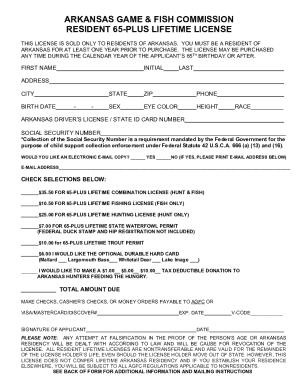
Get Ar Game & Fish Commission Resident 65-plus Lifetime License 2021-2025
How it works
-

Open form follow the instructions
-

Easily sign the form with your finger
-

Send filled & signed form or save
How to fill out the AR Game & Fish Commission Resident 65-plus Lifetime License online
This guide provides step-by-step instructions on how to complete the AR Game & Fish Commission Resident 65-plus Lifetime License form online. It aims to ensure that all users, regardless of their experience level, can submit their applications accurately and efficiently.
Follow the steps to complete your application successfully:
- Press the ‘Get Form’ button to access the application form and open it in the editing tool.
- Begin by entering your personal information in the required fields. This includes your first name, middle initial, last name, address, city, state, and ZIP code.
- Fill in your birth date in the specified format, ensuring you meet the age requirement of 65 years or older.
- Add your phone number for contact purposes. Provide your sex, eye color, height, and race in the respective fields.
- Input your Arkansas driver’s license or state ID card number, and your social security number, as this is mandated for processing.
- Indicate whether you would like an electronic email copy of your license by selecting 'Yes' or 'No', and if choosing 'Yes', provide your email address.
- Select the type of license you wish to purchase by checking the appropriate box, along with any additional permits if needed.
- Enter your total amount due based on your selections. Make sure to review the payment options, including check, cashier’s check, or credit card information.
- Sign the application where indicated and provide the date at the bottom of the form.
- Review all of your provided information for accuracy, then proceed to save your changes, download the document, or share it as needed.
Start your application today and submit the AR Game & Fish Commission Resident 65-plus Lifetime License form online!
AR uses a real-world setting while VR is completely virtual. AR users can control their presence in the real world; VR users are controlled by the system. VR requires a headset device, but AR can be accessed with a smartphone.
Industry-leading security and compliance
US Legal Forms protects your data by complying with industry-specific security standards.
-
In businnes since 199725+ years providing professional legal documents.
-
Accredited businessGuarantees that a business meets BBB accreditation standards in the US and Canada.
-
Secured by BraintreeValidated Level 1 PCI DSS compliant payment gateway that accepts most major credit and debit card brands from across the globe.