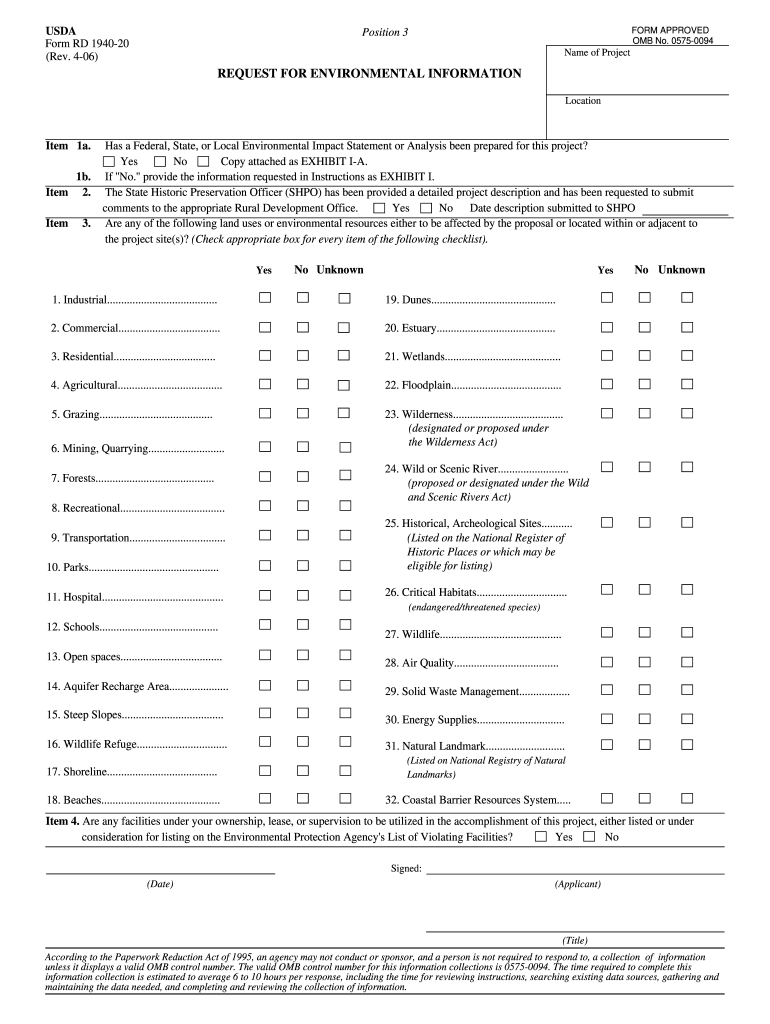
Or Local Environmental Impact Statement or Analysis been prepared for this project? Yes No Copy attached as EXHIBIT I-A. If ''No.'' provide the information requested in Instructions as EXHIBIT I. The State Historic Preservation Officer (SHPO) has been provided a detailed project description and has been requested to submit comments to the appropriate Rural Development Office. Yes No Date description submitted to SHPO Are any of the following land uses or environmental resources either to be aff.

Open form follow the instructions

Easily sign the form with your finger

Send filled & signed form or save
How to fill out the USDA Form RD 1940-20 online
Filling out the USDA Form RD 1940-20 online can be a straightforward process when you understand each section and its requirements. This guide will provide you with step-by-step instructions to help ensure your form is completed accurately and efficiently.
Follow the steps to complete the form with ease
- Click ‘Get Form’ button to obtain the form and open it in the editor.
- In the first section, provide the name of the project and its location under 'Name of Project' and 'Location.' Ensure that this information accurately reflects your project.
- For Item 1a, indicate whether a Federal, State, or Local Environmental Impact Statement or Analysis has been prepared for your project by selecting 'Yes' or 'No.' If 'No,' ensure you prepare the necessary information as outlined in the instructions and attach it as EXHIBIT I.
- In Item 1b, confirm whether the State Historic Preservation Officer (SHPO) has received a detailed project description and request that they submit comments to the appropriate Rural Development Office. Provide the submission date if applicable.
- Proceed to check the appropriate response for the checklist items related to land uses or environmental resources that may be affected by your proposal or are located near the project site. Options will allow you to select 'Yes,' 'No,' or 'Unknown' for items such as Industrial, Recreational, Wetlands, and others as listed.
- For Item 4, answer if any facilities under your ownership, lease, or supervision are listed or considered for listing on the Environmental Protection Agency's List of Violating Facilities by selecting 'Yes' or 'No.'
- Once all fields have been filled out and reviewed, go to the end of the form to sign and date it as the applicant. Include your title if applicable.
- Finally, save your changes, and consider downloading, printing, or sharing the completed form as needed.
Take the first step towards submitting your documents online by starting with the USDA Form RD 1940-20 today.
Experience a faster way to fill out and sign forms on the web. Access the most extensive library of templates available.
Related content
This information request is designed to obtain an understanding of the area's present...
14-Jun-2000 — 1940-20 *. Request for Environmental Information. 4-06. WSAL. 4-26-06...
deejays in the 1950s through the invention of format radio, the rediscovery ... weather...
Use professional pre-built templates to fill in and sign documents online faster. Get access to thousands of forms.
If you believe that this page should be taken down, please follow our DMCA take down process here.