Loading
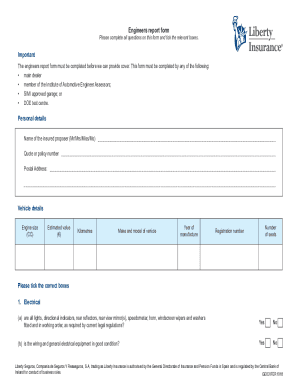
Get Ie Liberty Insurance Engineers Report Form 2018-2026
How it works
-

Open form follow the instructions
-

Easily sign the form with your finger
-

Send filled & signed form or save
How to fill out the IE Liberty Insurance Engineers Report Form online
This guide aims to assist you in completing the IE Liberty Insurance Engineers Report Form efficiently and accurately. By following the steps outlined below, you will be able to provide essential information required for your insurance coverage.
Follow the steps to complete the form with ease.
- Press the ‘Get Form’ button to access the form and open it for editing.
- In the personal details section, fill in the name of the insured proposer, quote or policy number, and postal address.
- Proceed to the vehicle details section. Input the engine size in CC, estimated value in euros, total kilometers driven, make and model, year of manufacture, number of seats, and registration number.
- In the electrical section, respond to the questions regarding the functionality of essential electrical components by ticking 'Yes' or 'No'. Ensure that all listed components are working correctly.
- Continue to the steering section and indicate whether the steering operates freely and if the suspension is without undue wear or free play by ticking the appropriate boxes.
- In the brakes section, assess the effectiveness of both the handbrake and footbrake, selecting 'Yes' or 'No' as applicable.
- For the wheels or tyres section, confirm if all tyres meet current legal standards and specify the tread depth remaining on each tyre.
- Review the modifications section. If any modifications have been made to the vehicle, specify these changes in the space provided. Confirm whether additional seating and windows meet legal requirements.
- In the general road worthiness section, describe the overall condition of the vehicle's bodywork, confirm if fuel and water systems are leak-free, and assess the vehicle's roadworthy condition overall.
- Finally, fill out the declaration section by affirming that the information provided is true and complete. Enter garage details, including the name and position held, as well as the date. Ensure the garage stamp is included.
- After completing the form, you can save your changes, download a copy, print the form, or share it as needed.
Complete your documents online for a seamless insurance process.
If you cancel your policy at any time after the first 14 working days, we will refund your premium for any period of insurance remaining less an administration fee. Please refer to your policy booklet for further details on cancellations.