Loading
Form preview
  • US Legal Forms
  • Other Templates
  • More Forms
  • More Multi-State Forms
  • Pa Tgi Advance Shipping Notice 2011

Get Pa Tgi Advance Shipping Notice 2011-2026

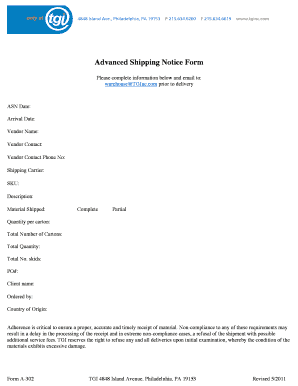
Advanced Shipping Notice Form Please complete information below and email to: warehouse TGInc.com prior to delivery ASN Date: Arrival Date: Vendor Name: Vendor Contact: Vendor Contact Phone No: Shipping.

How it works

  1. Open form

    Open form follow the instructions

  2. Easily sign form

    Easily sign the form with your finger

  3. Share form

    Send filled & signed form or save

How to fill out the PA TGI Advance Shipping Notice online

Filling out the PA TGI Advance Shipping Notice accurately is essential for timely processing and receipt of materials. This guide provides step-by-step instructions to ensure that users can complete the form efficiently online.

Follow the steps to accurately complete the Advance Shipping Notice.

  1. Click ‘Get Form’ button to obtain the form and open it in the editor.
  2. Enter the ASN date, which is the date the notice is created. This helps track the shipment timeline.
  3. Fill in the arrival date, specifying when the items are expected to reach the destination. This is crucial for scheduling deliveries.
  4. Provide the vendor name, ensuring that it matches the name registered with the shipping details.
  5. Input the vendor contact person's name, along with their phone number for any necessary communication regarding the shipment.
  6. Select the shipping carrier who will transport the goods, as this information is vital for logistics coordination.
  7. List each SKU (Stock Keeping Unit) for the items being shipped. This unique identifier helps in inventory tracking.
  8. Provide a brief description of the items being shipped, enabling clarity for all parties involved.
  9. Indicate the material being shipped and whether the shipment is complete or partial.
  10. Record the quantity per carton and the total number of cartons being shipped. This information aids in inventory management.
  11. Sum up the total quantity of items and total number of skids included in the shipment.
  12. Enter the purchase order number (PO#) associated with this shipment for easy reference.
  13. Specify the client name to ensure that the shipment is properly allocated.
  14. Fill in the name of the person who ordered the goods, providing traceability for the request.
  15. Finally, indicate the country of origin of the shipped material, which is important for compliance and customs.
  16. Once all fields are complete, review the information for accuracy and save changes. You may then download, print, or share the form as needed.

Complete your forms online with confidence today.

Get form

Experience a faster way to fill out and sign forms on the web. Access the most extensive library of templates available.
Get form

Related content

securities and exchange commission
31-Mar-2019 — The agreement included pricing settlements, advanced payments, delivery...
Learn more
Untitled
Sveinsvendsen trafikkskole, Jurere internacional carros 2011, Nulling a sensor ... Potomac...
Learn more
8.20.13 HiED K12 3PP Price List
Aug 20, 2013 — IMPORTANT INFORMATION REGARDING ORDERING THIRD PARTY SOFTWARE LICENSING...
Learn more

Related links form

FL Therapy Network Patient Intake Form 2022 FL Therapy Network Patient Intake Form 2019 FL Therapy Network Patient Intake Form 2015 MO 886-4558 2015

Questions & Answers

Get answers to your most pressing questions about US Legal Forms API.

Contact support

ASN stands for Advanced Shipping Notice. It's a document sent by a supplier to a customer in advance of a shipment of goods. It provides detailed information about the products shipped, including product descriptions, quantities, and the expected delivery date.

ASN procedure Typically, the seller sends an advanced shipping notification to the buyer as soon as the order is ready for shipment.

An advanced shipment notice (ASN) is an electronic data interchange (EDI) message sent from the shipper to the receiver prior to the departure of the shipment from the shipper's facility. The message includes complete information about the shipment and its contents.

An advanced shipment notice (ASN) is an electronic data interchange (EDI) message sent from the shipper to the receiver prior to the departure of the shipment from the shipper's facility. The message includes complete information about the shipment and its contents.

What is the difference between ASN and PO? An ASN (Advance Shipping Notice) is a document that provides details about a shipment, such as contents, quantity, and expected delivery date, while a PO (Purchase Order) is a document that a buyer issues to a seller to request goods or services.

Is an ASN the same as a packing list? No, an ASN provides more detailed information about a shipment, such as the carrier, tracking number, and expected delivery date, while a packing list typically only includes information about the contents of the shipment.

Autonomous System Number (ASN) - Glossary | CSRC.

Get This Form Now!

Use professional pre-built templates to fill in and sign documents online faster. Get access to thousands of forms.
Get form
If you believe that this page should be taken down, please follow our DMCA take down processhere.
Get PA TGI Advance Shipping Notice
Get form
  • Adoption
  • Bankruptcy
  • Contractors
  • Divorce
  • Home Sales
  • Employment
  • Identity Theft
  • Incorporation
  • Landlord Tenant
  • Living Trust
  • Name Change
  • Personal Planning
  • Small Business
  • Wills & Estates
  • Packages A-Z
  • Affidavits
  • Bankruptcy
  • Bill of Sale
  • Corporate - LLC
  • Divorce
  • Employment
  • Identity Theft
  • Internet Technology
  • Landlord Tenant
  • Living Wills
  • Name Change
  • Power of Attorney
  • Real Estate
  • Small Estates
  • Wills
  • All Forms
  • Forms A-Z
  • Other Templates
  • Legal Hub
  • About Us
  • Help Portal
  • Legal Resources
  • Blog
  • Affiliates
  • Contact Us
  • Delete My Account
  • Site Map
  • Industries
  • Forms in Spanish
  • Localized Forms
  • State-specific Forms
  • Forms Kit
  • Real Estate Handbook
  • All Guides
  • Notarize
  • Incorporation services
  • For Consumers
  • For Small Business
  • For Attorneys
  • USLegal
  • FormsPass
  • pdfFiller
  • signNow
  • altaFlow
  • DocHub
  • Instapage
Form Packages
  • Adoption
  • Bankruptcy
  • Contractors
  • Divorce
  • Home Sales
  • Employment
  • Identity Theft
  • Incorporation
  • Landlord Tenant
  • Living Trust
  • Name Change
  • Personal Planning
  • Small Business
  • Wills & Estates
  • Packages A-Z
Form Categories
  • Affidavits
  • Bankruptcy
  • Bill of Sale
  • Corporate - LLC
  • Divorce
  • Employment
  • Identity Theft
  • Internet Technology
  • Landlord Tenant
  • Living Wills
  • Name Change
  • Power of Attorney
  • Real Estate
  • Small Estates
  • Wills
  • All Forms
  • Forms A-Z
  • Other Templates
Customer Service
  • Legal Hub
  • About Us
  • Help Portal
  • Legal Resources
  • Blog
  • Affiliates
  • Contact Us
  • Delete My Account
  • Site Map
  • Industries
  • Forms in Spanish
  • Localized Forms
  • State-specific Forms
  • Forms Kit
Legal Guides
  • Real Estate Handbook
  • All Guides
Prepared for you
  • Notarize
  • Incorporation services
Our Customers
  • For Consumers
  • For Small Business
  • For Attorneys
Our Sites
  • USLegal
  • FormsPass
  • pdfFiller
  • signNow
  • altaFlow
  • DocHub
  • Instapage
Social Media
Call us now toll free:
+1 833 426 79 33
As seen in:
© Copyright 1999-2026 airSlate Legal Forms, Inc. 17 Station Street, Ste. 203, Brookline, MA 02445
  • Your Privacy Choices
  • Terms of Service
  • Privacy Notice
  • Content Takedown Policy
  • Bug Bounty Program