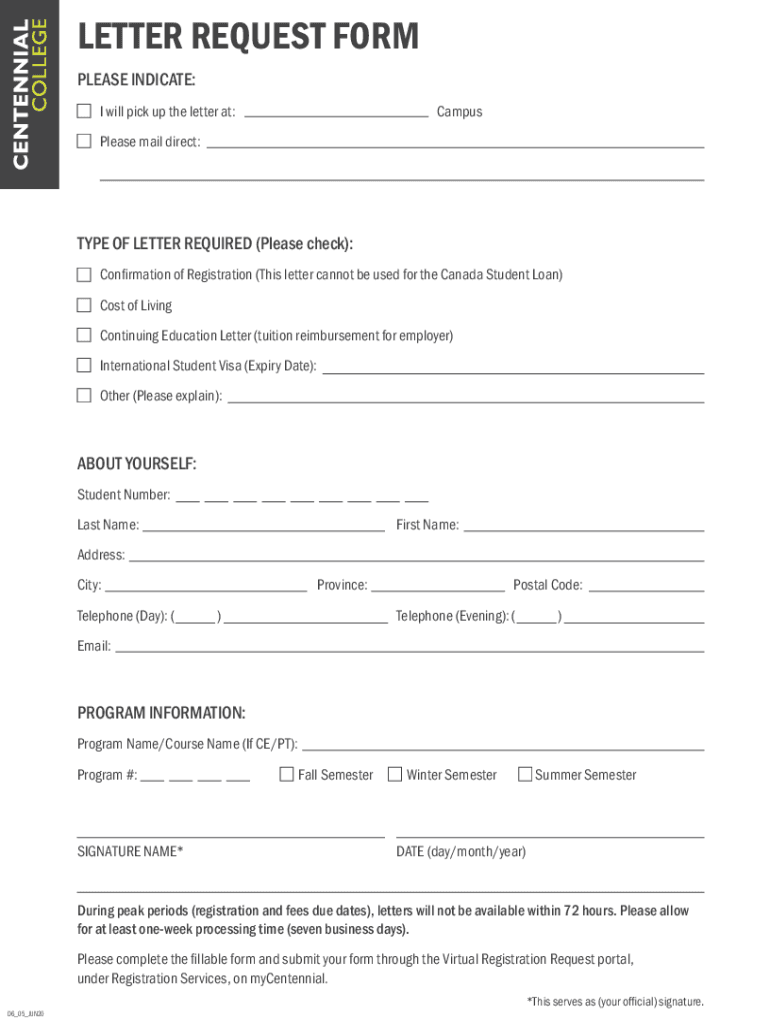
LETTER REQUEST FORM PLEASE INDICATE: I will pick up the letter at: Campus Please mail direct: TYPE OF LETTER REQUIRED (Please check): Confirmation of Registration (This letter cannot be used for the.
Loading

Open form follow the instructions

Easily sign the form with your finger

Send filled & signed form or save
How to fill out the Canada Centennial College Letter Request Form online
Filling out the Canada Centennial College Letter Request Form online can streamline your request for important documents. This guide provides clear, step-by-step instructions to ensure your form is completed accurately and efficiently.
Follow the steps to successfully complete the letter request form.
- Click ‘Get Form’ button to access the form and open it in the editing interface.
- Indicate how you wish to receive the letter by selecting either 'I will pick up the letter at:' followed by the campus or 'Please mail direct.'
- Choose the type of letter required by checking the appropriate box. Options include: 'Confirmation of Registration,' 'Cost of Living,' 'Continuing Education Letter,' 'International Student Visa (Expiry Date),' or 'Other'—if selecting 'Other,' provide a brief explanation in the space provided.
- Fill out your personal information in the 'ABOUT YOURSELF' section. Include your student number, last name, first name, address, city, and province. Additionally, provide both your daytime and evening telephone numbers along with your email address.
- Complete the 'PROGRAM INFORMATION' section by entering your program name or course name (if applicable) and program number.
- Sign the form in the 'SIGNATURE NAME' field. Note that this serves as your official signature.
- Select the semester for which the letter is needed—options include 'Fall Semester,' 'Winter Semester,' or 'Summer Semester.'
- Enter the date in the specified format (day/month/year) in the date section.
- Be aware that during peak periods, including registration and due dates for fees, letters may not be available within 72 hours. Allow at least one week (seven business days) for processing.
- Once the form is fully completed, save your changes and submit the form through the Virtual Registration Request portal, located under Registration Services, on myCentennial.
Complete your letter request now and ensure all necessary documents are processed timely.
Experience a faster way to fill out and sign forms on the web. Access the most extensive library of templates available.
Related content
Included with this application are letters from 16 schools or LEAs that have agreed to...
Please submit a letter request form for EACH letter you want written. Specifically, for...
tion of employment goal path resources in use across college LBS programs ... Inmate...
Get answers to your most pressing questions about US Legal Forms API.
How long does it take to get completion letter from Centennial College?
Confirmation of Graduation Letter If you completed your program but haven't received this letter after 6 weeks, please get in touch with us by emailing sageletters@centennialcollege.ca.
How long does the application process take for Centennial College?
You should prepare your application as soon as possible, since the process usually takes four to six months. You are asked to pay your tuition fees before the stated deadline. If you are not granted a Study Permit, you will receive a full refund.
How do I submit documents to Centennial College?
How to Upload Your Documents Go to your personal document management webpage. Sign in with your myCentennial User Name and Password. Your User Name is your 9-digit student number (check your offer letter). ... Upload your documents. The file formats you can upload are . ... Frequently Asked Questions.
How to apply to Centennial College offer letter?
How to Apply Choose a program. Pick a program that matches your interests and career goals. ... Apply to Centennial College. If you are a Canadian citizen, visit Ontariocolleges.ca. ... Send us your transcripts. ... Wait for your offer of admission.
How do I get an Enrolment letter from Centennial College?
Letter Request Form released by Centennial College, fill out this form. Once completed, submit your form through CASS - Centennial Access for Student Services (formerly known as Virtual Registration Services) access is located in myCentennial – under the “Student” menu, select “Registration” and locate the CASS link.
How to check application in Centennial College?
myApplication is a web-based tool for applicants to see the status of their Centennial College program choices. myApplication draws secure data directly from our applicant information system so you can check your status in "real time."
Is it hard to get offer letter from Centennial College?
Centennial College acceptance rate is 7%.
How to download Centennial College application form?
Start by visiting the official website of Centennial College. Look for the "Admissions" or "Apply" section on the website. Create an account and complete the necessary registration process. Once logged in, select the program or course you wish to apply for.
Use professional pre-built templates to fill in and sign documents online faster. Get access to thousands of forms.
If you believe that this page should be taken down, please follow our DMCA take down process here.