Loading
Get Pa Eo-365 2010-2026
How it works
-

Open form follow the instructions
-

Easily sign the form with your finger
-

Send filled & signed form or save
How to fill out the PA EO-365 online
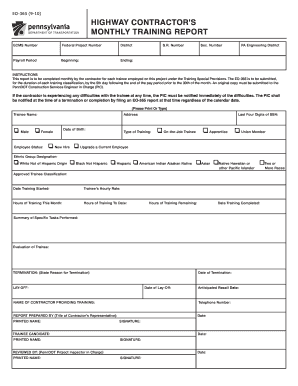
The PA EO-365 is a critical document used to report the monthly training progress of individuals on highway construction projects. This guide provides clear and structured instructions for completing the form online, ensuring accuracy and compliance with submission deadlines.
Follow the steps to complete the PA EO-365 efficiently.
- Click the ‘Get Form’ button to access the PA EO-365 form and open it in the editing interface.
- Begin by filling out the ECMS number and federal project number in the designated fields at the top of the form.
- Input the district and payroll period, including the beginning and ending dates for the month you are reporting.
- Provide the S.R. number and section number relevant to the project, as well as the Pennsylvania engineering district.
- Complete the trainee's information: name, address, date of birth, employee status, and type of training (select from the options provided).
- Fill in the last four digits of the trainee’s social security number and select the ethnic group designation that applies.
- Specify the approved trainee classification and the date training commenced.
- Record the trainee’s hourly rate, hours of training for the month, total hours of training to date, and hours remaining.
- Indicate the date training is expected to be completed, provide a summary of specific tasks performed, and include an evaluation of the trainee.
- If applicable, state the reason for termination or lay-off, along with the relevant dates and anticipated recall date.
- Fill in the name and telephone number of the contractor providing training, and complete the report preparer's information, including title, printed name, and signature.
- Ensure that the trainee candidate signs and dates the form. Finally, the form should be reviewed and signed by the PennDOT project inspector in charge.
- Once all fields are completed, review the form for accuracy, and then save your changes. You may download, print, or share the form as needed.
Complete your documents online to ensure timely and accurate submissions.