Loading
Get Or Pd 615a 2013-2026
How it works
-

Open form follow the instructions
-

Easily sign the form with your finger
-

Send filled & signed form or save
How to use or fill out the OR PD 615A online
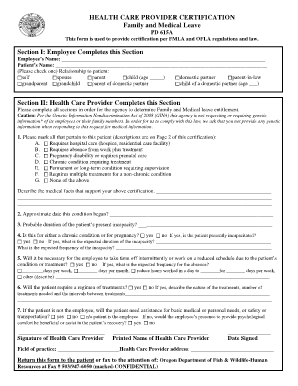
The OR PD 615A form is essential for providing certification under Family Medical Leave Act (FMLA) and Oregon Family Leave Act (OFLA) regulations. This guide will walk you through each section of the form to ensure you fill it out accurately and comprehensively.
Follow the steps to successfully complete the OR PD 615A form online.
- Press the ‘Get Form’ button to obtain the OR PD 615A and open it in the online editor.
- In Section I, enter the employee’s name and the patient’s name. Select the relationship to the patient by checking the appropriate box and filling in any required age fields.
- Proceed to Section II, where the health care provider must complete the required information. This includes marking all applicable items regarding the patient's condition from options A to G.
- Provide detailed medical facts that support the certification in the designated area.
- Indicate the approximate date the condition began and the expected duration of the patient's incapacity.
- Answer whether the condition pertains to a chronic condition or pregnancy, including questions about incapacitation duration and frequency.
- Specify if the employee will need to take time off intermittently or work a reduced schedule, detailing frequency and expected time off.
- If treatment is necessary, describe the nature, number, and intervals required for those treatments.
- Indicate if the patient requires assistance with daily needs and whether the employee's presence would be beneficial.
- Ensure the health care provider signs the form, includes their printed name, the date signed, and their field of practice, along with their address.
- Once all sections are filled, review the form for accuracy, then save your changes. You can download, print, or share the completed OR PD 615A form as needed.
Complete the OR PD 615A online today and ensure proper documentation for your family and medical leave.
All Oregon workers get sick time, but those who work for larger employers can qualify for protected leave under OFLA or the federal Family and Medical Leave Act (FMLA). OFLA leave gives you job protection, but OFLA is unpaid unless you have vacation, sick, or other paid leave.