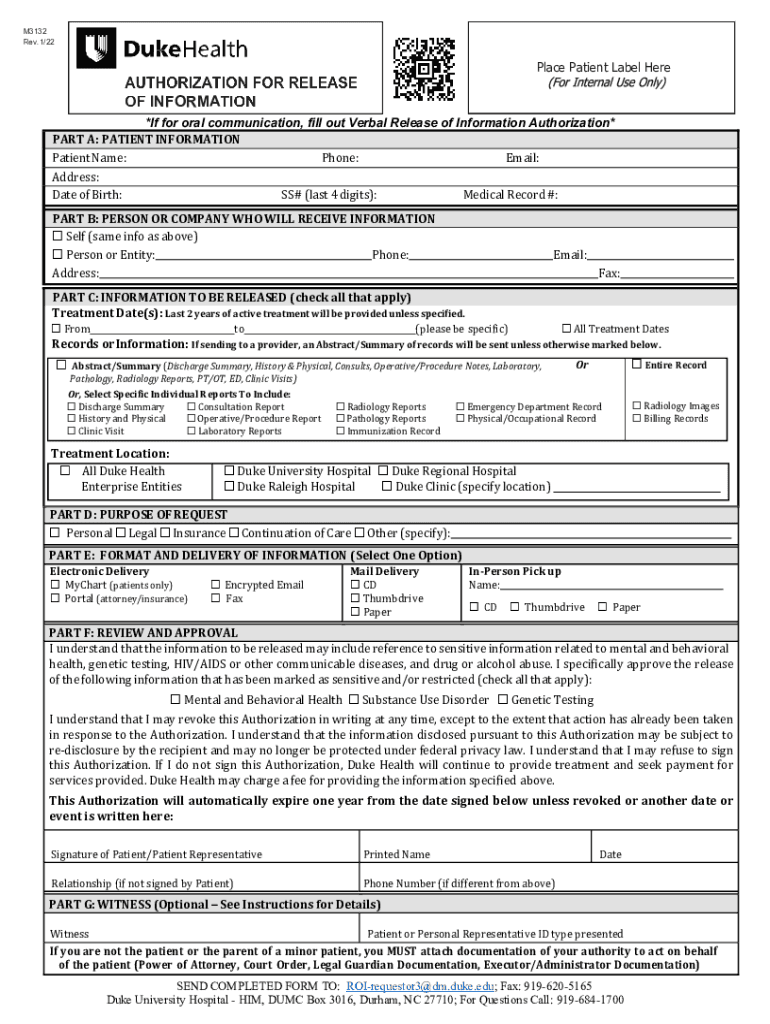
M3132 Rev. 7/19Place Patient Label Reinform PART A: PATIENT INFORMATION ACTION Patient Name: Address: Date of Birth:Phone:Email:SS# (last 4 digits):PART B: PERSON OR COMPANY WHO WILL RECEIVE INFORMATION.
Loading

Open form follow the instructions

Easily sign the form with your finger

Send filled & signed form or save
How to fill out the NC Duke Health M3132 online
Filling out the NC Duke Health M3132 form online is a straightforward process that ensures your medical information is shared appropriately. This guide provides step-by-step instructions to help you complete the form accurately and efficiently.
Follow the steps to successfully complete your M3132 form.
- Click the ‘Get Form’ button to acquire the M3132 form and open it in your preferred editor.
- In Part A, enter patient information such as the patient's name, phone number, email address, and home address. Be sure to include the patient's date of birth and the last four digits of their Social Security number, as well as the medical record number.
- In Part B, indicate the person or company who will receive the information. If the patient is the recipient, select the corresponding option. Otherwise, provide the name, phone number, address, email, and fax number of the designated recipient.
- Part C requires you to specify the information to be released. You can select treatment dates, individual records, or opt for the entire medical record. Check all relevant boxes to clearly indicate what information is needed.
- In Part D, state the purpose of the request by checking the appropriate option such as personal, legal, insurance, continuation of care, or other. Provide a brief explanation if needed.
- Part E details how you want the information delivered. Choose from electronic delivery options like MyChart or encrypted email, or select mail delivery methods, including CD, thumb drive, or paper.
- Review Part F where you acknowledge the release of sensitive information, if applicable. Check all relevant boxes and understand your rights regarding revocation and re-disclosure.
- Finally, sign and date the form in the designated area. If someone is signing on behalf of the patient, provide their printed name and relationship to the patient.
- If applicable, complete the optional witness section in Part G and ensure any authority documents are attached. After completing the form, you can save changes, download, print, or share it.
Complete your NC Duke Health M3132 form online today for a smooth experience in managing your health information.
Experience a faster way to fill out and sign forms on the web. Access the most extensive library of templates available.
Related content
comments in response to the petition filed by Rex Healthcare for an adjusted need...
Welcome! Duke Temporary Service (DTS) was created exclusively to serve the temporary...
Get answers to your most pressing questions about US Legal Forms API.
How do I cancel my Duke appointment?
Cancellation Policy If you need to cancel or reschedule your appointment, please do so 24 hours prior to your appointment. You can cancel or schedule through Duke MyChart. Or, you can call your doctor's office or 919-516-9086.
What is the medical records number for Duke?
Medical Records Customer Service: 919-684-1700. We are open Monday – Friday 8:00 am to 4:30 pm.
How do I access my Duke MyChart?
Download the My Duke Health app to stay engaged with your care on the go. My Duke Health includes access to your Duke MyChart account and features an educational health library, urgent care virtual visits and wait times, Duke Health news and events, and more!
What is Duke's Hospital called?
Duke University Hospital is sometimes referred to as Duke North.
How do I get my Duke medical records?
Get Your Medical Records from Duke Health Email: ROI-Requestor3@dm.duke.edu. Fax: 919-620-5165. Mail: Release of Information. Duke University Health System. P.O. Box 3016. Durham, NC 27710. Customer Service: 919-684-1700. We are open Monday – Friday 8:00 am to 4:30 pm.
Does Duke MyChart have an app?
The Duke MyChart secure website and app also makes it easy for you to schedule appointments, participate in video visits, pay your bills, and send a message to your doctor's office when you have non-urgent medical needs.
What is the Duke outcome measure?
The Duke Health Profile (The Duke) is used as a brief technique for measuring health as an outcome of medical intervention and health promotion. This self-administered instrument features a raw item scoring on a scale of 0 to 100. High scores indicate good health.
Use professional pre-built templates to fill in and sign documents online faster. Get access to thousands of forms.
If you believe that this page should be taken down, please follow our DMCA take down process here.