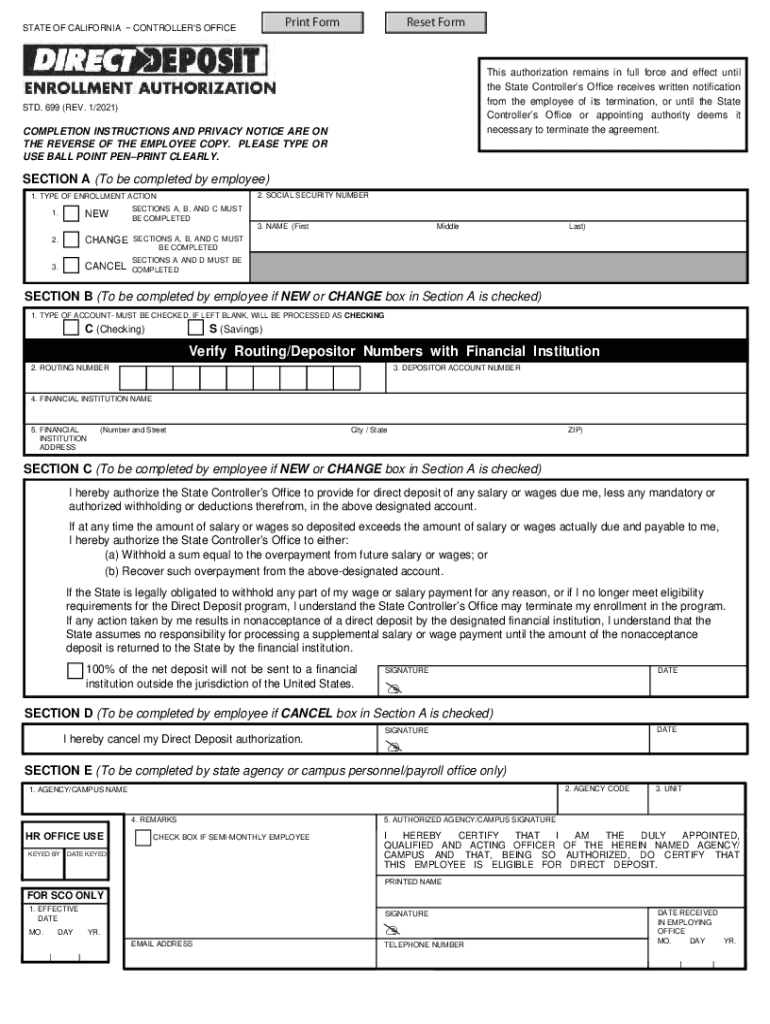
Print Form STATE OF CALIFORNIA CONTROLLER 'S OFFICE Reset Form This authorization remains in full force and effect until the State Controller s Office receives written notification from the employee.
Loading

Open form follow the instructions

Easily sign the form with your finger

Send filled & signed form or save
How to fill out the CA STD 699 online
Filling out the CA STD 699 form online is essential for enrolling in the Direct Deposit program with the State Controller's Office. This guide provides you with step-by-step instructions to ensure your form is completed accurately and efficiently.
Follow the steps to successfully complete your CA STD 699 form.
- Click ‘Get Form’ button to obtain the form and open it for editing.
- Proceed to Section A where you will indicate the type of enrollment action. Select one of the options: 'New', 'Change', or 'Cancel', and fill in your social security number.
- Complete your name in the space provided (First, Middle, Last) under Section A.
- If you selected 'New' or 'Change' in Section A, move to Section B. Here, indicate the type of account you wish to enroll for. Mark either 'C' for Checking or 'S' for Savings. It is mandatory to check one box; otherwise, the form will default to Checking.
- Enter the routing number associated with your financial institution. Ensure it does not start with a ‘5’ and does not exceed 9 digits.
- Next, input your depositor account number, making sure it does not exceed 17 digits.
- Fill in the name and address of your financial institution in the relevant fields provided in Section B.
- If you indicated 'New' or 'Change' in Section A, read Section C carefully and authorize the State Controller’s Office to deposit your salary in the designated account by providing your signature and the date.
- If you opted to cancel your enrollment in Section A, complete Section D by signing and dating the form to confirm your cancellation.
- Finally, if Section E is applicable, ensure that the personnel or payroll office of your state agency completes that section. After everything is filled out, submit your completed form to your personnel/payroll office.
- Once submitted, you can save changes, download, print, or share your completed form as needed.
Complete your CA STD 699 form online today and take the next step in enrolling for direct deposit.
Experience a faster way to fill out and sign forms on the web. Access the most extensive library of templates available.
Related content
STATE OF CALIFORNIA − CONTROLLER'S OFFICE. STD. 699 (REV. 10/2019) ... To enroll in...
To redesignate, complete and submit a new STD. 699 with the new information. DO NOT CLOSE...
Oct 27, 2019 — We adopted the standard in the first quarter of fiscal year 2021 and the...
Get answers to your most pressing questions about US Legal Forms API.
Is direct deposit required in California?
Can an employer require direct deposit in California? Under California Labor Code section 213, employers cannot require an employee to receive payment of wages by direct deposit. A California employer can pay an employee by direct deposit only if the employee expressly consents.
How long should it take for direct deposit to hit?
On average, it'll take one to three business days for a direct deposit to clear, but the timing can depend on the type of payroll software your employer or sender uses. With some employers and payroll processing services, your direct deposits can be available on your scheduled payday.
Why hasn't my direct deposit hit?
Reasons your direct deposit hasn't hit Your employer entered an incorrect date when processing your payroll. Processing is taking longer than usual due to holidays (payday falling on a bank holiday often delays direct deposits). The direct deposit request was accidentally submitted after business hours.
How do I check my direct deposit status?
1:07 2:35 How to Check Direct Deposit Status (Quick & Easy) - YouTube YouTube Start of suggested clip End of suggested clip And you'll be able to see this status of your deposit. You'll either see pending meaning theMoreAnd you'll be able to see this status of your deposit. You'll either see pending meaning the transfer is still in progress. Or exception which means the transfer failed.
What time does direct deposit go through?
What time of day does direct deposit hit? Usually, you'll have access to your direct deposit at the opening of business on your payday — by 9 a.m. In many cases, direct deposits hit accounts even earlier, often between midnight and 6 a.m. on payday morning.
What does it mean to enroll in direct deposit?
The term direct deposit refers to the deposit of funds electronically into a bank account rather than through a physical, paper check. Direct deposit requires the use of an electronic network that allows deposits to take place between banks. This network is called the automated clearing house (ACH).
Why doesn't direct deposit hit at midnight?
This is because some financial institutions update their accounts a few hours after midnight. However, most banks complete the direct deposit before 6 am, allowing many consumers to wake up the next day with the funds sitting in their accounts.
Is it normal for direct deposit to be late?
Why hasn't my direct deposit hit yet? There are multiple reasons your direct deposit may not be showing up in your bank account, but the two most common include: – The deposit was made after the cutoff time. – There is a delay between when the deposit was made and when the funds were available.
Use professional pre-built templates to fill in and sign documents online faster. Get access to thousands of forms.
If you believe that this page should be taken down, please follow our DMCA take down process here.