Loading
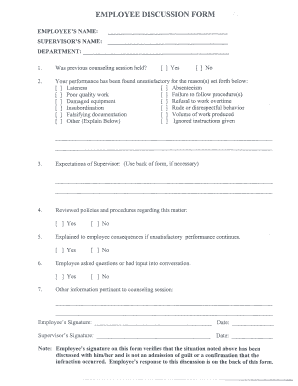
Get Va Employee Discussion Form - City Of Alexandria 2014-2025
How it works
-

Open form follow the instructions
-

Easily sign the form with your finger
-

Send filled & signed form or save
How to fill out the VA Employee Discussion Form - City Of Alexandria online
This guide provides a clear and concise overview of how to complete the VA Employee Discussion Form online. Whether you are an employee or supervisor, understanding the steps to fill out this form is essential for effective communication and documentation.
Follow the steps to fill out the VA Employee Discussion Form properly.
- Click ‘Get Form’ button to obtain the form and open it in the editor.
- Begin by entering the employee's name in the designated field. This identifies the individual involved in the discussion.
- Next, provide the supervisor's name in the corresponding field. This establishes who is conducting the discussion.
- Fill out the department information to clarify the area of employment related to the discussion.
- Indicate whether a previous counseling session was held by selecting 'Yes' or 'No' from the options available.
- In the performance section, check all the reasons for unsatisfactory performance that apply. This includes options like lateness, absenteeism, and others. If necessary, explain any unique reasons in the space provided.
- Detail the expectations of the supervisor regarding improvements or future performance. You may use the back of the form if additional space is required.
- Confirm whether the relevant policies and procedures were reviewed with the employee by selecting 'Yes' or 'No'.
- Record whether the consequences of continued unsatisfactory performance have been explained to the employee by selecting 'Yes' or 'No'.
- Mark whether the employee had the opportunity to ask questions or provide input into the conversation by selecting the appropriate option.
- Include any other pertinent information related to the counseling session in the designated area.
- Both the employee and supervisor should sign and date the form in their respective signature fields to confirm the discussion took place.
- The employee may provide their response on the back of the form, as indicated, and also sign and date this section.
- After completing the form, you can save changes, download, print, or share the finalized document as needed.
Complete your VA Employee Discussion Form online today for efficient documentation and clear communication.
Related links form
The district boundaries, as defined by the National Register and the Virginia Landmarks Register, are the Potomac River to the east, Queen Street to the north, Jones Point and the Capital Beltway to the south, and Alfred Street to the west.
Industry-leading security and compliance
US Legal Forms protects your data by complying with industry-specific security standards.
-
In businnes since 199725+ years providing professional legal documents.
-
Accredited businessGuarantees that a business meets BBB accreditation standards in the US and Canada.
-
Secured by BraintreeValidated Level 1 PCI DSS compliant payment gateway that accepts most major credit and debit card brands from across the globe.