Loading
Form preview
  • US Legal Forms
  • Other Templates
  • More Forms
  • More Multi-State Forms
  • Il Homestar Title Company Personal Information Affidavit 2012

Get Il Homestar Title Company Personal Information Affidavit 2012-2026

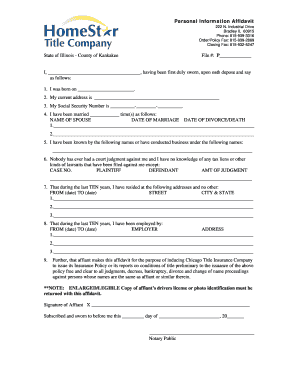
Personal Information Affidavit 222 N. Industrial Drive Bradley IL 60915 Phone: 815-939-3316 Order/Policy Fax: 815-939-2869 Closing Fax: 815-932-5247 State of Illinois County of Kankakee File #: P.

How it works

  1. Open form

    Open form follow the instructions

  2. Easily sign form

    Easily sign the form with your finger

  3. Share form

    Send filled & signed form or save

How to fill out the IL HomeStar Title Company Personal Information Affidavit online

Filling out the IL HomeStar Title Company Personal Information Affidavit online is a straightforward process. This guide walks you through each section of the affidavit, providing clear instructions to ensure you complete the form accurately and efficiently.

Follow the steps to fill out the affidavit correctly online.

  1. Click ‘Get Form’ button to obtain the affidavit and open it in your preferred editing tool.
  2. Begin by entering your full name in the designated field marked 'I, ______________________________________,' ensuring you spell your name accurately.
  3. In the next section, enter your birthdate on the line 'I was born on _______________________.' This information is crucial for identification purposes.
  4. Provide your current address by filling in the relevant fields under 'My current address is.'
  5. Input your Social Security Number in the format __________-________-__________, ensuring that each part is filled correctly.
  6. Count and indicate the number of times you have been married in the section 'I have been married ____________ time(s) as follows:' and list your spouse's name and the dates of marriage. If applicable, fill in the date of divorce or death.
  7. List any other names you have been known by in the section provided for this purpose.
  8. In the section about court judgments and tax liens, indicate if you have any, or confirm that you do not have any judgments against you.
  9. Document your residence history for the past ten years by filling out all relevant fields for each address.
  10. Provide your employment history for the last ten years, including employer names and addresses.
  11. Ensure that you sign the affidavit where indicated: 'Signature of Affiant X __________________________________________________.' Remember to include a legible copy of your driver's license or photo identification with this affidavit.
  12. Finally, review all the information for accuracy, then save your changes. You can download, print, or share the completed form as needed.

Complete your documents online with confidence today!

Get form

Experience a faster way to fill out and sign forms on the web. Access the most extensive library of templates available.
Get form

Related content

1:10-cv-03408 Document
Feb 24, 2014 — The Court granted the motion in part and denied it in part, leaving the...
Learn more
dig060704.txt
The reported information appears as follows: Form, Name, Address and Phone Number (if...
Learn more
Banco Popular North America v. Gizynski, 2015 IL...
Aug 14, 2015 — Defendant had thus supplied a total of nine affidavits to support his...
Learn more

Related links form

123RF Model Release Form 2007 AAAE Airports Conference Of The Americas Registration 2011 Eagle Power & Equipment PM-17129 2008 Eagle Power & Equipment PM-17129 2014

Questions & Answers

Get answers to your most pressing questions about US Legal Forms API.

Contact support

This affidavit for the confidential use of the Chicago Title and Trust Company will assist in determining whether certain matters of record affect the title under consideration, or whether they relate to other persons whose names are similar to those of the owner or former owners. PERSONAL INFORMATION AFFIDAVIT - Chicago Title ctic.com https://cmetro.ctic.com › CT-RS-CMetro › pdfsAndDocs ctic.com https://cmetro.ctic.com › CT-RS-CMetro › pdfsAndDocs

How to make a sworn statement. A blank SAPS affidavit template can be downloaded below, filled in and stamped at any police station. The form can also be obtained from the police station and completed by hand.

Step 1: Decide what the title of your affidavit will be. Step 2: Put the name and personal background information of the person giving the information in the first paragraph. Step 3: Write an opening sentence in the first person tense. Step 4: Make an outline of the information given or state the facts of the case.

I, Mr./Ms. Age,_________ , occupation R/at:_________________________________________ do hereby take oath and state on solemn affirmation as under:- I. state that, I undertake to show all the original documents at the time of submission/admission. I will submit true/attested copies of Marksheet, Passport and Visa.

The following are six critical sections that must be included: Title. This is either your name (“Affidavit of Jane Doe”) or the specific case information. Statement of identity. The next paragraph tells the court about yourself. ... Statement of truth. ... Statement of facts. ... Closing statement of truth. ... Sign and notarize.

Get This Form Now!

Use professional pre-built templates to fill in and sign documents online faster. Get access to thousands of forms.
Get form
If you believe that this page should be taken down, please follow our DMCA take down processhere.
Get IL HomeStar Title Company Personal Information Affidavit
Get form
  • Adoption
  • Bankruptcy
  • Contractors
  • Divorce
  • Home Sales
  • Employment
  • Identity Theft
  • Incorporation
  • Landlord Tenant
  • Living Trust
  • Name Change
  • Personal Planning
  • Small Business
  • Wills & Estates
  • Packages A-Z
  • Affidavits
  • Bankruptcy
  • Bill of Sale
  • Corporate - LLC
  • Divorce
  • Employment
  • Identity Theft
  • Internet Technology
  • Landlord Tenant
  • Living Wills
  • Name Change
  • Power of Attorney
  • Real Estate
  • Small Estates
  • Wills
  • All Forms
  • Forms A-Z
  • Other Templates
  • Legal Hub
  • About Us
  • Help Portal
  • Legal Resources
  • Blog
  • Affiliates
  • Contact Us
  • Delete My Account
  • Site Map
  • Industries
  • Forms in Spanish
  • Localized Forms
  • State-specific Forms
  • Forms Kit
  • Real Estate Handbook
  • All Guides
  • Notarize
  • Incorporation services
  • For Consumers
  • For Small Business
  • For Attorneys
  • USLegal
  • FormsPass
  • pdfFiller
  • signNow
  • altaFlow
  • DocHub
  • Instapage
Form Packages
  • Adoption
  • Bankruptcy
  • Contractors
  • Divorce
  • Home Sales
  • Employment
  • Identity Theft
  • Incorporation
  • Landlord Tenant
  • Living Trust
  • Name Change
  • Personal Planning
  • Small Business
  • Wills & Estates
  • Packages A-Z
Form Categories
  • Affidavits
  • Bankruptcy
  • Bill of Sale
  • Corporate - LLC
  • Divorce
  • Employment
  • Identity Theft
  • Internet Technology
  • Landlord Tenant
  • Living Wills
  • Name Change
  • Power of Attorney
  • Real Estate
  • Small Estates
  • Wills
  • All Forms
  • Forms A-Z
  • Other Templates
Customer Service
  • Legal Hub
  • About Us
  • Help Portal
  • Legal Resources
  • Blog
  • Affiliates
  • Contact Us
  • Delete My Account
  • Site Map
  • Industries
  • Forms in Spanish
  • Localized Forms
  • State-specific Forms
  • Forms Kit
Legal Guides
  • Real Estate Handbook
  • All Guides
Prepared for you
  • Notarize
  • Incorporation services
Our Customers
  • For Consumers
  • For Small Business
  • For Attorneys
Our Sites
  • USLegal
  • FormsPass
  • pdfFiller
  • signNow
  • altaFlow
  • DocHub
  • Instapage
Social Media
Call us now toll free:
+1 833 426 79 33
As seen in:
© Copyright 1999-2026 airSlate Legal Forms, Inc. 17 Station Street, Ste. 203, Brookline, MA 02445
  • Your Privacy Choices
  • Terms of Service
  • Privacy Notice
  • Content Takedown Policy
  • Bug Bounty Program