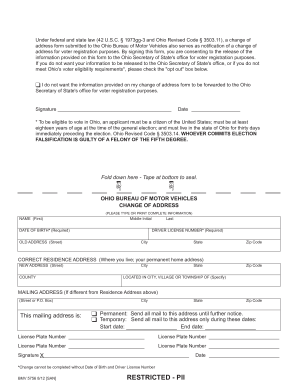
O. Box THIS MAILING ADDRESS IS PERMANENT SEND ALL MAIL TO THIS ADDRESS UNTIL FURTHER NOTICE. TEMPORARY SEND ALL MAIL TO THIS ADDRESS ONLY DURING THESE DATES START DATE END DATE License Plate Number Signature X Change cannot be completed without Date of Birth and Driver License Number BMV 5756 12/14 760-1491 RESTRICTED - PII Postage Required Post Office will not deliver without proper postage. .
Open form follow the instructions
Easily sign the form with your finger
Send filled & signed form or save
How to fill out the OH BMV 5756 online
The OH BMV 5756 form is essential for notifying the Ohio Bureau of Motor Vehicles of a change of address. Additionally, it serves as a notification for voter registration purposes. This guide will provide clear, step-by-step instructions for completing the form online.
Follow the steps to successfully complete the form online.
- Click ‘Get Form’ button to obtain the form and open it in the editor.
- Begin by entering your name in the designated fields: first name, middle initial, and last name.
- Provide your date of birth in the required format, as it is essential for processing your change of address.
- Enter your driver license number in the specified field. This information is also required for the form to be processed.
- Fill out your old address, including street, city, state, and zip code, where you currently reside.
- Enter your new address. Provide the street, city, state, and zip code of your new permanent residence.
- Specify the county where your new address is located.
- Indicate if your mailing address is different from your residence address. If it is, complete the mailing address section.
- Choose whether your mailing address is permanent or temporary by selecting the appropriate box and, if temporary, providing the start and end date.
- If applicable, provide up to four vehicle license plate numbers that are associated with your address change.
- Sign and date the form to certify that the information you provided is accurate. Ensure the signature aligns with your legal name.
- After completing all sections, save your changes, and follow the instructions for downloading, printing, or sharing the form as necessary.
Complete your OH BMV 5756 online today for a smooth transition to your new address.
Experience a faster way to fill out and sign forms on the web. Access the most extensive library of templates available.
Related content
By signing this form, you are consenting to the release of the information provided on...
Page 1. IN THE UNITED STATES DISTRICT COURT. FOR THE SOUTHERN DISTRICT OF OHIO. EASTERN...
Get answers to your most pressing questions about US Legal Forms API.
Can Ohio plates be renewed online?
Yes, you can renew your Ohio plates online through the Ohio BMV website. The online platform simplifies the renewal process, allowing you to complete it from the comfort of your home. Make sure you have your renewal information handy, including any necessary payment details. If you're unsure about the steps, US Legal Forms can provide useful guidance.
How long can you go without renewing your tags in Ohio?
In Ohio, you should renew your tags before they expire to avoid penalties. The state does not provide a grace period for registration renewals. Therefore, it's best to keep track of your expiration dates and renew on time. For more insights on these processes, US Legal Forms offers valuable resources.
Does Ohio BMV mail license plates?
Yes, the Ohio BMV does mail license plates after you complete your registration. Typically, you can expect to receive them within a few weeks of processing your application. Ensure that your address is updated with the BMV to avoid any delivery issues. For assistance, consider turning to US Legal Forms for step-by-step help.
How to file a lost title in Ohio?
If you have lost your vehicle title in Ohio, you can file for a duplicate title through the Ohio BMV. Fill out the appropriate forms and gather any necessary documentation. You may complete this process online or by visiting a local BMV office. US Legal Forms can streamline this process by providing the required forms.
How do I submit proof of insurance to Ohio BMV?
Submitting proof of insurance to the Ohio BMV is straightforward. You can either present it in person at your local BMV office or send a copy via mail. Be sure that the document is current and includes all required details. For quick assistance, you may explore options on US Legal Forms.
Does a power of attorney for Ohio vehicle registration need to be notarized?
Yes, a power of attorney for Ohio vehicle registration does need to be notarized. Notarization helps verify the identities of the signers and adds an extra layer of authenticity to the OH BMV 5756 form. This step is essential for the form to be accepted by the Ohio Bureau of Motor Vehicles.
How do I fill out a power of attorney for a car?
To fill out a power of attorney for a car, first obtain the OH BMV 5756 form. Then, accurately fill in the necessary information regarding your vehicle and the authorized person's details. Lastly, ensure that all parties involved sign the document to make it legally binding.
How to fill out a permit driving log?
Filling out a permit driving log requires you to record each driving session accurately. Document the date, the number of hours driven, and any additional details about your driving practice. This ensures you track your progress toward obtaining your driver's license effectively.
How to fill out an MVR form?
To complete an MVR (Motor Vehicle Report) form, gather all necessary details about your vehicle and your driving history. Input your personal information accurately and provide specific information as requested in the form. Using the OH BMV 5756 as a reference can guide you through the process to avoid common mistakes.
How to fill out the back of a Ohio car title?
Filling out the back of an Ohio car title involves providing details about the transfer of ownership. You should write in the buyer's name, address, and the sale date. Additionally, ensure you complete the odometer disclosure statement, if applicable, to comply with state requirements.
Use professional pre-built templates to fill in and sign documents online faster. Get access to thousands of forms.
If you believe that this page should be taken down, please follow our DMCA take down process here.
This form is available in several versions. Select the version you need from the drop-down list below.