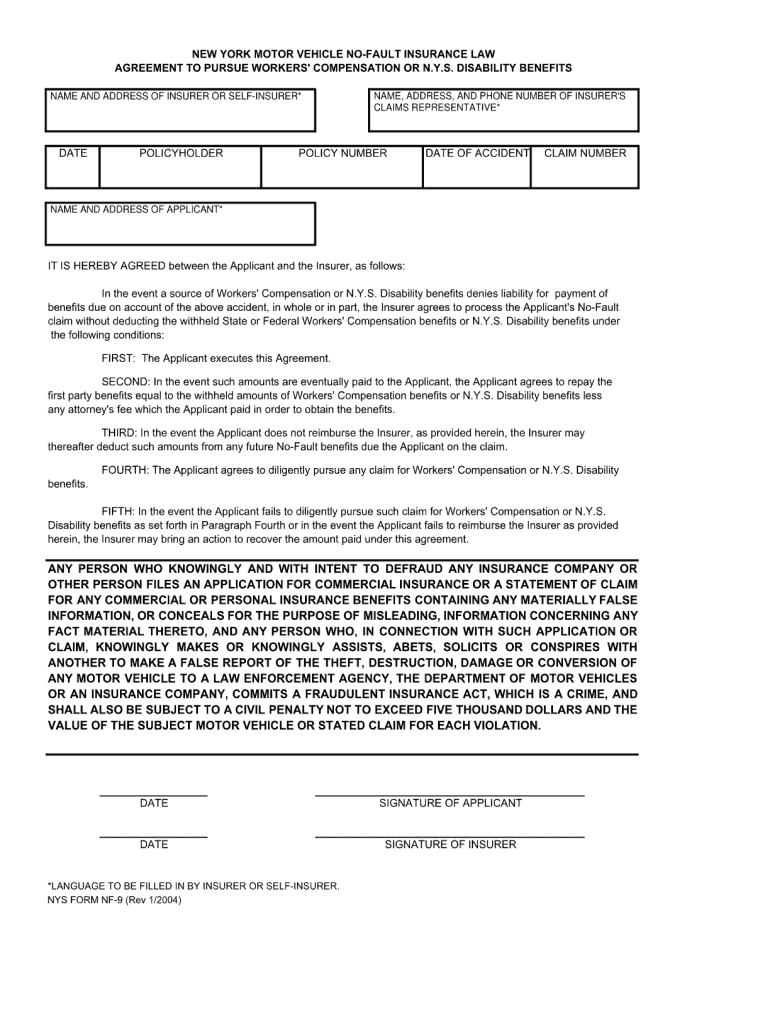
NEW YORK MOTOR VEHICLE NO-FAULT INSURANCE LAW AGREEMENT TO PURSUE WORKERS' COMPENSATION OR N.Y.S. DISABILITY BENEFITS NAME AND ADDRESS OF INSURER OR SELF-INSURER* NAME AND ADDRESS OF INSURER OR SELFINSURER*.
Loading

Open form follow the instructions

Easily sign the form with your finger

Send filled & signed form or save
How to fill out the NY NYS NF-9 online
This guide provides clear and detailed instructions on how to complete the NY NYS NF-9 form online. Whether you are familiar with digital forms or new to the process, this resource is designed to support you.
Follow the steps to successfully fill out the NY NYS NF-9 online.
- Click ‘Get Form’ button to acquire the form and open it in your preferred editor.
- Begin by entering your personal information in the designated fields. Include your full name, address, and contact details as requested.
- Move on to the section where you provide specific details relevant to your situation. Make sure to accurately fill in the information, ensuring it reflects your circumstances.
- Review all entered data for accuracy. It is important to double-check for any errors or missing information before proceeding.
- Once all fields are completed and verified, you can save the changes made to your form.
- Finally, choose to download, print, or share the completed form as per your needs.
Take a moment to fill out your documents online for a more efficient process.
Experience a faster way to fill out and sign forms on the web. Access the most extensive library of templates available.
Related content
NYS FORM NF-9 (Rev 1/2004). NEW YORK MOTOR VEHICLE NO-FAULT INSURANCE LAW. AGREEMENT TO...
by LJ Papa · 2016 · Cited by 11 — (d) any New York State resident who sustains...
Mar 15, 2008 — For Medicaid Prepaid Capitation Plans only, the two-digit plan code and...
Get answers to your most pressing questions about US Legal Forms API.
How can I simplify the process of filing an NF-9?
To simplify the process of filing an NF-9, you can use platforms like USLegalForms. They offer step-by-step guidance on completing the NY NYS NF-9 form correctly. Their resources help you gather necessary information and ensure accuracy in filing. By utilizing their tools, you reduce the chances of delays in receiving your benefits.
Who pays for a no-fault accident?
In a no-fault accident, the insurance companies handle the claims without assigning blame. Each driver submits claims based on their own coverage, which is a fundamental aspect of the NY NYS NF-9 system. This setup encourages quicker settlements and less unnecessary legal disputes. Using the proper forms makes this process even easier.
What is the No-Fault death benefit in NY?
The No-Fault death benefit in New York provides financial compensation to the beneficiaries of someone killed in a car accident. Under the NY NYS NF-9 regulations, these benefits cover funeral costs and economic support for the deceased's family. It serves as a safety net during difficult times. Knowing about these benefits can offer peace of mind.
Who pays for car damage in a No-Fault state in New York?
In a No-Fault state like New York, each driver’s insurance covers their own vehicle damage. This means that your insurance provides compensation for your losses regardless of who caused the accident. By following the rules associated with the NY NYS NF-9 form, you can navigate the claims smoothly. It simplifies the reimbursement process for all parties involved.
What is the NF9 form?
The NY NYS NF-9 form is a no-fault application form used in New York. It allows individuals to apply for benefits related to car accidents without determining fault. This form ensures that you receive medical expenses and lost wages promptly. Understanding the NF-9 form helps streamline your claims process.
What is a no-fault assignment of benefits in NY?
fault assignment of benefits is a legal agreement allowing a healthcare provider to be directly compensated for medical services rendered to an injured party following an accident in New York. This process simplifies billing for patients by reducing their outofpocket expenses. Understanding this assignment can help you maximize the benefits outlined in your NY NYS NF9. Engaging with professionals familiar with this system can ensure a smoother claims process.
What is NF-7?
The NF-7 form is part of New York's no-fault insurance process and is typically used for reporting lost wages as a result of an accident. This form requires you to provide documentation to substantiate your loss of income due to injuries. The NF-7 and the NY NYS NF-9 work together to help you collect necessary benefits. Using these forms accurately can help you navigate the complexities of your no-fault insurance claim.
What is an NF9 form?
The NF9 form is an official no-fault insurance document used in New York State. It is submitted to provide comprehensive information about the insured individual and the claim being filed. Proper completion of the NY NYS NF-9 form is vital for ensuring that your claim gets processed without delays. It's a foundational step in accessing the benefits you're entitled to under New York's no-fault laws.
What is NF-6?
The NF-6 form is a crucial document in New York’s no-fault insurance system. It is used primarily for reporting additional details related to personal injury protection claims. This form helps clarify the extent of medical expenses and losses. Understanding the role of the NF-6 can enhance your overall structure of filing using the NY NYS NF-9.
How to file a no-fault insurance claim in New York?
To file a no-fault insurance claim in New York, you need to complete the appropriate forms and submit them to your insurance company. The NY NYS NF-9 form is essential for this process, as it provides vital information about the accident and the damages incurred. You should also gather any relevant documentation, such as accident reports and medical bills, to support your claim. Be sure to act promptly, as there are deadlines to file your claim effectively.
Use professional pre-built templates to fill in and sign documents online faster. Get access to thousands of forms.
If you believe that this page should be taken down, please follow our DMCA take down process here.