Loading
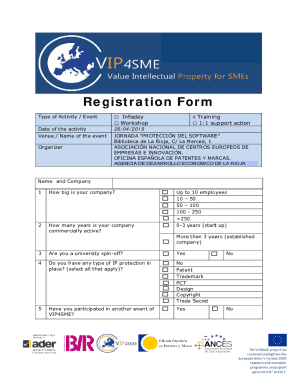
Get Es Ader Vip4sme Registration Form 2019-2026
How it works
-

Open form follow the instructions
-

Easily sign the form with your finger
-

Send filled & signed form or save
How to fill out the ES ADER VIP4SME Registration Form online
This guide provides users with a clear and supportive overview of how to successfully complete the ES ADER VIP4SME Registration Form online. By following these step-by-step instructions, you will be able to navigate through each section effectively.
Follow the steps to complete the registration form with ease.
- Click ‘Get Form’ button to open the form in your preferred online editor.
- Fill in the 'Type of Activity / Event' section by selecting the appropriate option such as workshop or training. This helps to categorize the event you are registering.
- Enter the 'Date of the Activity' and ensure to use the correct format, which is day/month/year.
- Provide details in the 'Venue / Name of the Event' field. Clearly state the location to avoid any confusion.
- Complete the 'Organizer' section by putting the name of the organizing party. This is crucial for validation purposes.
- In the 'Name and Company' section, enter your name and the name of your organization to identify the applicant.
- Indicate the size of your company by selecting from the multiple-choice options given in the 'How big is your company?' section.
- Answer the question regarding how long your company has been active commercially. This may involve selecting either '0-3 years' for startups or 'more than 3 years' for established companies.
- If applicable, respond to the question about whether you are a university spin-off by selecting 'Yes' or 'No'.
- Provide information regarding any existing intellectual property protection by selecting all applicable options.
- Indicate whether you have participated in other VIP4SME events by selecting 'Yes' or 'No'.
- Once all sections are completed and reviewed for accuracy, you can save your changes, download the form, print it for a physical copy, or share it as needed.
Begin completing your ES ADER VIP4SME Registration Form online today!