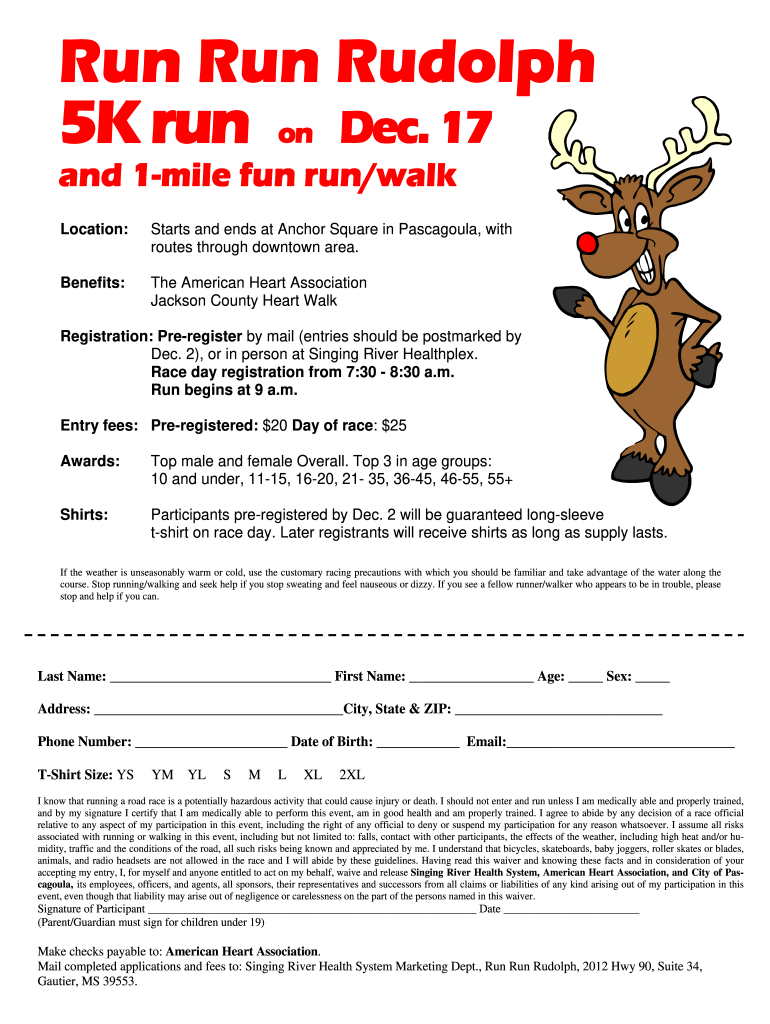
Jackson County Heart Walk Registration: Pre-register by mail (entries should be postmarked by Dec. 2), or in person at Singing River Healthplex. Race day registration from 7:30 - 8:30 a.m. Run begins at 9 a.m. Entry fees: Pre-registered: $20 Day of race: $25 Awards: Top male and female Overall. Top 3 in age groups: 10 and under, 11-15, 16-20, 21- 35, 36-45, 46-55, 55+ Shirts: Participants pre-registered by Dec. 2 will be guaranteed long-sleeve t-shirt on race day. Later registrants will rece.
Loading

Open form follow the instructions

Easily sign the form with your finger

Send filled & signed form or save
How to fill out the MS Singing River Health System Run Run Rudolph Registration Form online
Filling out the MS Singing River Health System Run Run Rudolph Registration Form online is a straightforward process designed to facilitate your participation in this exciting event. This guide provides step-by-step instructions to help you complete the form accurately and efficiently.
Follow the steps to successfully complete your registration form.
- Click the ‘Get Form’ button to obtain the form and open it in the registration interface.
- Begin by entering your last name and first name in the designated fields. Ensure that your spelling is correct.
- Input your age, selecting the appropriate number from the dropdown menu or entering it manually.
- Indicate your sex by selecting the corresponding option from the given choices.
- Fill in your complete address, including city, state, and ZIP code, ensuring all details are accurate.
- Provide your phone number, making sure to include the area code.
- Enter your date of birth in the specified format to ensure proper age verification for the event.
- Fill in your email address for confirmation and communication regarding the event.
- Select your t-shirt size from the provided options, ensuring you choose the correct size for your comfort.
- Read the waiver statement carefully, indicating your understanding and acceptance of the terms related to participation.
- Sign the form at the designated signature line and date it. If you are registering a participant under the age of 19, ensure a parent or guardian's signature is included.
- Upon completing the form, save your changes and choose to download, print, or share the registration form as needed.
Complete your registration form online today and secure your spot in the Run Run Rudolph event!
Experience a faster way to fill out and sign forms on the web. Access the most extensive library of templates available.
Related content
If any of the securities being registered on this Form are to be offered on a delayed or...
Become a thinker and entrepreneur who can direct creative vision, explorations, services...
The Civilian Conservation Corps activities in the National Capital Region of the National...
Use professional pre-built templates to fill in and sign documents online faster. Get access to thousands of forms.
If you believe that this page should be taken down, please follow our DMCA take down process here.