Loading
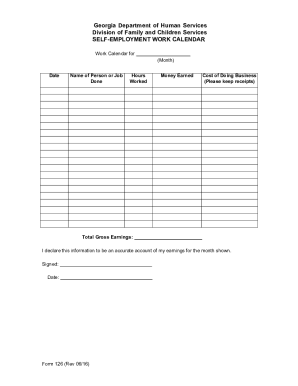
Get Ga Form 126 2016-2026
How it works
-

Open form follow the instructions
-

Easily sign the form with your finger
-

Send filled & signed form or save
How to fill out the GA Form 126 online
Filing the GA Form 126, a self-employment work calendar, is an important step for documenting your earnings. This guide will walk you through the process of completing the form online, ensuring you can accurately report your income and expenses.
Follow the steps to fill out the GA Form 126 online.
- Click ‘Get Form’ button to obtain the form and open it in the editor.
- Begin by entering the month for which you are reporting earnings. Clearly indicate the month at the top of the form to ensure that your records are accurate.
- Fill in your name or the name of the job completed in the designated box. This should reflect the person or project associated with the self-employment activity.
- Record the hours worked for each day in the appropriate section. Be sure to provide clear and honest entries to reflect your actual working time.
- Document the total money earned during the month. Input this total in the specified field, ensuring to include all relevant earnings.
- List the costs of doing business in the designated area. It’s essential to keep receipts for all expenses incurred, as this will support your reported figures.
- Calculate the total gross earnings and enter this amount in the specified area. This total should reflect your earnings before expenses are deducted.
- Review all entries for accuracy. Ensure that the information provided is correct and complete.
- Once you have verified your information, you are required to sign the form. This confirms that the information is accurate to the best of your knowledge.
- Lastly, record the date of signing and proceed to save your changes. You can download, print, or share the form as needed.
Complete your GA Form 126 online today to ensure your income is accurately recorded.