Loading
Get Request To Issue Subpoena
How it works
-

Open form follow the instructions
-

Easily sign the form with your finger
-

Send filled & signed form or save
How to fill out the Request To Issue Subpoena online
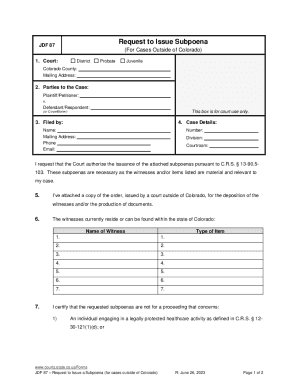
Filling out the Request To Issue Subpoena form is an essential step in seeking court authorization for subpoenas in cases outside of Colorado. This guide will provide a clear and structured approach to help you navigate through the form.
Follow the steps to successfully complete the Request To Issue Subpoena.
- Click the ‘Get Form’ button to access the form and open it in the online editor.
- Identify the court handling your case. Select from District, Probate, or Juvenile, and specify the Colorado County where your case is filed. Provide the mailing address as needed.
- List the names of the parties involved in the case. Include the Plaintiff or Petitioner and the Defendant or Respondent, and provide details including any Co-petitioner if applicable.
- Enter your name and contact details in the 'Filed by' section, including your mailing address, phone number, and email.
- Fill in the case details section, including the case number, division, and courtroom information.
- In the request section, state your desire for the court to authorize subpoenas. Reference the relevant Colorado statute which underscores the importance of the subpoenas for your case.
- Attach any orders issued by a court outside of Colorado related to the depositions or document productions you require.
- Provide the names of witnesses that currently reside or can be found in Colorado. Ensure that you include each witness's full name.
- Identify the items you need from the witnesses and list them in the designated fields.
- Complete the certification section confirming that the subpoenas are not intended for legally protected healthcare activities or entities providing specific healthcare services.
- Sign the verification section, including the date and location, your printed name, your signature, and the signature of your lawyer if applicable.
- Once you have filled out the form completely, save any changes you made, and opt to download, print, or share the completed form for your records.
Start filling out your Request To Issue Subpoena online today!
(d) Subpoenas by attorneys. An attorney appearing for a party may issue subpoenas or subpoenas duces tecum returnable at a hearing before an administrative law judge.