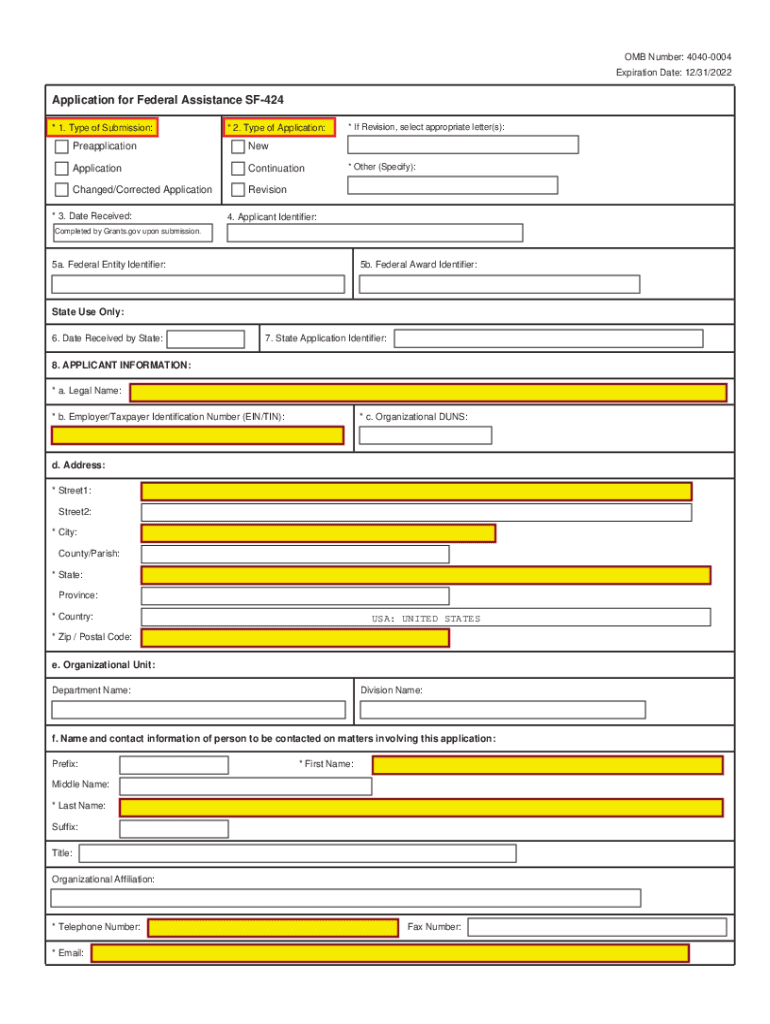
OMB Number: 40400004 Expiration Date: 12/31/2022Application for Federal Assistance SF424 * 1. Type of Submission:* 2. Type of Application:PreapplicationNewApplicationContinuationChanged/Corrected.

Open form follow the instructions

Easily sign the form with your finger

Send filled & signed form or save
How to use or fill out the SF424 2 1 Page 4 - USDA Rural Development online
Filling out the SF424 2 1 Page 4 form for USDA Rural Development can be a crucial step in securing federal assistance for your project. This guide aims to provide clear and comprehensive instructions to help users navigate the form efficiently and effectively.
Follow the steps to fill out the SF424 2 1 Page 4 form online
- Use the ‘Get Form’ button to obtain the form, which can be accessed easily in the online environment.
- Begin by filling in the type of submission. Choose from options such as new application, continuation, or revision based on your specific needs.
- For the applicant information, provide the legal name of your organization, along with the Employer/Taxpayer Identification Number and organizational DUNS number.
- Fill out the address section accurately with street address, city, state, and zip code, ensuring that this information corresponds to your organizational registration.
- Complete the contact information section with the first and last name of the person who can be reached regarding the application. Ensure to include their telephone number and email address.
- Select the appropriate applicant type and federal agency, ensuring that you specify any additional applicant types if necessary.
- In the funding opportunity section, provide the funding opportunity number and a descriptive title of your project.
- Indicate the proposed project start and end dates, ensuring they align with your project timeline.
- Detail the estimated funding amounts from federal, state, local, and other sources, as well as the total funding required for the project.
- Review the application for any federal debt delinquency, indicating yes or no, and provide an explanation if applicable.
- Finally, ensure that the authorized representative certifies the application by providing their name, title, and signature, where required.
- Once all sections are complete, save your changes, download a copy of the form, and if necessary, print or share it for submission.
Begin filling out your SF424 2 1 Page 4 form online today to streamline your application process.
Experience a faster way to fill out and sign forms on the web. Access the most extensive library of templates available.
Related content
Application for Federal Assistance SF-424. * 1. Type of Submission: * 2. Type of...
This is a standard form required for use as a cover sheet for submission of...
Oct 2, 2018 — Attend one face-to-face meeting with USDA personnel and fellow grantees to...
Get answers to your most pressing questions about US Legal Forms API.
What is the standard form 424?
This is a standard form required for use as a cover sheet for submission of pre-applications and applications and related information under discretionary programs. Some of the items are required and some are optional at the discretion of the applicant or the federal agency (agency).
What is NIH SF424?
Form Number. SF424 (R&R) Description. Use to apply for grants and cooperative agreements.
How to fill out sf424a?
2:45 9:28 Applicant Tutorials - SF 424A Form Overview - YouTube YouTube Start of suggested clip End of suggested clip Project on this slide we will talk about columns a and b of this. Section. You will get theMoreProject on this slide we will talk about columns a and b of this. Section. You will get the information for these fields from the opportunity listing on grants.gov.
What is the federal identifier on grants gov?
A Unique Entity Identifier (UEI) is a unique number assigned to all entities (public and private companies, individuals, institutions, or organizations) who register to do business with the federal government. (U.S. General Services Administration). UEI numbers are obtained from .sam.gov.
What is federal assistance SF 424?
This is a standard form required for use as a cover sheet for submission of pre-applications and applications and related information under discretionary programs. Some of the items are required and some are optional at the discretion of the applicant or the federal agency (agency).
What does SF 424 mean?
The Standard Forms 424 (SF-424) Form Families represent the government-wide standard data sets and forms for grant application packages, which were developed in partnership with federal grant-making agencies and the applicant community.
What is an applicant identifier in grants gov?
The Applicant Identifier (Item 4) is the number assigned by HUD to the grantee for the grant program. For example, B-12-DN-03-0014 is considered as an applicant identifier.
Use professional pre-built templates to fill in and sign documents online faster. Get access to thousands of forms.
If you believe that this page should be taken down, please follow our DMCA take down process here.