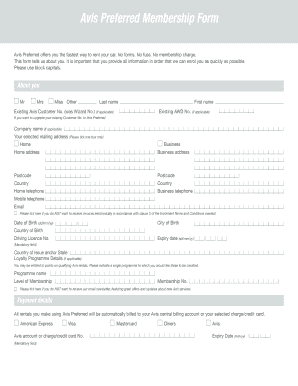
Avis Preferred Membership Form Avis Preferred offers you the fastest way to rent your car. No forms. No fuss. No membership charges. This form tells us about you. It is important that you provide.

How it works
  • Open form

    Open form follow the instructions

  • Easily sign form

    Easily sign the form with your finger

  • Share form

    Send filled & signed form or save

How to fill out the Avis Preferred Membership Form online

The Avis Preferred Membership Form is designed to streamline your car rental experience. By following the steps outlined in this guide, you can easily complete the form online and gain access to exclusive membership benefits.

Follow the steps to successfully fill out the Avis Preferred Membership Form.

  1. Click ‘Get Form’ button to obtain the form and open it in the editor.
  2. Begin by selecting your title (Mr, Mrs, Miss, Other) and enter your last name in block capitals, as well as your first name. If you are an existing customer wanting to upgrade, provide your existing Avis Customer Number.
  3. Indicate your company name if applicable, followed by your selected mailing address. Ensure to fill in the home address, including postcode, country, and your contact numbers (home, mobile, business).
  4. Provide your email address. If you do not wish to receive electronic invoices, tick the corresponding box.
  5. Enter your date of birth and country of birth, alongside your driving licence number, city of birth, and the expiry date of your driving licence.
  6. If you participate in a loyalty program, provide the program name and your membership details. Decide whether to receive Avis email newsletters by ticking the appropriate box.
  7. Fill out your payment details by selecting your charge/credit card type and entering your account number and expiry date.
  8. Choose your car rental preferences, including preferred car types and whether you prefer manual or automatic transmission. Ensure to tick one box for each available option.
  9. Select any optional insurances or coverages you may require by ticking Yes or No in the respective sections.
  10. Review your choices regarding service level preferences and determine if you wish to receive the fastest service or a traditional rental agreement.
  11. Acknowledge the Terms and Conditions by reading them and confirming your acceptance. Sign and date the form, ensuring all required fields are completed.
  12. Once completed, save your changes, and choose to download, print, or share the form as needed.

Complete your Avis Preferred Membership Form online today for a smooth car rental experience.

Get form

Experience a faster way to fill out and sign forms on the web. Access the most extensive library of templates available.

Related content

Form S-4

FORM S-4. REGISTRATION STATEMENT. UNDER. THE SECURITIES ACT OF 1933 ... AB Car Rental...

Learn more
Avis and Budget Car Rental | University of...

Results 1 - 10 of 9445 — With complimentary membership in the Avis Preferred Program...

Learn more
Avis Budget Group, Inc. 2016 Annual Report

Mar 21, 2017 — Through the Avis Now application, our customers are able to view which...

Learn more
Questions & Answers

Get answers to your most pressing questions about US Legal Forms API.

Contact support

What is the difference between Budget and Avis cars?

Budget offers economically-friendly vehicles that tend to be a bit older and more seasoned than Avis' lineup. However, Avis does charge more for the opportunity to drive newer cars with some of the latest features.

If you book a rental car with Avis, then take the extra step to enroll in the rental company's Avis Preferred membership program. Avis Preferred is free to join, and as a member, you'll earn Avis Preferred Points that can be used toward future rentals.

At many major airports, Budget Fastbreak offers a similar experience to Avis Preferred. You proceed directly to the lot, choose your own car, drive to the exit gate, and show your license.

As a Preferred Member, you earn a minimum of 100 points every rental. Redeem points for rentals and accessories. Enjoy expedited service and go straight to your car at most locations. Save your rental preferences and track your activity and rewards anytime.

To join Avis Preferred, you only need to sign up online. You will then get an Avis Wizard Number, your Avis Preferred membership number. You can use this number to log in to your account once enrolled.

As a Preferred Member, you earn a minimum of 100 points every rental. Redeem points for rentals and accessories. Enjoy expedited service and go straight to your car at most locations. Save your rental preferences and track your activity and rewards anytime. Receive exclusive monthly email offers.

As a leading global provider of mobility solutions, Avis Budget Group operates three of the most recognized brands in the industry, including Avis, Budget and Zipcar. Avis is one of the world's largest car rental providers dedicated to expanding on-demand mobility solutions and personalizing the customer experience.

The Wizard number (e.g. A1B2C3) is a Customer Number that you will receive once you join Avis Preferred. The number is shown on the card that we will send you and can be used at our Rental Stations and Call Centre to speed up the reservation process.

Get This Form Now!

Use professional pre-built templates to fill in and sign documents online faster. Get access to thousands of forms.

If you believe that this page should be taken down, please follow our DMCA take down process here.

Get Avis Preferred Membership Form