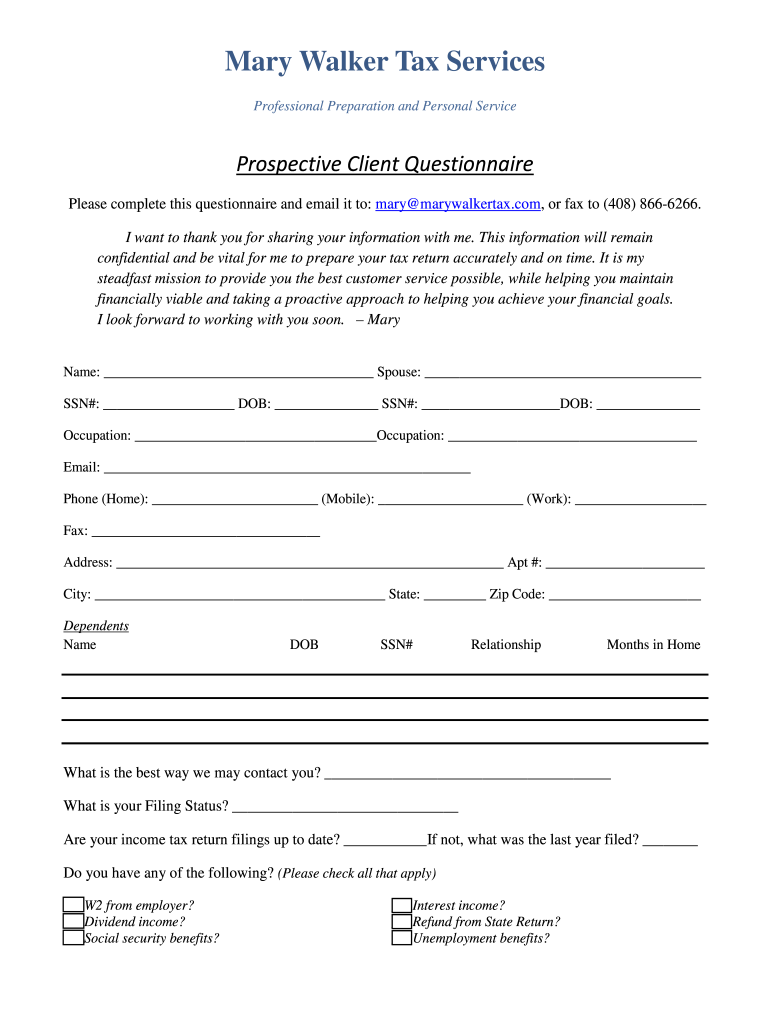
Mary Walker Tax Services Professional Preparation and Personal Service Prospective Client Questionnaire Please complete this questionnaire and email it to:.
Loading

Open form follow the instructions

Easily sign the form with your finger

Send filled & signed form or save
How to fill out the CA Mary Walker Tax Services Prospective Client Questionnaire online
Completing the CA Mary Walker Tax Services Prospective Client Questionnaire online is an essential step in facilitating your tax preparation process. This guide will provide you with clear, step-by-step instructions to ensure that you can fill out the form accurately and efficiently.
Follow the steps to complete the questionnaire with ease.
- Press the ‘Get Form’ button to access the questionnaire and open it in your editor.
- Begin by filling in your name and, if applicable, your partner's name in the designated fields.
- Enter your Social Security Number (SSN) and date of birth (DOB) in the provided sections. Repeat this for your partner.
- Complete the occupation fields for both yourself and your partner.
- Provide your email address and phone numbers in the specified formats, including home, mobile, and work numbers.
- Fill in your fax number (if you have one) and your complete address, including apartment number, city, state, and zip code.
- List any dependents you have by entering their names, dates of birth, SSNs, relationships, and months they resided in your home.
- Indicate your preferred method of contact by filling in the respective section.
- Select your filing status from the options provided.
- Answer whether your income tax return filings are current. If not, specify the last year filed.
- Check all applicable boxes for income sources and relevant tax documents you have, such as W2s, 1099s, or pension income.
- Indicate any payments you made in the past year by checking relevant boxes for deductions such as mortgage interest, charitable donations, or childcare expenses.
- Select any additional financial situations that apply to you, including unpaid taxes, job expenses, or home-related improvements.
- Check any situations you encountered in the past year that may affect your tax needs.
- Provide any additional information that may assist in serving your tax needs in the last section.
- Finally, sign and date the form at the bottom. Make sure to provide your partner's signature if applicable.
- Review all entered information to ensure accuracy, then save changes and download a copy of your completed questionnaire for your records.
Start completing your CA Mary Walker Tax Services Prospective Client Questionnaire online today!
Experience a faster way to fill out and sign forms on the web. Access the most extensive library of templates available.
Related content
22-Feb-2002 — Burton McGovern (McGovern) for claimed malpractice in tax matters while...
1995 — This booklet contains the questions and unofficial answers of the. November 1995...
Department of Health and Human Services, conducted seven separate examination surveys to...
Use professional pre-built templates to fill in and sign documents online faster. Get access to thousands of forms.
If you believe that this page should be taken down, please follow our DMCA take down process here.