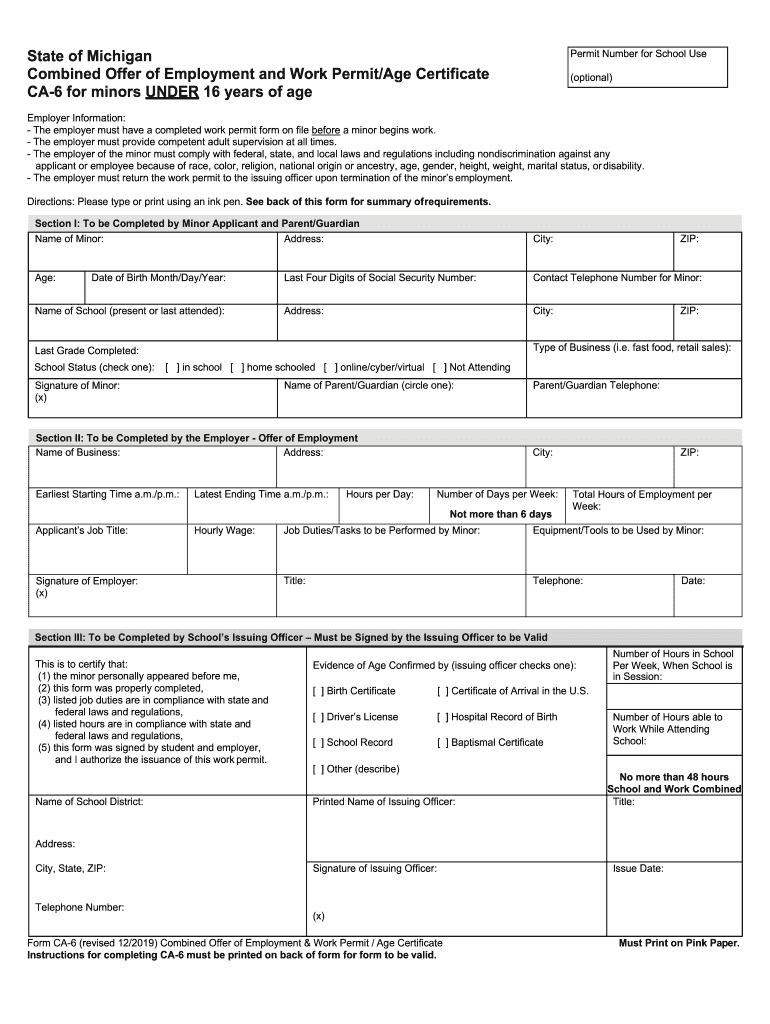
Must have a completed work permit form on file before a minor begins work. - The employer must provide competent adult supervision at all times. - The employer of the minor must comply with federal, state, and local laws and regulations including nondiscrimination against any applicant or employee because of race, color, religion, national origin or ancestry, age, gender, height, weight, marital status, or disability. - The employer must return the work permit to the issuing officer upon termin.
Loading

Open form follow the instructions

Easily sign the form with your finger

Send filled & signed form or save
How to fill out the Work Permit Michigan - Fill Online, Printable, Fillable, Blank ... online
Filling out the Work Permit Michigan form is an important step for minors seeking employment in the state of Michigan. This guide provides clear instructions on how to complete the form efficiently, ensuring compliance with the relevant laws and regulations.
Follow the steps to successfully fill out the Work Permit Michigan form.
- Press the ‘Get Form’ button to access the work permit form and open it in the editor.
- In Section I, begin by filling in the name of the minor applicant and their address, including city, ZIP code, and contact telephone number. Don't forget to include the minor's age and the last four digits of their Social Security Number.
- Provide the date of birth in the specified format and list the school the minor currently attends or last attended, including the ZIP code.
- Indicate the type of business where the minor will be employed, the last grade completed, and mark the school status by selecting one of the options: in school, home schooled, online/cyber/virtual, or not attending.
- Complete the parent's or guardian's name and ensure the minor signs in the designated area.
- Move to Section II, where the employer must provide their business name, address, and specify the working hours, including the earliest starting time and latest ending time.
- Fill in the applicant's job title, hourly wage, and number of hours the minor will work per day and per week. The employer's signature is also required in this section.
- In Section III, the school's issuing officer will need to verify the minor's presence and complete various certifications regarding the form and compliance with laws.
- The issuing officer must check evidence of age and complete their own details before signing and dating the form.
- Finally, save any changes, download or print the completed form, and ensure the minor returns it to the employer before starting work.
Complete your documents online today for a smooth and efficient process!
Experience a faster way to fill out and sign forms on the web. Access the most extensive library of templates available.
Related content
Form CA-6 (revised 4/2021) Combined Offer of Employment & Work Permit / Age Certificate...
Employee Information and Attestation: Employees must complete and sign Section 1 of Form...
15-Dec-2016 — Complete Form 8962 to claim the credit and to reconcile your ... Fillable...
Get answers to your most pressing questions about US Legal Forms API.
How do I get a work permit at 15 in Michigan?
Instructions for Completing and Issuing: The Minor obtains the original pink CA-6 from an employer or a Michigan Issuing Officer of the school district to complete Section I. 2. The Minor takes the original pink CA-6 to the Person proposing to employ the minor to complete Section II.
How do you obtain a work permit for Michigan?
How do you get a work permit in Michigan? Work permits can be obtained from the state of Michigan school issuing officer (the chief administrator of a school district, intermediate school district, etc.) of the school the minor attends or the school district where the minor will be employed.
Do homeschoolers need a work permit in Michigan?
working papers Minors under 18 years of age must obtain a work permit or a written agreement or contract entered into between the employer and the governing school ... All employers hiring minors need a minor work permit.
How does a homeschooler get a work permit in Michigan?
Proof or evidence of age is required. Minors seeking employment who are homeschooled shall be issued a work permit by the State of Michigan issuing officer of the school district, intermediate school district, public school academy, or nonpublic school in which the minor's residence or prospective employer is located.
Do 16 year olds need a work permit in Michigan?
Additionally, 16- or 17-year-old minors currently not attending school who have not met the requirements of graduation, or have not obtained a GED, or have not been emancipated by court order must secure a work permit from an authorized issuing officer.
How old do you have to be to work without a work permit in Michigan?
Employment Certificates in Michigan Employment Certificates, also known as Work Permits, are mandatory in Michigan for minors under 18. The certificate must be acquired by the minor and presented to their employer to verify their ability to work before they are hired.
How many hours can a homeschooled minor work in Michigan?
Minors are limited to working no more than 10 hours in a day with a weekly average of 8 hours per day. A minor may not work more than 6 days in a week.
Use professional pre-built templates to fill in and sign documents online faster. Get access to thousands of forms.
If you believe that this page should be taken down, please follow our DMCA take down process here.
This form is available in several versions. Select the version you need from the drop-down list below.