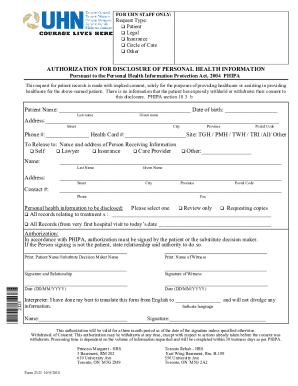
FOR UHN STAFF ONLY:Request Type: Patient Legal Insurance Circle of Care OtherAUTHORIZATION FOR DISCLOSURE OF PERSONAL HEALTH INFORMATION Pursuant to the Personal Health Information Protection Act,.
Open form follow the instructions
Easily sign the form with your finger
Send filled & signed form or save
How to fill out the Canada UHN 2323 online
The Canada UHN 2323 form is an important document for requesting the disclosure of personal health information. This guide provides clear instructions to assist users in filling out this form accurately and efficiently.
Follow the steps to complete the Canada UHN 2323 online
- Press the ‘Get Form’ button to access the form and open it in your preferred digital document editor.
- Indicate the type of request by selecting one option from the list: Patient, Legal, Insurance, Circle of Care, or Other.
- Enter the patient’s name, including last name and given name, followed by their date of birth.
- Fill in the patient’s address, including street, city, province, and postal code.
- Provide the patient's phone number and health card number, then indicate the site where the records are held: TGH, PMH, TWH, TRI, All, or Other.
- Specify the recipient by choosing an option, such as Self, Lawyer, Insurance, Care Provider, or Other. If selecting 'Other', provide the name and address of the person receiving the information.
- Select the personal health information to be disclosed by choosing one option: Review only, Requesting copies, All records relating to treatments, or All Records from the very first hospital visit to the current date.
- Ensure authorization is completed by having the patient or a substitute decision maker sign the form. If someone other than the patient is signing, they must state their relationship and authority.
- Print the names of both the patient/substitute decision maker and the witness, followed by obtaining signatures.
- Fill in the date for both the authorization and the witness signatures.
- If an interpreter assisted in translations, they should provide their name, signature, and indicate the language.
- After completing the form, save your changes, and then you can choose to download, print, or share the document.
Complete your Canada UHN 2323 form online today for efficient healthcare management.
Experience a faster way to fill out and sign forms on the web. Access the most extensive library of templates available.
Related content
by K Okrainec · 2017 · Cited by 22 — 1 Toronto Western Hospital, University Health...
Current Management of Loco regional Muscle-Invasive Bladder Cancer: A Consensus Statement...
by S Tosoni · 2021 · Cited by 8 — UHN Researchers with ethical approval for their...
Get answers to your most pressing questions about US Legal Forms API.
What does it mean if a decision is set aside?
When a court renders a decision of another court invalid, that verdict or decision is set aside; see also annul or vacate. The phrase is often used in the context of appeals, when an appellate court invalidates the judgment of a lower court.
Can a court set aside its own judgment?
This provides that the court may set aside or vary a judgment or order after judgment is entered if the judgment or order has been given or made in the absence of a party, whether or not the absent party had notice of the relevant hearing or of the application for the judgment or order.
How do I set aside a default Judgement in Tennessee?
First, the moving party must show that the default was not the result of willfulness. Second, the party must show that it has a meritorious defense. Third, the setting aside of the default judgment must not prejudice the opposing party.
How do you set aside a default Judgement?
The court must set aside a default judgment if you: have paid the whole amount owed (including any interest and costs) before the date the creditor entered judgment; sent back the acknowledgment of service form within the time limit; put in a defence within the time limit; or.
How do I vacate a Judgement in Florida?
Vacating a Florida Judgment Florida Rules of Civil Procedure 1.540 allows a defendant to vacate of judgment for numerous reasons including: mistake, inadvertence, surprise, excusable neglect, newly discovered evidence, the judgment is void or the judgment has been satisfied.
What does setting aside an order mean?
Cancelling a judgment, order or a step taken by a party in proceedings.
Can default judgment be set aside by consent?
Consent from the claimant is very likely to lead to the judgment being set aside but it's not guaranteed. Consent on its own is not enough. It is always at the discretion of the court. Our experience is that judges are generally happy to endorse an agreement made between the parties to litigation.
Can you appeal a default Judgement?
You cannot appeal this kind of judgment and have a new trial until you “vacate the default judgment”, that is, until you have the judgment removed or erased. To vacate a default judgment, do the following: 1. Get the form called Notice of Motion to Vacate Judgment from the small claims clerk.
How do I file a motion to set aside default judgment in Missouri?
The motion must include an affidavit of the party in default (i) stating facts showing that the party in default has a good defense to the allegations in the pleading, and (ii) showing “good cause” as to why the party in default failed to appear in court or to file an answer to the pleading.
How do you set a Judgement aside?
Judgment must be set aside if: The defendant filed an acknowledgment of service within the time limits. The defendant applied for summary judgment before default judgment was entered. Before default judgment was entered, the defendant filed and served on the claimant an admission of liability to pay all the money ...
Use professional pre-built templates to fill in and sign documents online faster. Get access to thousands of forms.
If you believe that this page should be taken down, please follow our DMCA take down process here.