Loading
Get Au Ms016 2022-2026
How it works
-

Open form follow the instructions
-

Easily sign the form with your finger
-

Send filled & signed form or save
How to fill out the AU MS016 online
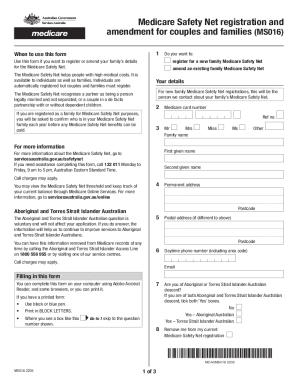
The AU MS016 form is essential for registering or amending the details of your family's Medicare Safety Net. Completing this form online ensures a streamlined process for managing your healthcare costs.
Follow the steps to complete the AU MS016 form online.
- Click ‘Get Form’ button to access the AU MS016 document and open it in your preferred online editor.
- Determine if you want to register for a new family Medicare Safety Net or amend existing details. Indicate your choice by selecting the appropriate option at the beginning of the form.
- Fill in your details, ensuring you provide the name of the person we should contact regarding your family's Medicare Safety Net. Confirm the nature of your partnership — legally married or in a de facto relationship.
- Enter your Medicare card number. If registered as a family, confirm the individuals included in the Medicare Safety Net family framework.
- Provide your personal details, including your family name, first given name, and any additional names, ensuring accuracy. Include your permanent address and postal address if different.
- Indicate your daytime phone number and email address for contact purposes. This allows Medicare to reach you if clarification is needed.
- Answer whether you are of Aboriginal or Torres Strait Islander Australian descent. This section is optional but helpful for improving services.
- Complete partner and dependant details as necessary. If adding partners or dependants, provide their Medicare card numbers and personal details.
- If you need to remove a dependant, indicate their departure date and ensure you fill out their details accurately.
- Fill out the bank account details section if you wish for payments to be processed through Electronic Funds Transfer. Ensure the account is eligible for such transfers.
- Review your completed form for accuracy. Once verified, you can save your changes, download a copy for your records, or print the form directly.
- Return the completed form and any supporting documents either by post to the address provided or in person at your nearest service center.
Start the process of completing the AU MS016 online today to manage your family's Medicare Safety Net effectively.
Medicare Safety Nets have thresholds. When you spend certain amounts in gap and out of pocket costs, you'll reach the thresholds. Once you've reached the thresholds, you'll start getting higher Medicare benefits. This means you'll get more money back from us for certain Medicare services.