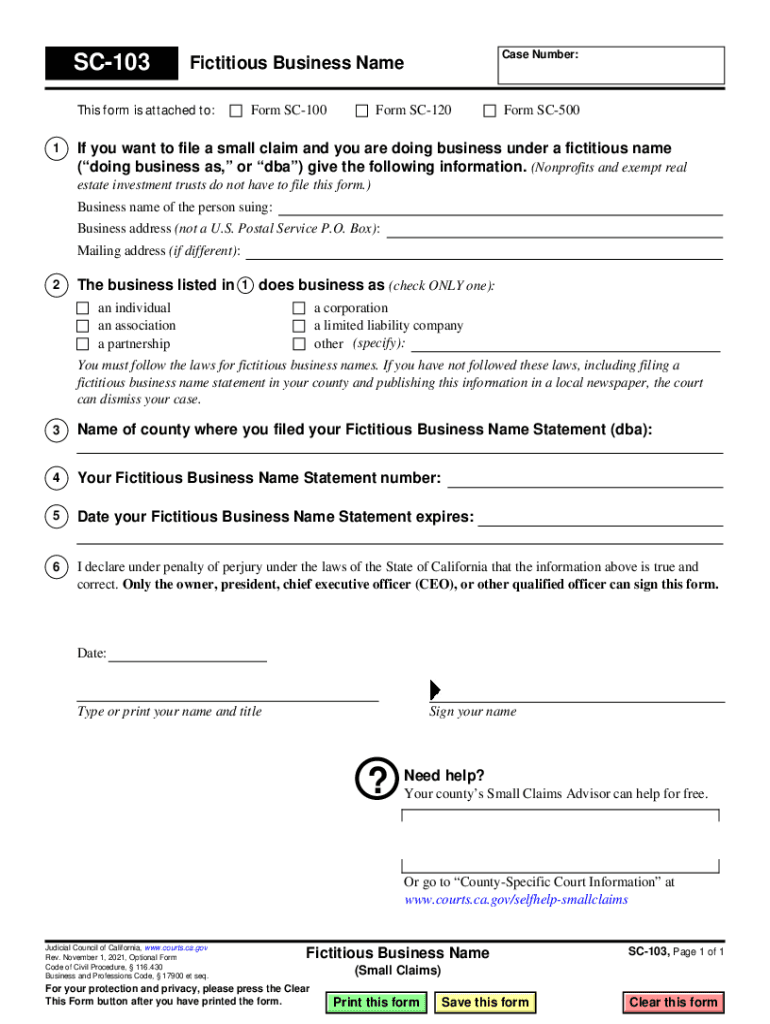
SC-103 This form is attached to: 1 Case Number: Fictitious Business Name Form SC-100 Form SC-120 Form SC-500 If you want to file a small claim, and you are doing business under a fictitious name ( doing.
Loading

Open form follow the instructions

Easily sign the form with your finger

Send filled & signed form or save
How to fill out the SC-103 Fictitious Business Name online
The SC-103 Fictitious Business Name form is essential for individuals or entities conducting business under a name different from their own. This guide provides detailed instructions on how to complete this form online, ensuring you provide all necessary information accurately and comply with legal requirements.
Follow the steps to fill out the SC-103 Fictitious Business Name form online.
- Press the ‘Get Form’ button to access the SC-103 Fictitious Business Name form and open it in the online editor.
- Fill in the case number indicated at the top of the form. If you do not have a case number, you may leave this field blank.
- Provide your business name in the section labeled 'Business name of the person suing'.
- Enter the physical business address (not a U.S. Postal Service P.O. Box) in the 'Business address' field.
- If your mailing address is different from your business address, provide it in the 'Mailing address' field.
- Indicate how your business operates by selecting only one option: individual, association, partnership, corporation, limited liability company, or other.
- Specify the name of the county where you filed your Fictitious Business Name Statement in the relevant section.
- Input your Fictitious Business Name Statement number in the designated area.
- Enter the expiration date of your Fictitious Business Name Statement in the appropriate field.
- Complete the declaration statement by typing your name, title, and signing the form. Remember that only authorized individuals can sign.
- After filling out the form, review all entered information for accuracy. Save your changes, then choose to download, print, or share the form as needed.
Complete your SC-103 Fictitious Business Name form online today to ensure your business complies with local regulations.
Experience a faster way to fill out and sign forms on the web. Access the most extensive library of templates available.
Related content
Fictitious Business Name (Small Claims) (SC-103) ... Tell the court and other side if you...
Fictitious business name statements Every person covered by the statute should be...
This form is attached to Form SC-120, item 1 or 2. ... Is this defendant doing business...
Get answers to your most pressing questions about US Legal Forms API.
How do I file a small claims court claim in California?
To start a Small Claims suit, you need to file the Plaintiff's Claim and Order to Go to Small Claims Court (Form SC-100). You can get this form for free on the internet, at .courts.ca.gov/forms. You can also fill out the form for free at TurboCourt: http://turbocourt.com.
How do I file small claims in Placer County?
Get a number ticket for “Civil” at the kiosk on the 1st floor of the courthouse. File the forms with the clerk when your number is called. The clerk will file-stamp all your forms and give you back the 2 copies. You will keep a filed copy for your records and serve the 2nd copy on the Defendant.
Where do I file small claims in Los Angeles?
In Los Angeles County, the places where the court hears small claims matters are the small claims hub courts located in the Chatsworth, Compton, Downey, Governor George Deukmejian (Long Beach), Inglewood, Michael D.
How much does it cost to file a small claims case in Los Angeles?
The fee for filing in small claims court depends on the amount of the claim: $30 if the claim is for $1,500 or less, $50 if the claim is for more than $1,500 but less than or equal to $5,000, or $75 if the claim is for more than $5,000.
How long does small claims court take in Los Angeles?
Once you file a case through a small claims court in Los Angeles – provided that your case is accepted by the court – your hearing will take place within 30-70 days.
What is a SC 103 form?
Tell the court and other side if you are suing on behalf of your business that has a Fictitious Business Name.
Can I file a small claims case online in California?
If you decide to e-file your case, you will have to pay an additional fee to TurboCourt. CAUTION: Cases filed with a Request to Waive Court Fees may not be filed through TurboCourt.
How do I contact small claims court Los Angeles?
Call (213) 974-9759. You can speak with a small claims advisor Monday through Friday from 8:00 am to 4:30 pm. We are open Monday through Friday from 8:00 am to 4:30 pm. Court forms are available at the clerk's office and online at: .courts.ca.gov.
Use professional pre-built templates to fill in and sign documents online faster. Get access to thousands of forms.
If you believe that this page should be taken down, please follow our DMCA take down process here.