Loading
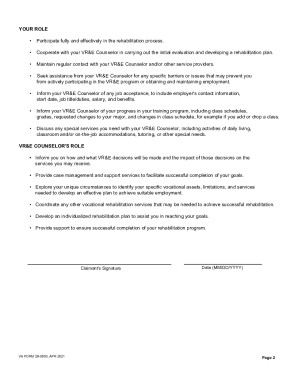
Get Va Form 28-0800. Vocational Readiness & Employment (vr&e) Program Orientation
How it works
-

Open form follow the instructions
-

Easily sign the form with your finger
-

Send filled & signed form or save
How to fill out the VA Form 28-0800. Vocational Readiness & Employment (VR&E) Program Orientation online
This guide provides a clear and supportive approach to completing the VA Form 28-0800, ensuring users can effectively navigate the process of applying for Vocational Readiness and Employment services. The following step-by-step instructions will help you fill out the form confidently and accurately.
Follow the steps to fill out the VA Form 28-0800 online.
- Press the ‘Get Form’ button to access the VA Form 28-0800 and open it in your preferred document editor.
- Begin filling in your personal information at the top of the form. This includes your name, address, contact information, and Social Security number. Ensure all details are current and accurate to avoid delays.
- Move to the section regarding your service-connected disabilities. Provide detailed information about your disabilities, including dates of diagnosis and percentage of disability rating, as this is crucial for determining your eligibility.
- Next, describe your employment history. List your previous jobs, including job titles, duties, and dates of employment. Be thorough to highlight your experiences and skills.
- In the next section, outline your educational background. Include schools attended, degrees earned, and any relevant training courses. This information helps assess your qualifications for the VR&E services.
- Review the section about your readiness for employment. Reflect on your personal goals and challenges related to obtaining and maintaining suitable work. Providing honest answers will assist the VR&E Counselor in helping you.
- Once you have filled out the form completely, review all the information for accuracy. Make any necessary corrections to ensure that the details you provided are accurate.
- Finally, save your changes within the editor, then download the form in your desired format. You may also print a copy or share it electronically as required.
Complete your VA Form 28-0800 online today and take a step closer to achieving your vocational goals.
What is the Veteran Readiness and Employment (VR&E) program? The VR&E program is authorized under Title 38, U.S. Code, Chapter 31. It is referred to as the Chapter 31 program. It assists entitled Veterans with service-connected disabilities and an employment handicap to prepare for, obtain, and maintain a job.
Industry-leading security and compliance
US Legal Forms protects your data by complying with industry-specific security standards.
-
In businnes since 199725+ years providing professional legal documents.
-
Accredited businessGuarantees that a business meets BBB accreditation standards in the US and Canada.
-
Secured by BraintreeValidated Level 1 PCI DSS compliant payment gateway that accepts most major credit and debit card brands from across the globe.