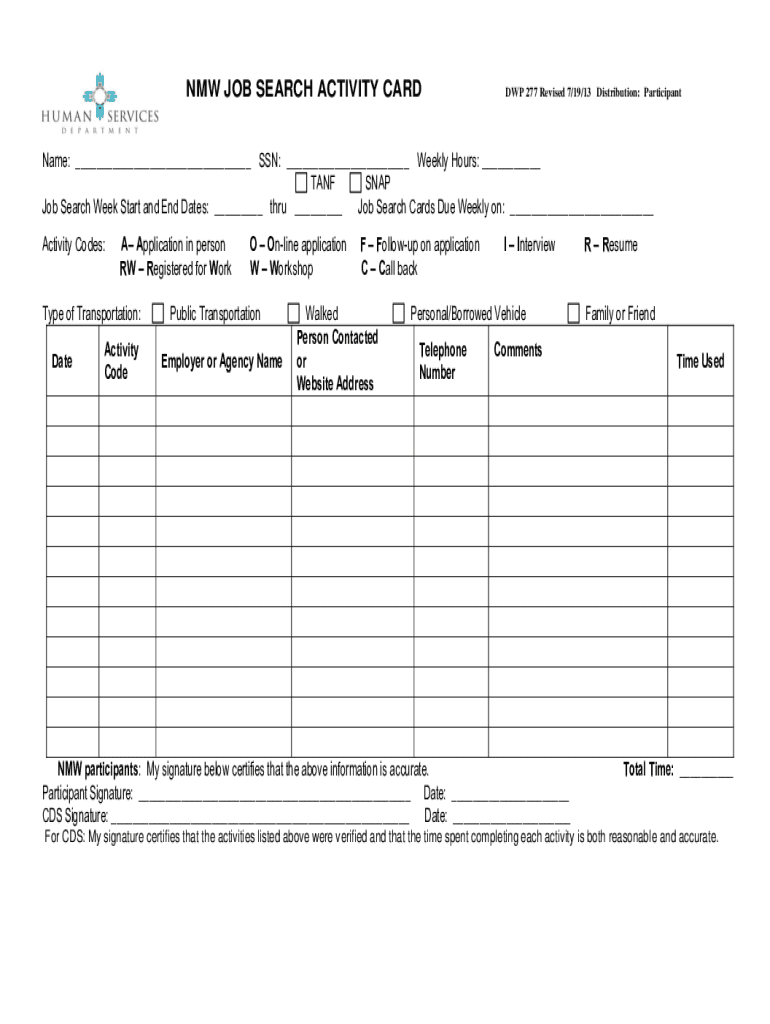
NMW JOB SEARCH ACTIVITY CARDDWP 277 Revised 7/19/13 Distribution: ParticipantName: SSN: Weekly Hours: TANF SNAP Job Search Week Start and End Dates: thru Job Search Cards Due Weekly.
Loading

Open form follow the instructions

Easily sign the form with your finger

Send filled & signed form or save
How to fill out the NM DWP 277 online
Filling out the NM DWP 277 form online is an essential step for participants to track their job search activities accurately. This guide will provide you with a clear and structured approach to completing the form effectively.
Follow the steps to complete your NM DWP 277 form online.
- Click 'Get Form' button to obtain the NM DWP 277 form and open it in your document editor.
- Enter your name and Social Security Number (SSN) in the designated fields at the top of the form. Ensure that your information is accurate to avoid any issues.
- Input the total weekly hours you have spent on job search activities. Be consistent with your reporting to reflect your efforts accurately.
- Fill in the TANF or SNAP boxes as applicable to your situation by checking the appropriate box.
- Record the start and end dates for the job search week. Ensure these dates match the activities listed on your form.
- Document each activity you performed related to your job search in the provided section. Use the correct activity codes for easy tracking, such as 'A' for application in person or 'O' for online application.
- Indicate the type of transportation used for each job search activity, whether it was public transportation or a personal vehicle, and provide the corresponding details.
- Provide the names of the employers or agencies contacted and the person you spoke to or the website used, along with the respective dates.
- Write any comments related to your job search on the form, this could include notes about challenges faced or successes achieved.
- At the end of the form, ensure to sign and date in the participant signature section, certifying that all information provided is accurate.
- If a Community Development Specialist (CDS) verified your activities, they should sign and date in their signature field as well.
- Finally, save the changes you've made to the form. You can then download, print, or share the completed document as necessary.
Start filling out your NM DWP 277 form online today to keep your job search on track.
Experience a faster way to fill out and sign forms on the web. Access the most extensive library of templates available.
Related content
May 31, 2018 — Learn how you can integrate job aids into your learning strategy to...
Dec 17, 2020 — We come up with the money for you this proper as competently as simple...
^ Perry's Handbook, Sixth Edition, McGraw-Hill Co., 1984. Template:Citation needed. one of...
Get answers to your most pressing questions about US Legal Forms API.
How do I make a job card?
Choose the. icon, enter Jobs, and then choose the related link. Choose the New action, and then fill in the fields as necessary. ... To specify the job with information on other jobs, choose the Copy Job action, fill in the fields as necessary, and then choose the OK button.
What is a job card?
A job card is a detailed description of work that is performed for a work order. ... When you create a job card, you specify planning and scheduling information that can be used by the Task Cards and Work Order Tracking applications.
Why do you need job card?
Job Card is a key document that records workers' entitlements under MGNREGA. It legally empowers the registered households to apply for work, ensures transparency and protects workers against fraud.
What is a job card in automotive workshop?
After getting feedback from the vehicle owner or driver regarding defects of the vehicle, the supervising engineer in a service station or workshop inspects it. The defects pointed out or listed are noted down in a standard format, which is called the job card or work order.
What is the validity of job card?
A Job Card is valid for five years from the date of issue, and hence factors such as the durability and proper provision for filling up of information for 5 years must be ensured by providing enough space.
How do I write a job card?
Missing you already ... Enjoy the greener pastures! Congratulations on your new job! ... Wishing you the best success in your new role xx. Cheers to your continued success you deserve your promotion and will do great in your new role! Congratulations for landing a great job!
What is job card in cost accounting?
: a card in a cost-accounting system on which the detailed costs of an order are accumulated : cost sheet.
How do I create a card in Excel?
0:01 16:13 Suggested clip Business Job Order or Job Card in MS Excel - YouTubeYouTubeStart of suggested clipEnd of suggested clip Business Job Order or Job Card in MS Excel - YouTube
Use professional pre-built templates to fill in and sign documents online faster. Get access to thousands of forms.
If you believe that this page should be taken down, please follow our DMCA take down process here.