Loading
Get Au D2622 2014-2026
How it works
-

Open form follow the instructions
-

Easily sign the form with your finger
-

Send filled & signed form or save
How to fill out the AU D2622 online
Filling out the AU D2622 form correctly is crucial for applying for a Repatriation Pharmaceutical Benefits Card. This guide provides step-by-step instructions to ensure that you complete the form efficiently and accurately.
Follow the steps to successfully complete the AU D2622 form.
- Click 'Get Form' button to obtain the form and open it in the editor.
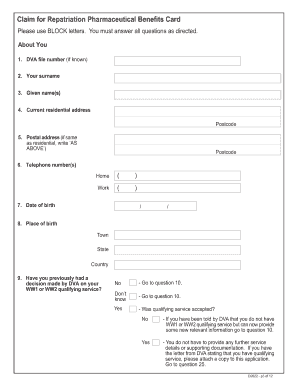
- Begin by providing your DVA file number if you have one, followed by your surname and given names. Make sure to use block letters for clarity.
- Enter your current residential address and postcode. If your postal address is the same, simply indicate 'AS ABOVE.'
- Fill in your telephone numbers for home and work, ensuring you include area codes.
- Provide your date of birth in the specified format (DD/MM/YYYY) along with your place of birth, including town, state, and country.
- Answer the questions regarding your previous decisions by the DVA concerning your WW1 or WW2 qualifying service. Follow the directions depending on your answer.
- If you are a veteran, continue to provide details of your service, including the branch of armed forces, enlistment, and discharge dates, as well as any names used during service.
- If you are a mariner, complete the corresponding sections regarding your service in the merchant navy and any experiences of danger.
- Indicate your residency status in Australia and upload any necessary supporting documentation regarding your residency.
- Complete the payment section if applicable, specifying where you would like your Veterans Supplement to be paid.
- Finalize the form by signing and dating the declaration to confirm that all information provided is accurate.
- Review the checklist to ensure all parts of the form are completed and documents are attached as required.
- Once finished, save your changes, download the completed form, print it, or share it as needed.
Start filling out your AU D2622 form online today for efficient processing.