Loading
Form preview
  • US Legal Forms
  • Other Templates
  • More Forms
  • More Multi-State Forms
  • Nm Santa Fe Public Schools Teacher Input Form 2013

Get Nm Santa Fe Public Schools Teacher Input Form 2013-2026

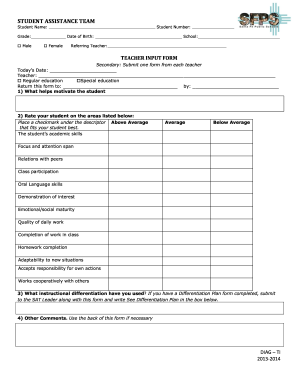
STUDENT ASSISTANCE TEAM Student Name: Student Number: Grade: Date of Birth: School: Male Female Referring Teacher: TEACHER INPUT FORM Secondary: Submit one form from each teacher Today's Date: Teacher:.

How it works

  1. Open form

    Open form follow the instructions

  2. Easily sign form

    Easily sign the form with your finger

  3. Share form

    Send filled & signed form or save

How to fill out the NM Santa Fe Public Schools Teacher Input Form online

The NM Santa Fe Public Schools Teacher Input Form is an essential tool for providing important feedback about a student's performance and support needs. This guide will help you navigate each section of the form with clarity and confidence as you complete it online.

Follow the steps to successfully complete the Teacher Input Form.

  1. Click ‘Get Form’ button to obtain the form and open it in the editor.
  2. Begin by entering the student’s details, including their name, student number, grade, date of birth, and school. Ensure that this information is accurate as it is crucial for identifying the student.
  3. Fill in the referring teacher's name. This identifies who is providing the input about the student.
  4. Date the form by entering today’s date in the provided space.
  5. Provide your name as the teacher filling out this form. Indicate if you are a Regular education teacher or a Special education teacher by checking the corresponding box.
  6. In section 1, describe what helps motivate the student. This information is valuable for understanding how to support the student better.
  7. In section 3, detail any instructional differentiation strategies you have implemented. If applicable, mention that a Differentiation Plan is attached by writing 'See Differentiation Plan' in the designated box.
  8. Use section 4 for any additional comments or observations about the student that may assist in their support. Feel free to use the back of the form if more space is needed.
  9. Once you have completed all sections, review the information for accuracy. Save any changes you have made, and proceed to download, print, or share the form as needed.

Complete the NM Santa Fe Public Schools Teacher Input Form online by following these steps.

Get form

Experience a faster way to fill out and sign forms on the web. Access the most extensive library of templates available.
Get form

Related content

Technical Review Form
Dec 9, 2013 — in these areas. Race to the Top - District. Technical Review Form...
Learn more
Addressing Student Behavior
Addressing. Student. Behavior. A Guide for All Educators. New Mexico Public Education...
Learn more
First Steps Towards a National Virtual University...
by T Karran · 2000 · Cited by 2 — It will be open to any California public or private...
Learn more

Related links form

NJ L-112 2013 AZ Legal Document Preparer Program Application For Standard Certification As A Business Entity 2007 IL Probation/Court Services Employment/Promotion Application 2020 OR Motion For Order To Show Cause Re Enforcement Of Parenting Plan And Order 2004

Questions & Answers

Get answers to your most pressing questions about US Legal Forms API.

Contact support

Request a certified copy of a Marriage License. Request a certified copy of a Marriage License online . To request a certified copy by mail, send a written request including the full names of both applicants, the date of marriage, and $5.00 for each copy requested. A $2.00 mail fee is also required.

The fees for a new title and license plate are $122.00 (plus $5.00 if mailing the plate and documentation to the customer).

Tennessee Marriage Records 1970 - Present For marriage records from 1970 to the present, contact the Tennessee Department of Health, Office of Vital Records.

The Tennessee Public Records Act provides that public records are open for inspection to any citizen of Tennessee except as otherwise provided by law. Tenn. Code Ann. § 10-7-503(a)(2)(A).

Both parties must be 18 years of age or older. A driver's license or Government issued photo ID, with date of birth, is required for identification. If either party is under the age of 18, contact the County Clerk's Office for additional requirements.

There is no waiting period, the marriage license is valid for thirty (30) days from issuance, and is good for ceremonies performed anywhere in Tennessee.

Tennessee Law requires both bridal party members to be 18 years old. Both individuals must have either a valid driver's license, passport or birth certificate. If your Social Security number is not printed on your driver's license you will need to bring a Social Security card with you.

Although technically unsealed divorce records are public, in Tennessee divorces granted after 1970 enjoy some level of protection. To obtain those records from the Tennessee Vital Records Office an individual must submit a request in person or by mail for a fee.

The Montgomery County Clerk's office issues marriage licenses to couples who apply in Clarksville. Both applicants will need to appear in person to submit the marriage license application. The Montgomery County Clerk's office is located in Suite 502 at 350 Pageant Lane, Clarksville, Tennessee.

www.freebmd.org.uk is a collaboration amongst family historians to transcribe the birth, marriage and death indexes from 1837 on to the Internet.

Get This Form Now!

Use professional pre-built templates to fill in and sign documents online faster. Get access to thousands of forms.
Get form
If you believe that this page should be taken down, please follow our DMCA take down processhere.
Get NM Santa Fe Public Schools Teacher Input Form
Get form
  • Adoption
  • Bankruptcy
  • Contractors
  • Divorce
  • Home Sales
  • Employment
  • Identity Theft
  • Incorporation
  • Landlord Tenant
  • Living Trust
  • Name Change
  • Personal Planning
  • Small Business
  • Wills & Estates
  • Packages A-Z
  • Affidavits
  • Bankruptcy
  • Bill of Sale
  • Corporate - LLC
  • Divorce
  • Employment
  • Identity Theft
  • Internet Technology
  • Landlord Tenant
  • Living Wills
  • Name Change
  • Power of Attorney
  • Real Estate
  • Small Estates
  • Wills
  • All Forms
  • Forms A-Z
  • Other Templates
  • Legal Hub
  • About Us
  • Help Portal
  • Legal Resources
  • Blog
  • Affiliates
  • Contact Us
  • Delete My Account
  • Site Map
  • Industries
  • Forms in Spanish
  • Localized Forms
  • State-specific Forms
  • Forms Kit
  • Real Estate Handbook
  • All Guides
  • Notarize
  • Incorporation services
  • For Consumers
  • For Small Business
  • For Attorneys
  • USLegal
  • FormsPass
  • pdfFiller
  • signNow
  • altaFlow
  • DocHub
  • Instapage
Form Packages
  • Adoption
  • Bankruptcy
  • Contractors
  • Divorce
  • Home Sales
  • Employment
  • Identity Theft
  • Incorporation
  • Landlord Tenant
  • Living Trust
  • Name Change
  • Personal Planning
  • Small Business
  • Wills & Estates
  • Packages A-Z
Form Categories
  • Affidavits
  • Bankruptcy
  • Bill of Sale
  • Corporate - LLC
  • Divorce
  • Employment
  • Identity Theft
  • Internet Technology
  • Landlord Tenant
  • Living Wills
  • Name Change
  • Power of Attorney
  • Real Estate
  • Small Estates
  • Wills
  • All Forms
  • Forms A-Z
  • Other Templates
Customer Service
  • Legal Hub
  • About Us
  • Help Portal
  • Legal Resources
  • Blog
  • Affiliates
  • Contact Us
  • Delete My Account
  • Site Map
  • Industries
  • Forms in Spanish
  • Localized Forms
  • State-specific Forms
  • Forms Kit
Legal Guides
  • Real Estate Handbook
  • All Guides
Prepared for you
  • Notarize
  • Incorporation services
Our Customers
  • For Consumers
  • For Small Business
  • For Attorneys
Our Sites
  • USLegal
  • FormsPass
  • pdfFiller
  • signNow
  • altaFlow
  • DocHub
  • Instapage
Social Media
Call us now toll free:
+1 833 426 79 33
As seen in:
© Copyright 1999-2026 airSlate Legal Forms, Inc. 17 Station Street, Ste. 203, Brookline, MA 02445
  • Your Privacy Choices
  • Terms of Service
  • Privacy Notice
  • Content Takedown Policy
  • Bug Bounty Program