Loading
Get Mn Ps2019 2013
How it works
-

Open form follow the instructions
-

Easily sign the form with your finger
-

Send filled & signed form or save
How to fill out the MN PS2019 online
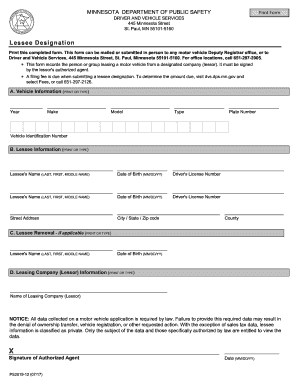
Filling out the MN PS2019 form is an essential step for users looking to record a lessee designation for a motor vehicle. This guide provides clear and detailed instructions to ensure you complete the form accurately and efficiently.
Follow the steps to complete your MN PS2019 form online.
- Click ‘Get Form’ button to obtain the form and open it in the editor.
- Provide the vehicle information in section A. Ensure you print or type the details, including the year, make, model, type, plate number, and vehicle identification number.
- In section B, enter the lessee information. You will need to include the lessee's name (last, first, middle name), date of birth (MM/DD/YY), driver's license number (omit dashes), street address, city, state, zip code, and county.
- If applicable, fill out section C for lessee removal. Again, use print or type text to provide the lessee's name, date of birth, and driver's license number.
- Enter the leasing company (lessor) information in section D. Include the name of the leasing company clearly.
- Once you have filled out all relevant sections, review the information for accuracy. It may be helpful to have a second person check your entries.
- Save your changes, download a copy of the completed form, and prepare to print or share it as necessary. Ensure to follow the submission instructions provided.
Take the next step and complete your MN PS2019 form online!
Get form
Experience a faster way to fill out and sign forms on the web. Access the most extensive library of templates available.
To change your address on your driver’s license in Minnesota, you will need to provide your current license, proof of your new address, and possibly a form of identification, such as a passport. The process can vary slightly based on whether you are online or in-person; however, it is generally straightforward. Referencing the MN PS2019 guidelines can ensure you have the necessary documents in order to avoid any delays.
Get This Form Now!
Use professional pre-built templates to fill in and sign documents online faster. Get access to thousands of forms.