Loading
Get Sg Sgs Group Event Registration Form 2012-2026
How it works
-

Open form follow the instructions
-

Easily sign the form with your finger
-

Send filled & signed form or save
How to fill out the SG SGS Group Event Registration Form online
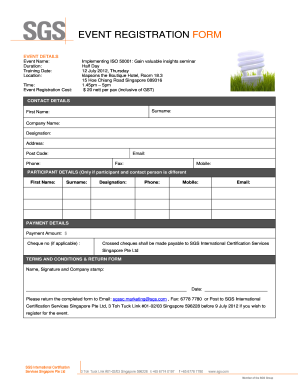
Filling out the SG SGS Group Event Registration Form online is a straightforward process. This guide will walk you through each section to ensure you provide all necessary details accurately and efficiently.
Follow the steps to complete your registration form online.
- Click ‘Get Form’ button to obtain the form and open it in your chosen editing application.
- In the 'Event Details' section, fill in the event name, duration, training date, location, time, and registration cost. Ensure all information matches the event specifics.
- If the participant is different from the contact person, fill out the 'Participant Details' section with the participant's first name, surname, designation, phone, mobile, and email.
- Proceed to the 'Payment Details' section. Indicate the payment amount and, if applicable, the cheque number. Remember that crossed cheques should be addressed to SGS International Certification Services Singapore Pte Ltd.
- In the 'Terms and Conditions & Return Form' section, provide your name, signature, and company stamp, then date your entry.
- Finally, ensure all fields are filled out correctly. Save any changes, and you may choose to download, print, or share the form as necessary to submit it accordingly.
Complete your registration form online now for a seamless experience!
Orders of Protection do show up on background checks. Once an Order of Protection has been granted, it is on your record. Anyone can find it, even if it gets dismissed.