Loading
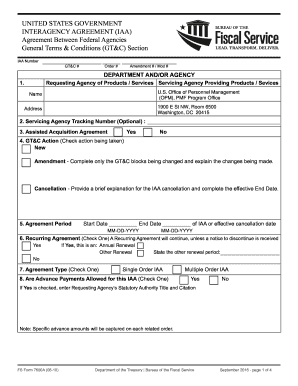
Get Dot Fs Form 7600a 2016-2026
How it works
-

Open form follow the instructions
-

Easily sign the form with your finger
-

Send filled & signed form or save
How to fill out the DOT FS Form 7600A online
Filling out the DOT FS Form 7600A online is an essential process for establishing interagency agreements between federal agencies. This guide provides a clear and user-friendly approach to ensure that users can complete the form accurately and efficiently.
Follow the steps to successfully fill out the DOT FS Form 7600A online.
- Click the ‘Get Form’ button to obtain the form and open it in your editor.
- Enter the IAA number in the designated field. This unique identifier is crucial for tracking the agreement.
- Provide the name and address of the requesting agency, including contact details.
- Indicate whether the acquisition is assisted by selecting 'Yes' or 'No' for assisted acquisition agreement.
- Select the appropriate GT&C action by checking 'New', 'Amendment', or 'Cancellation' as applicable.
- Fill in the agreement period by entering the start date and end date in MM-DD-YYYY format.
- Specify whether this is a recurring agreement, and if so, detail the renewal period.
- Choose the agreement type by checking either 'Single Order IAA' or 'Multiple Order IAA'.
- Indicate if advance payments are allowed by selecting 'Yes' or 'No', and if applicable, provide the statutory authority title and citation.
- Describe the estimated agreement amount, including any associated fees or charges.
- Enter the statutory authority for both the requesting and servicing agency.
- Outline the requesting agency's scope, detailing any supporting attachments.
- Detail roles and responsibilities for both the requesting and servicing agencies.
- List any optional restrictions or unique requirements associated with this IAA.
- State the terms regarding disputes and provide any additional guidelines as necessary.
- Specify the termination notice period.
- List organizations authorized to request acquisition assistance for both requesting and servicing agencies.
- Include any additional clauses from both agencies, if relevant.
- If needed, attach any additional documents that support the agreement.
- After completing all fields, you can save changes, download, print, or share the form as required.
Start filling out your DOT FS Form 7600A online today for a smooth interagency agreement process.
How to Write a Tennessee Quitclaim Deed Preparer's name and address. Full name and mailing address of the person to whom the recorded deed should be sent. County where the real property is located. The consideration paid for the property. Grantor's name and address. Grantee's name and address.