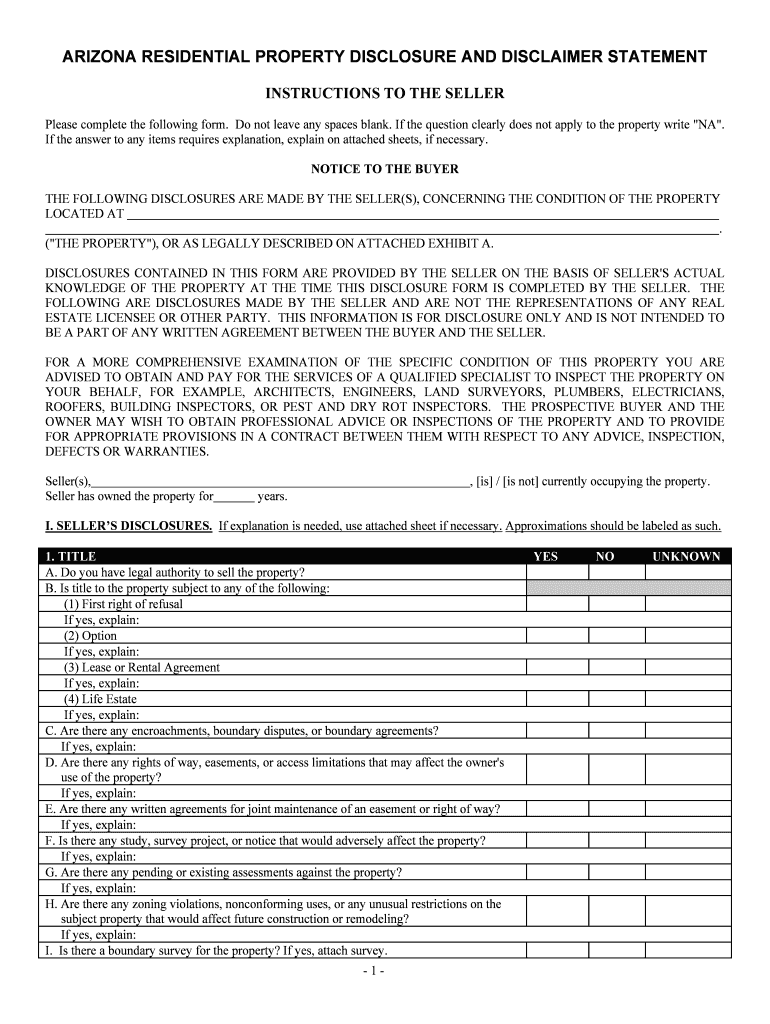
ARIZONA RESIDENTIAL PROPERTY DISCLOSURE AND DISCLAIMER STATEMENT INSTRUCTIONS TO THE SELLER Please complete the following form. Do not leave any spaces blank. If the question clearly does not apply.
Loading

Open form follow the instructions

Easily sign the form with your finger

Send filled & signed form or save
How to fill out the AZ Residential Property Disclosure And Disclaimer Statement online
The AZ Residential Property Disclosure And Disclaimer Statement is an essential document for sellers and buyers in real estate transactions in Arizona. It provides critical information about the property's condition, ensuring transparency between parties involved. This guide will help you navigate the process of completing the form online with ease and confidence.
Follow the steps to complete the form accurately online.
- Click ‘Get Form’ button to obtain the form and open it in the editor.
- Begin by providing the property details, including the property address and the seller's ownership duration. Ensure that all spaces are filled; if a question does not apply, write 'NA'.
- Proceed to the Seller’s Disclosures section. Here, respond to questions regarding title, zoning, assessments, and other pertinent information. Utilize attached sheets for explanations if necessary.
- Continue to the Water and Sewer/Septic System sections. Specify your water source, any water rights, and the condition of your plumbing systems, including those for sewage. Provide detailed answers where required.
- In the Structural section, answer questions related to the condition of the roof, walls, and any renovations. Be honest about known issues and include relevant explanations as needed.
- Complete the Systems and Fixtures section by indicating the condition of electrical, plumbing, heating, and cooling systems, marking any defects, and providing additional details as applicable.
- Fill out the Common Interest section if applicable. Identify whether there’s a Home Owners' Association and note any assessments associated with the property.
- In the Appliances section, list appliances included in the sale and their conditions. Specify each appliance's age and working status.
- Answer questions in the General section, addressing issues like drainage, environmental hazards, and any history of damage to the property.
- Finalize by reviewing all provided information for accuracy. Confirm that the declaration of full disclosure is signed and dated by the seller. Once complete, save changes, download, print, or share the form as needed.
Complete your AZ Residential Property Disclosure And Disclaimer Statement online to ensure a smooth property transfer.
Experience a faster way to fill out and sign forms on the web. Access the most extensive library of templates available.
Related content
Dec 11, 2007 — Real Estate brokers or salespersons must disclose to buyers whether. ADWR...
Read chapter APPENDIX A: REAL ESTATE FAIR DISCLOSURE LAW: TRB's Airport Cooperative...
Sep 24, 2004 — All disclosures shall be signed and returned to the listing agent within...
Get answers to your most pressing questions about US Legal Forms API.
How much will you need to pay the state of TN to renew your LLC each year?
The annual report fee for LLCs is $300 minimum up to a maximum of $3000. The fee increases by an additional $50 per member for every member over 6 members up to a maximum of $3,000. An officer is not listed. If the business is a Tennessee for-profit corporation, the corporation must list at least one officer.
How do I set up a corporation in Tennessee?
To start a corporation in Tennessee, you'll need to do three things: appoint a registered agent, choose a name for your business, and file a For-Profit Corporation Charter with the Secretary of State. You can file this document online, by mail, or in person. The charter costs $100 to file.
How do I get an LLC license in Tennessee?
Just follow these six steps, and you'll be on your way. Name Your Tennessee LLC. You'll need to choose a name to include in your articles before you can register your LLC. ... Prepare and File Articles of Organization. ... Receive a Certificate From the State. ... Create an Operating Agreement. ... Get an Employer Identification Number.
Who is the largest employer in Clarksville TN?
We hand-curated a list of the best companies to work for headquartered in and around Clarksville, TN using data on salaries, company financial health, and employee diversity....Best Companies In Clarksville, TN. RankCompanyZippia Score1Del-Jen4.42Austin Peay State University4.13Gateway Health System Inc4.213 more rows
How much does it cost to register an LLC in Tennessee?
How much does it cost to form an LLC in Tennessee? The Tennessee Secretary of State charges $50 per LLC member included in the filing, with a minimum total fee of $300. The filing fee cannot exceed $3,000 for the Articles of Organization. A convenience fee will also be charged when paying online by credit card.
How much does it cost to form a corporation in Tennessee?
It costs $100 (add $2.35 for the online processing fee) to file Tennessee's For-Profit Corporation Charter. In addition, Tennessee requires your corporation to have a registered agent and assign a designated physical street address where all legal documents will be mailed.
How much does it cost to make a corp?
Filing Articles of Incorporation Secretary of State Offices usually charge $100 to $250 for administrative and filing fees, depending on the state in which the business is incorporating.
How much does it cost to register a business name in Tennessee?
The filing fee is $20. An online service fee may be added to the filing fee. Print and Mail documents to Apply to Register an Assumed Name. Information will be collected through the online tool, and then printed on the correct form to be mailed to the Secretary of State with payment.
How long does it take to form a corporation in Tennessee?
This guide will help you file formation documents, get tax identification numbers, and set up your company records. Incorporation: ~4 business days by mail. ~2 days online. Immediately in-person.
How much does it cost to register a corporation in Tennessee?
How much does it cost to form a corporation in Tennessee? You can register your business name with the Tennessee Department of State for $20. To file your Corporate Charter, the Tennessee Department of State charges a $100 filing fee.
Use professional pre-built templates to fill in and sign documents online faster. Get access to thousands of forms.
If you believe that this page should be taken down, please follow our DMCA take down process here.