Loading
Form preview
  • US Legal Forms
  • Other Templates
  • More Forms
  • More Multi-State Forms
  • Ma Champ Application For State-aided Public Housing And The Alternative Housing Voucher Program 2018

Get Ma Champ Application For State-aided Public Housing And The Alternative Housing Voucher Program 2018-2026

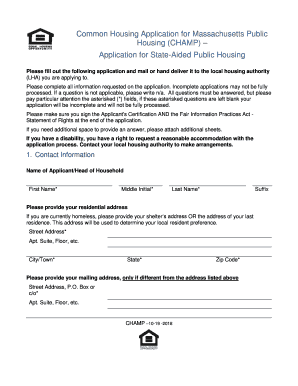
Ousing authority (LHA) you are applying to. Please complete all information requested on the application. Incomplete applications may not be fully processed. If a question is not applicable, please write n/a. All questions must be answered, but please pay particular attention the asterisked (*) fields, if these asterisked questions are left blank your application will be incomplete and will not be fully processed. Please make sure you sign the Applicant's Certification AND the Fair Information P.

How it works

  1. Open form

    Open form follow the instructions

  2. Easily sign form

    Easily sign the form with your finger

  3. Share form

    Send filled & signed form or save

How to fill out the MA CHAMP Application For State-Aided Public Housing And The Alternative Housing Voucher Program online

Completing the MA CHAMP application online is a crucial step in accessing state-aided public housing and the alternative housing voucher program in Massachusetts. This guide offers a clear, step-by-step approach to ensure that you understand and effectively fill out each section of the application.

Follow the steps to successfully complete your application.

  1. Click the ‘Get Form’ button to obtain the form and open it in your preferred online editor.
  2. Begin by entering your contact information in Section 1. This includes your full name, residential address, mailing address (if different), and contact numbers. Ensure that all asterisked fields are filled out accurately.
  3. In Section 2, indicate the type of housing you are applying for, such as elderly/handicapped housing or family housing. Select the number of bedrooms needed, noting that availability may vary.
  4. Provide details about your current housing situation in Section 3. Answer questions regarding your homelessness status, existing vouchers, and transfer requests comprehensively and truthfully.
  5. Section 4 requires information regarding your employment and veteran status. Provide the name of your employer, if applicable, and indicate any veteran-related information that may apply.
  6. In Section 5, indicate if you or any household member require specific accommodations due to a disability. Be thorough in your responses.
  7. Section 6 asks for the names and details of all household members. Make sure to include required information, such as relationships and income estimates.
  8. Select the housing programs you wish to apply for in Section 7, ensuring you meet the relevant criteria for each program you select.
  9. Before submitting your application, make sure to read and sign the Applicant's Certification and the Fair Information Practices Act Statement of Rights. This ensures you understand the terms and conditions associated with your application.
  10. Once you have completed the application, you may save changes, download a copy for your records, print, or share the form as necessary.

Start completing your MA CHAMP application online today and take an important step towards securing your housing needs.

Get form

Experience a faster way to fill out and sign forms on the web. Access the most extensive library of templates available.
Get form

Related content

champ
Application for State-Aided Public Housing and the Alternative Housing Voucher. Program...
Learn more
A grant that helps UofL's low-income and first-gen...
Oct 28, 2020 — The U.S. Department of Education recently extended funding to the...
Learn more
Public–private redevelopment of the Ellen Wilson...
May 23, 2018 — Cities, including Washington, DC, had always funded public housing with...
Learn more

Related links form

ID ITD 3374 2021 NV VP104 2022 MN PS2000 2021 MN Periodic Vehicle Inspection Report 2022

Questions & Answers

Get answers to your most pressing questions about US Legal Forms API.

Contact support

An acknowledgment requires the following steps: The signer must physically appear before you. You as the notary must positively identify the signer according to your state's rules. The signer may either sign the document before appearing before you, or in your presence.

Record The Notarization Complete a detailed record in a bound journal about the facts of the notarization: the date and time, a description of the document, the type of notarization, the signer's name and address, how the signer was identified, the fee collected, and the signer's signature.

0:21 2:39 How to Complete a Notary Certificate - YouTube YouTube Start of suggested clip End of suggested clip This provides information about the notarial act including the signer's name the date of theMoreThis provides information about the notarial act including the signer's name the date of the notarization. And details about the notarization. These details describe the facts about the notarization.

Florida does not require exact wording, but the certificate must include elements spelled out in Florida Statutes, 117.05[4], including the venue, name of signer, type and date of notarization, form of identification used, the Notary's signature, name and seal, and whether the signer appeared via physical presence or ...

The wording states “Subscribed and sworn to before me…” – subscribed meaning “signed” and sworn meaning that an oral oath or affirmation was given. “Before me” means that both were done in the presence of the notary public.

2:29 4:17 How to Complete an Acknowledgment - YouTube YouTube Start of suggested clip End of suggested clip Include your notary fee and have your signers sign the journal if your state requires a thumbprintMoreInclude your notary fee and have your signers sign the journal if your state requires a thumbprint have your signer apply there's in the box next to their signature.

In general, an acknowledgment certificate will contain the words, “acknowledged before me” or similar wording. Jurat certificates will contain the words, “subscribed and sworn to (or affirmed) before me.”

On this day of , (year), I certify, pursuant to Tex. Gov't Code §406.014(c), that the preceding or attached document is a true, exact, complete, and unaltered copy made by me of (description of notarial record), the original of which is held in my custody as a notarial record.

Get This Form Now!

Use professional pre-built templates to fill in and sign documents online faster. Get access to thousands of forms.
Get form
If you believe that this page should be taken down, please follow our DMCA take down processhere.
Get MA CHAMP Application For State-Aided Public Housing And The Alternative Housing Voucher Program
Get form
  • Adoption
  • Bankruptcy
  • Contractors
  • Divorce
  • Home Sales
  • Employment
  • Identity Theft
  • Incorporation
  • Landlord Tenant
  • Living Trust
  • Name Change
  • Personal Planning
  • Small Business
  • Wills & Estates
  • Packages A-Z
  • Affidavits
  • Bankruptcy
  • Bill of Sale
  • Corporate - LLC
  • Divorce
  • Employment
  • Identity Theft
  • Internet Technology
  • Landlord Tenant
  • Living Wills
  • Name Change
  • Power of Attorney
  • Real Estate
  • Small Estates
  • Wills
  • All Forms
  • Forms A-Z
  • Other Templates
  • Legal Hub
  • About Us
  • Help Portal
  • Legal Resources
  • Blog
  • Affiliates
  • Contact Us
  • Delete My Account
  • Site Map
  • Industries
  • Forms in Spanish
  • Localized Forms
  • State-specific Forms
  • Forms Kit
  • Real Estate Handbook
  • All Guides
  • Notarize
  • Incorporation services
  • For Consumers
  • For Small Business
  • For Attorneys
  • USLegal
  • FormsPass
  • pdfFiller
  • signNow
  • altaFlow
  • DocHub
  • Instapage
Form Packages
  • Adoption
  • Bankruptcy
  • Contractors
  • Divorce
  • Home Sales
  • Employment
  • Identity Theft
  • Incorporation
  • Landlord Tenant
  • Living Trust
  • Name Change
  • Personal Planning
  • Small Business
  • Wills & Estates
  • Packages A-Z
Form Categories
  • Affidavits
  • Bankruptcy
  • Bill of Sale
  • Corporate - LLC
  • Divorce
  • Employment
  • Identity Theft
  • Internet Technology
  • Landlord Tenant
  • Living Wills
  • Name Change
  • Power of Attorney
  • Real Estate
  • Small Estates
  • Wills
  • All Forms
  • Forms A-Z
  • Other Templates
Customer Service
  • Legal Hub
  • About Us
  • Help Portal
  • Legal Resources
  • Blog
  • Affiliates
  • Contact Us
  • Delete My Account
  • Site Map
  • Industries
  • Forms in Spanish
  • Localized Forms
  • State-specific Forms
  • Forms Kit
Legal Guides
  • Real Estate Handbook
  • All Guides
Prepared for you
  • Notarize
  • Incorporation services
Our Customers
  • For Consumers
  • For Small Business
  • For Attorneys
Our Sites
  • USLegal
  • FormsPass
  • pdfFiller
  • signNow
  • altaFlow
  • DocHub
  • Instapage
Social Media
Call us now toll free:
+1 833 426 79 33
As seen in:
© Copyright 1999-2026 airSlate Legal Forms, Inc. 17 Station Street, Ste. 203, Brookline, MA 02445
  • Your Privacy Choices
  • Terms of Service
  • Privacy Notice
  • Content Takedown Policy
  • Bug Bounty Program