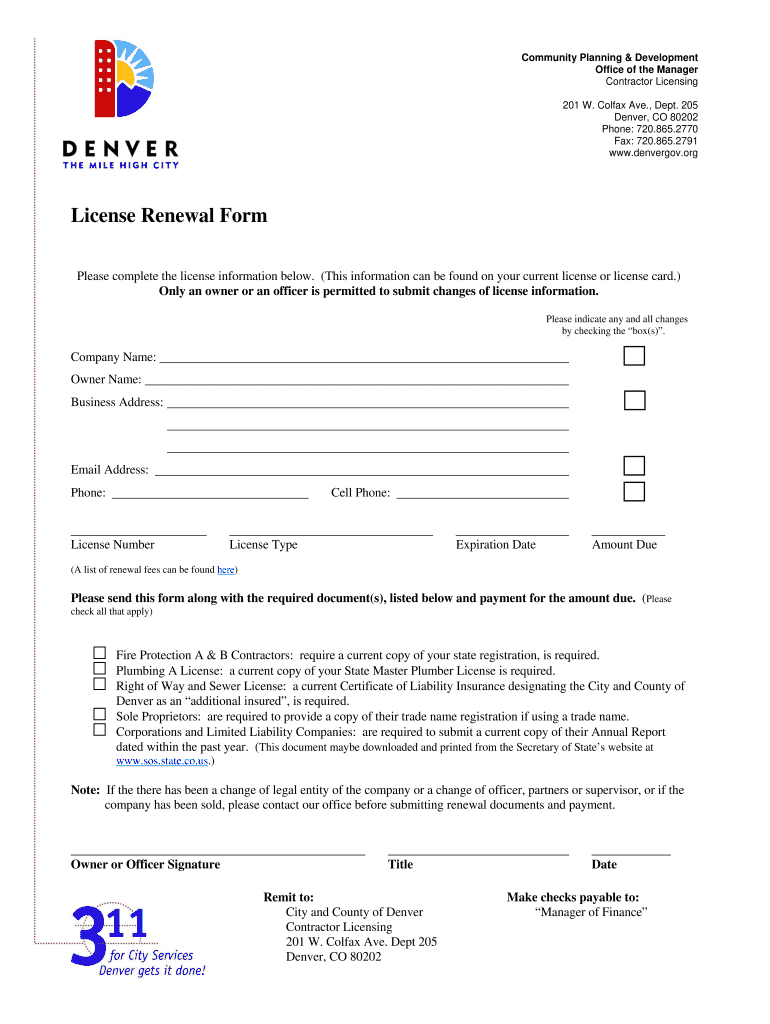
M Please complete the license information below. (This information can be found on your current license or license card.) Only an owner or an officer is permitted to submit changes of license information. Please indicate any and all changes by checking the box(s) . Company Name: Owner Name: Business Address: Email Address: Cell Phone: Phone: License Number License Type Expiration Date Amount Due (A list of renewal fees can be found here) Please send this form along with the require.
Loading

Open form follow the instructions

Easily sign the form with your finger

Send filled & signed form or save
How to fill out the CO License Renewal Form - Denver online
Renewing your CO license through the Denver system is a straightforward process, designed to be user-friendly. This guide will provide you with clear, step-by-step instructions to help you successfully complete the renewal form online.
Follow the steps to complete your CO License Renewal Form online.
- Click ‘Get Form’ button to obtain the form and open it for editing.
- Fill in your license information as it appears on your current license or license card. Provide details such as company name, owner name, business address, email address, cell phone number, and primary phone number.
- Enter your license number, license type, and expiration date accurately in the corresponding fields.
- Indicate any changes to your license information by checking the appropriate boxes, as permitted for owners or officers to submit.
- Review the list of required documents for your specific license type and ensure you have the necessary documentation prepared to accompany your application.
- If you are a corporation or limited liability company, ensure you are submitting your current Annual Report, while sole proprietors must provide their trade name registration if applicable.
- Sign and date the form, entering your title in the designated field.
- Once the form is complete, save your changes. You can choose to print, download, or share the form as needed.
Complete your CO License Renewal Form online today to ensure your license remains current and valid.
Experience a faster way to fill out and sign forms on the web. Access the most extensive library of templates available.
Related content
Forms - Licenses ... Affidavit of Colorado Driver License or ID Theft ... Application for...
Take the written exam or show proof obtained from a driving school that you have taken and...
Please fill out a Sales Tax/Wage. Withholding Account Application (CR 0100). Change of...
Get answers to your most pressing questions about US Legal Forms API.
What is processing of building permits?
Essentially, the Board of Permits and Inspections or Building and Zoning Board knows what the homeowner permit is for once a plan is submitted by a builder. Once fees are paid, permits are issued. Later, the agency will have the construction inspected to make sure it passes code.”
How long does it take to get a building permit approved in California?
The plans will be checked for compliance with the California Code of Regulations Title 24, Zoning Ordinance, Health Code, etc. Normal processing takes four to six weeks. Any remaining fees, including the building permit fee, are payable prior to issuance of the building permit, as well as school fees, if applicable.
Do you need a permit to build a fence in Pasadena?
No fence or wall (except for barbed wire, minor repair, or replacement providing there is no change in material or location) shall be erected, enlarged, altered or moved, unless such fence or wall is completely removed, without a permit from the building official.
How long does it take to get a building permit in Los Angeles County?
Once you fill out your application, you should expect to receive a building permit within two weeks if you are working on a residential project. On the other hand, approval process for a commercial project can take upwards of four weeks.
How long is the process of building permit?
In Metro Manila, it usually takes a month or two or even longer. In the provinces, it takes less than a month. There are also areas that just take a few days. It could cost you as low as PhP15,000 or as much as PhP200,000 depending on the size of the project and the project location.
How long does it take to get a building permit in Pasadena?
Simple projects that meet our over-the-counter thresholds can be reviewed over the counter in as little as 5 to 10 minutes. If your plan is complex, such that it must be submitted for review, you may expect this process to take approximately two to four weeks.
Does Harris County require contractors to be licensed?
Commercial Contractor's and Builder's Information: Harris County does not require a General Contractor's License to perform construction within the Unincorporated areas.
Does Pasadena Texas have zoning?
The City of Pasadena is a non-zoned municipality. Therefore, land use regulations within the City of Pasadena corporate limits are accomplished through City ordinances and deed restrictions, if applicable to the property.
Can I have chickens in Pasadena Texas?
The new city code allows residents to keep up to 10 backyard hens, as long as they are at least 35 feet away from neighboring dwellings, keep them in a coop and register with the Pasadena Humane Society.
Do I need a permit to build a shed in Pasadena Texas?
No permit shall be issued for the construction, erection or installation of a building or structure, or part of a building or structure, to be occupied exclusively as a private garage, shed, shop or other nonresidential use, or any combination thereof, located on the same lot with a dwelling, and attached to the ...
Use professional pre-built templates to fill in and sign documents online faster. Get access to thousands of forms.
If you believe that this page should be taken down, please follow our DMCA take down process here.