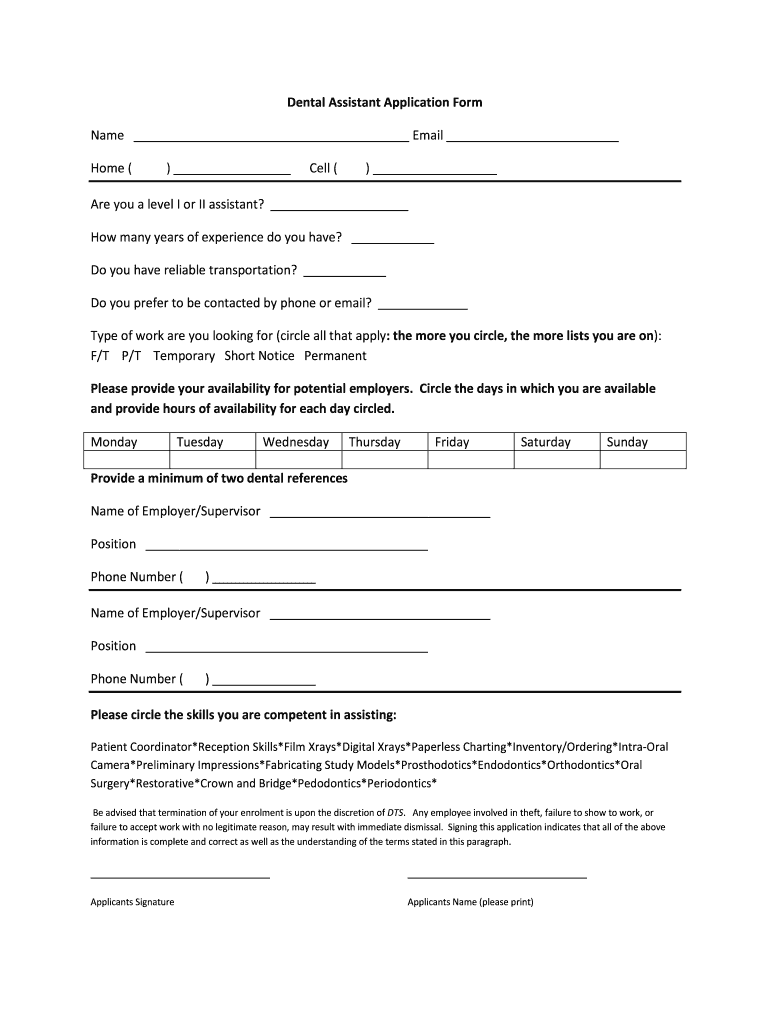
Dental Assistant Application Form Name Email Home () Cell () Are you a level I or II assistant? How many years of experience do you have? Do you have reliable transportation? Do you prefer to be contacted.
Loading

Open form follow the instructions

Easily sign the form with your finger

Send filled & signed form or save
How to fill out the DTS Dental Assistant Application Form online
Completing the DTS Dental Assistant Application Form online is a straightforward process that helps you present your qualifications and preferences effectively. This guide will walk you through each section, ensuring you have all the necessary information to fill out the form accurately.
Follow the steps to accurately complete your application form.
- Click ‘Get Form’ button to obtain the form and open it in your editor.
- Begin filling out the application by entering your name and email address. These fields are essential for the employer to contact you.
- Provide your phone numbers, including home and cell, ensuring they are accurate for potential communication.
- Indicate whether you are a level I or II assistant by selecting the appropriate option.
- State the number of years of experience you have in the dental field.
- Confirm if you have reliable transportation, as this is crucial for attending appointments or work.
- Choose your preferred method of contact: phone or email.
- Specify the type of employment you are seeking by circling all relevant options such as full-time, part-time, temporary, short notice, or permanent.
- Provide your availability by circling the days you are free and detailing the hours for each of those days.
- List at least two dental references. Fill in each reference's name, position, and phone number accurately.
- Circle the skills you are competent in from the provided options to showcase your capabilities.
- Read and acknowledge the terms regarding termination of enrolment before signing the application.
- Finally, sign the application and print your name as a confirmation of the information provided.
- Once you have filled out all sections, save the form, and choose to download, print, or share it as needed.
Complete your DTS Dental Assistant Application Form online today to take the next step in your dental career!
Experience a faster way to fill out and sign forms on the web. Access the most extensive library of templates available.
Related content
Dec 12, 2019 — (3) An application for a limited permit in [certified] registered dental...
Establish Dental Assisting Schools in Western North Dakota . ... required to make some...
Jul 1, 2014 — To facilitate the collection of dataset candidates, DTS created an online...
Get answers to your most pressing questions about US Legal Forms API.
What is the difference between a default and a default judgment?
The Rules define “default” as when “a party against whom a judgment for affirmative relief is sought has failed to plead or otherwise defend,” and define “judgment” as “a decree and any order from which an appeal lies.” Read together, a default judgment is simply any judgment that results from a default.
How long does a default judgment last in Texas?
Do Judgments Expire in Texas? Judgments awarded in Texas to a non-government creditor are generally valid for ten years but they can be renewed for longer. If a judgment is not renewed, it will become dormant.
What happens if a defendant does not pay a judgment in Texas?
If a defendant does not pay a judgment, the plaintiff can try to enforce the judgment by filing another lawsuit. For example, if the defendant owns several cars, the plaintiff can sue to have the car transferred to the plaintiff.
Do you have to give notice of default judgment Texas?
The law requires proper notice to defendants of a lawsuit against them. Any resulting default judgment against the defendant is voidable if a defendant has inadequate notice of the action.
How long is a default judgment valid for in Texas?
Do Judgments Expire in Texas? Judgments awarded in Texas to a non-government creditor are generally valid for ten years but they can be renewed for longer. If a judgment is not renewed, it will become dormant. You can attempt to revive a dormant judgment in order to continue to try and collect the debt.
Is a default judgment a final judgment Texas?
Yes. By its very design, a default judgment is a judgment entered in the trial court when a defendant (you) hasn't filed a response in a timely manner. If you failed to respond to a complaint in a timely manner, the odds are you may also be unable to respond to the motion for default which follows.
What happens after a default Judgement is issued in Texas?
What Happens After the Filing of a Motion for Default Judgment? After the motion for default judgment is filed and served upon the defendant, the defendant has an opportunity to respond. The defendant's response should state a valid reason why they didn't respond within the 20 day period to respond to complaints.
What is the meaning of default Judgement?
Primary tabs. A default judgment (also known as judgment by default) is a ruling granted by a judge or court in favor of a plaintiff in the event that the defendant in a legal case fails to respond to a court summons or does not appear in court.
What happens after a default Judgement is issued in Michigan?
Once the court has entered a judgment, your creditor can collect the judgment by garnishing you. This lets the creditor take the money directly from your bank account or paycheck. Your creditor might also legally seize your property.
Use professional pre-built templates to fill in and sign documents online faster. Get access to thousands of forms.
If you believe that this page should be taken down, please follow our DMCA take down process here.