Loading
Get Canada Construction Forms Remodeling Proposal 2007-2026
How it works
-

Open form follow the instructions
-

Easily sign the form with your finger
-

Send filled & signed form or save
How to fill out the Canada Construction Forms Remodeling Proposal online
Completing the Canada Construction Forms Remodeling Proposal online is a straightforward process that helps ensure clear communication between construction companies and clients. This guide will walk you through the essential components of the form, providing step-by-step instructions for each section to facilitate your experience.
Follow the steps to complete your remodeling proposal effortlessly.
- Click ‘Get Form’ button to obtain the form and open it in the editor.
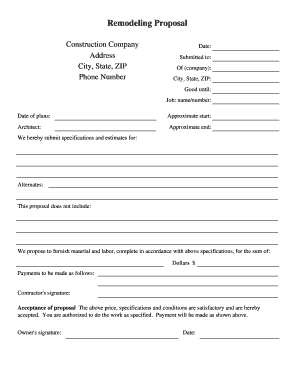
- Begin by filling in the construction company's name, address, city, state, and ZIP code. This information identifies the contractor submitting the proposal.
- Enter the phone number of the construction company for any further communication regarding the proposal.
- In the 'Date:' field, input the current date when the proposal is being submitted.
- Fill in the name of the individual or entity to whom the proposal is submitted in the 'Submitted to:' section.
- Provide the company name, city, and ZIP code of the recipient in the respective fields.
- Indicate how long the proposal is valid in the 'Good until:' section by entering the expiration date.
- Specify the job by name or number in the appropriate field, giving a reference for the nature of the work.
- Add the date of the plans in the provided field to clarify when the architectural designs were created.
- Provide an approximate start date for the project in the 'Approximate start:' section.
- Include the architect's name, who is responsible for the project, in the designated field.
- Specify the estimated project completion date in the 'Approximate end:' section.
- Outline the specifications and estimates for the proposed work in the designated section to give a detailed overview of the project scope.
- List any alternates or options for the proposal that may be considered by the client.
- Clearly state what is not included in the proposal, ensuring transparency and avoiding misunderstandings.
- Input the total sum of dollars proposed for the job. By entering the figure in the designated field, both parties will have clarity on the cost involved.
- Detail the payment schedule in the 'Payments to be made as follows:' section to outline how and when payments will be issued.
- Sign in the 'Contractor's signature:' area to formally accept the terms laid out in the proposal.
- In the 'Acceptance of proposal' section, the client must provide their acknowledgment by entering their signature and approving the terms.
- Lastly, include the date when the proposal is accepted by the client.
- After completing all sections, you can save your changes, download the proposal, print it, or share it as needed.
Start completing your Canada Construction Forms Remodeling Proposal online today!
A Texas abstract of judgment is always filed immediately after obtaining the judgment. The abstract is filed in the county where the defendant lives or where we know they own property.