Loading
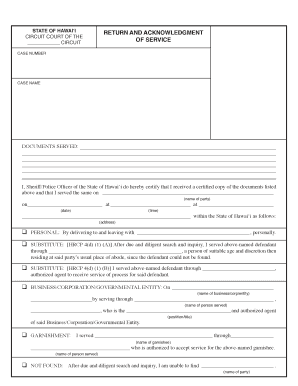
Get Return And Acknowledgment Of Service - Courts.state.hi.us
How it works
-

Open form follow the instructions
-

Easily sign the form with your finger
-

Send filled & signed form or save
How to fill out the Return And Acknowledgment Of Service - Courts.state.hi.us online
Filling out the Return and Acknowledgment of Service form is an essential step in the service of legal documents. This guide provides a comprehensive, step-by-step approach that supports users in navigating the online form with confidence.
Follow the steps to complete your Return and Acknowledgment of Service form online.
- Click the ‘Get Form’ button to access the form and open it for editing.
- Begin by entering the case number at the top of the form. This number is assigned by the court and identifies your case.
- Next, input the case name, which includes the names of the parties involved in the legal action.
- List the documents that you are serving. This should be a clear description of the papers provided.
- In the section labeled 'I, Sheriff/Police Officer of the State of Hawai‘i', indicate the name of the individual responsible for serving the documents.
- Fill in the date when the service occurred. This information is crucial for tracking and legal compliance.
- Provide the address where the service was performed. Make sure to include all relevant details for clarity.
- Choose the appropriate method of service from the options provided (personal, substitute, business/corporation/government entity, or garnishment). Fill in the necessary details for your selected option.
- Sign and print the name of the sheriff or police officer who executed the service in the designated area.
- A notary public must witness the signing. Ensure to complete the notary section accurately.
- Finally, gather all information, review the completed form for accuracy, and then save your changes, download, or print the document as needed.
Complete your Return and Acknowledgment of Service document online today.
To pay over the telephone by credit card, please call the Parking Citation Section at (800) 989-2058. Please be sure to have your credit card, parking ticket and vehicle license plate information available when placing your call.