Loading
Get Canada Ta4 2022-2026
How it works
-

Open form follow the instructions
-

Easily sign the form with your finger
-

Send filled & signed form or save
How to fill out the Canada TA4 online
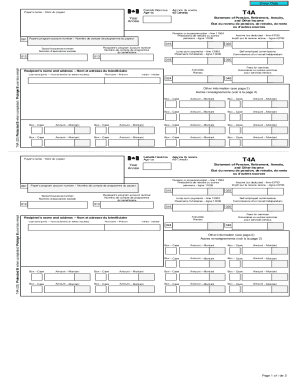
Filling out the Canada TA4 form is an essential step for reporting various types of income, including pensions, annuities, and self-employed commissions. This guide provides clear instructions on accessing the form and completing each section accurately.
Follow the steps to successfully fill out the Canada TA4 online.
- Click the ‘Get Form’ button to obtain the form and open it in your editor.
- Start by entering the payer's name in the designated section labeled 'Payer's name.' Ensure this is completed correctly to reflect the individual or organization's name that issued the income statement.
- Input the year relevant to the income being reported. This detail is crucial to ensure that your records align with the correct tax year.
- Fill in the 'Recipient's program account number' along with your social insurance number to identify yourself and the associated tax information properly.
- In the boxes provided, report each type of income: pensions (line 11500), lump-sum payments (line 13000), self-employed commissions, and income tax deducted (line 43700). Ensure to write these amounts clearly in the corresponding boxes.
- Complete your personal details, including the recipient's name, address, and initials. Double-check this information for accuracy.
- Consult the additional information section. If applicable, enter details regarding any amounts that fall under other income categories or specific deductions.
- Once all sections are completed, review your entries for any errors or omissions that may affect your tax reporting.
- Finally, save your changes to the document. You have options to download, print, or share the completed form at this stage.
Complete your forms online quickly and efficiently to ensure timely tax reporting.
What is a Motion to Stay the Writ of Possession? Simply put, the Motion to Stay the Writ of Possession is a document filed with the court asking the judge to “stay” or “stop” the sheriff from executing the Writ of Possession and removing the resident.